


B2B data validation means checking every field of a contact record before you use it: the email can receive mail, the phone reaches the right person, the job title is current and the company record is real. Run it on every list before it goes into a sequencer or a dialer, and you stop paying for bounces, dead numbers and calls to people who left two years ago.
This guide gives you a field-by-field method you can run today, what each result means, and what to do with it.
What is B2B data validation?
B2B data validation is the process of confirming that business contact records are correctly formed, still exist and describe the right person at the right company before you use them for outreach. It covers emails, phone numbers, job titles and company details, and it ends with a clear result for each field: use it, use it carefully, or remove it.
Validation is not the same as enrichment. Enrichment adds missing fields. Validation checks the fields you already have. Most lists need both: validate what is there, then fill the gaps with data that is verified before it reaches you.
What are the four types of data validation?
The four types of data validation most often named are type, format, range and consistency checks. There is no single official list, but these four cover what most databases and spreadsheets test. Here is what each one means for a contact list.
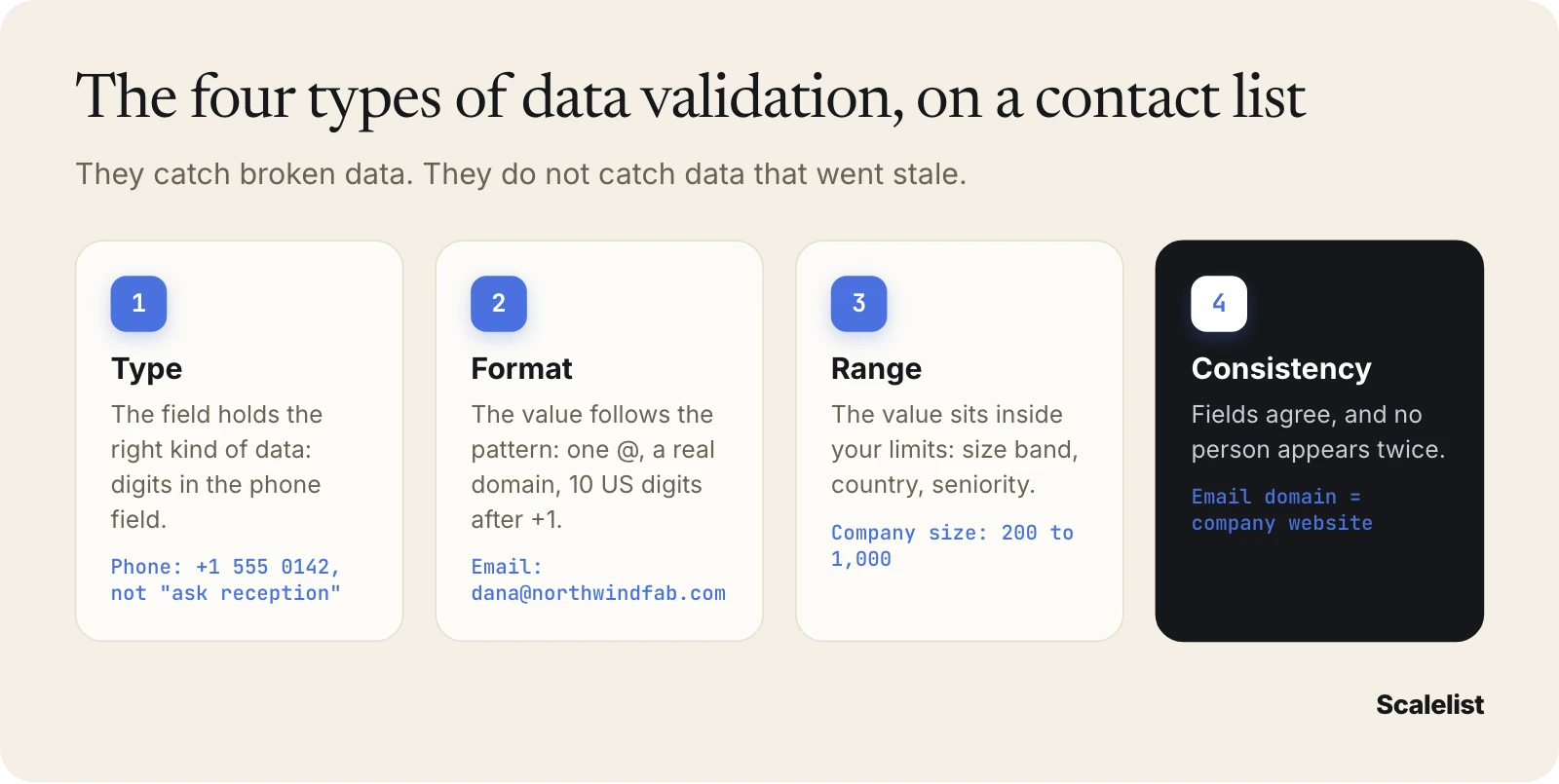
- Type check: the field holds the right kind of data. A phone field holds digits, not “call reception”.
- Format check: the value follows the pattern. An email has one @ and a real domain; a US phone has 10 digits after +1.
- Range check: the value sits inside allowed limits. Company size falls in your 200 to 1,000 employee band; the location is in the US.
- Consistency check: fields agree with each other and with no other row. The email domain matches the company website, and the same person is not in the list twice.
These four catch broken data. They do not catch stale data. A perfectly formatted email for someone who left in May passes all four. That is why contact data validation needs a fifth layer: checking the record against the world, field by field.
How to validate B2B contact data, field by field
Validating B2B contact data means running four checks in order, because each one changes what the next one needs to do. Do the email first, since it is the cheapest to test and the most expensive to get wrong.
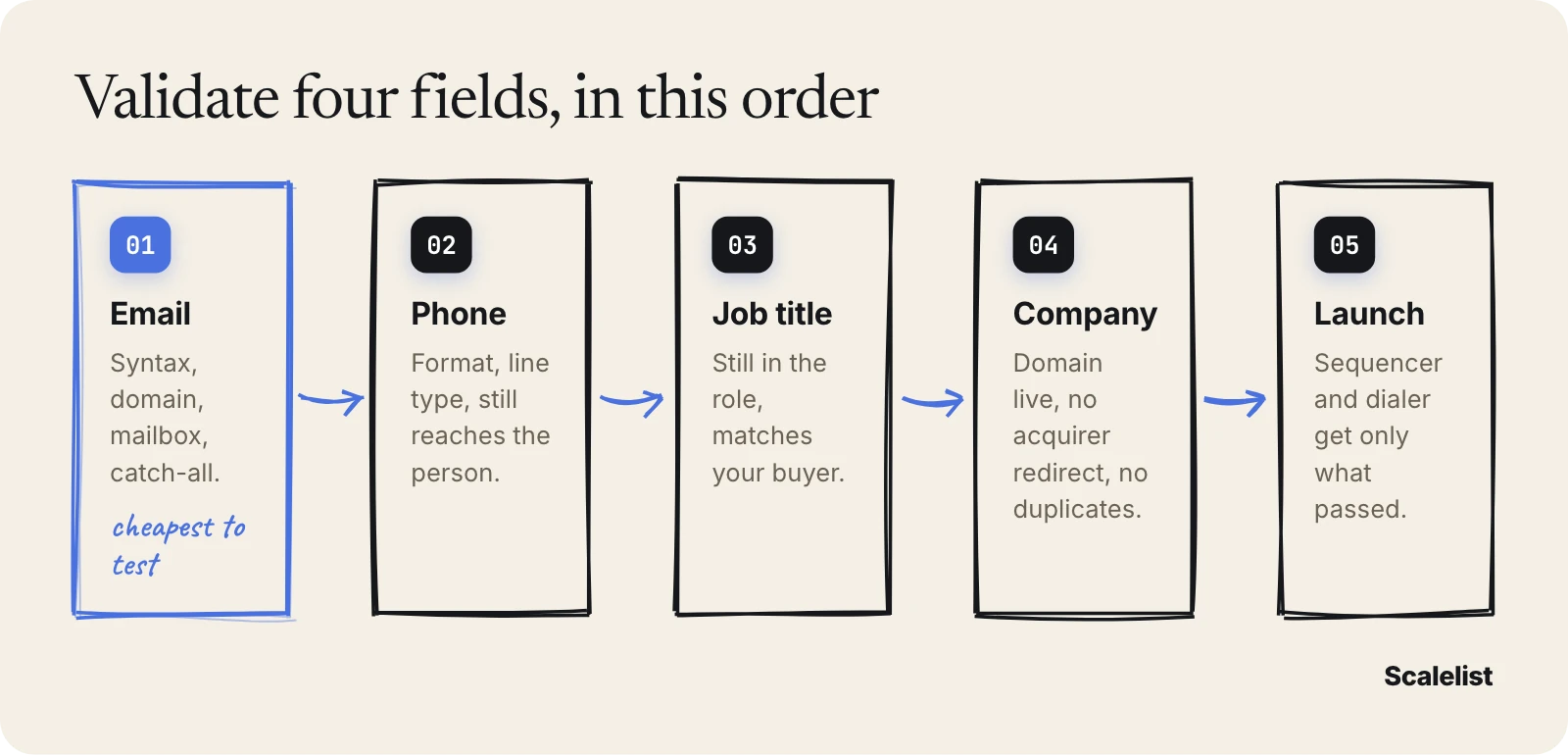
1. Validate the email address
An email passes validation when its mailbox can be confirmed before you send anything. A verifier runs the same tests in the same order, and stops at the first failure.
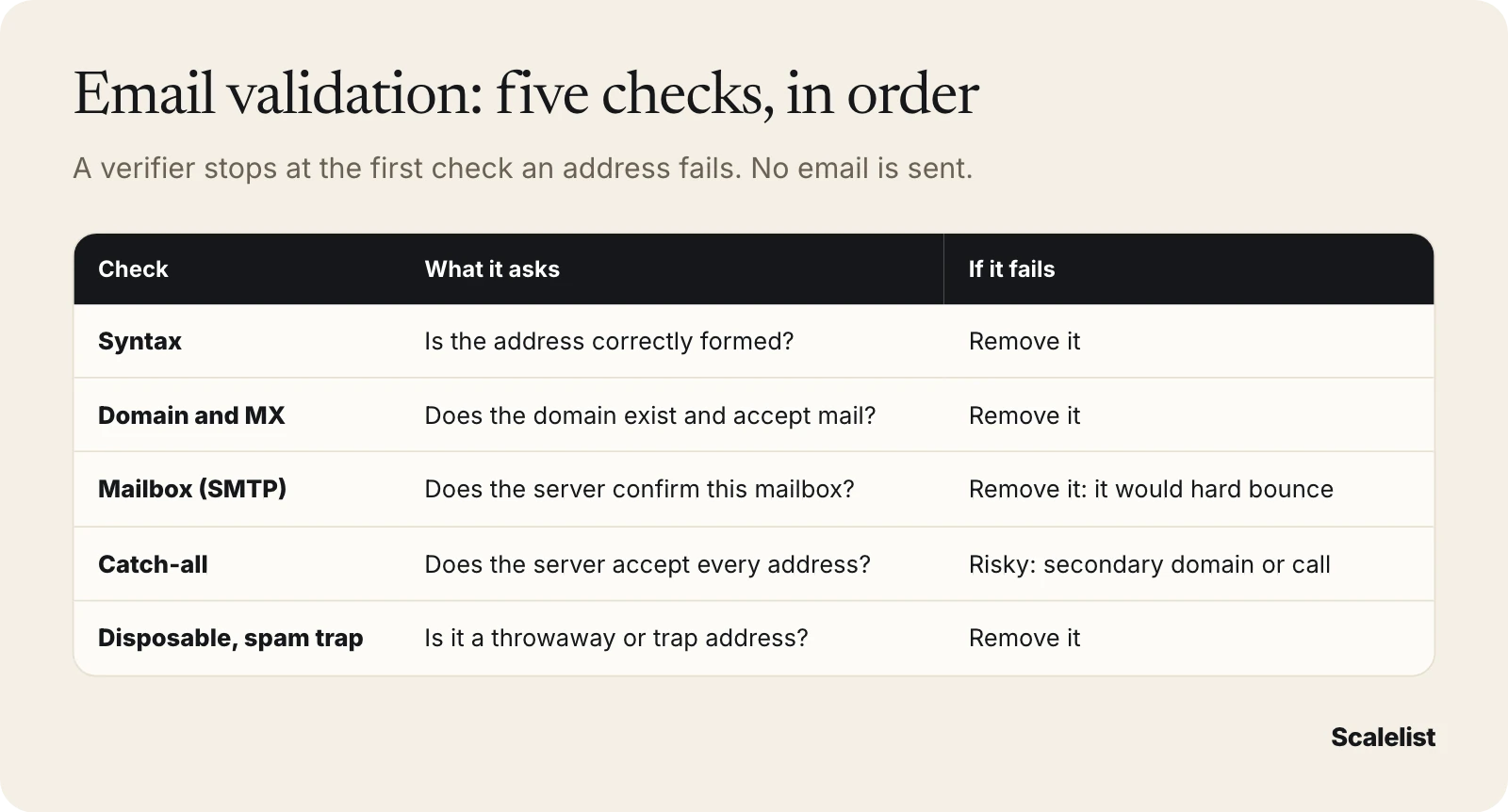
- Syntax: is the address correctly formed?
- Domain and MX records: does the domain exist, and is it set up to receive mail?
- Mailbox (SMTP) check: does the mail server confirm this mailbox exists? No message is sent.
- Catch-all test: does the server accept every address, real or made up? If yes, the mailbox cannot be confirmed.
- Disposable and spam-trap signals: is it a throwaway domain or a trap address?
Read the result before you act on it. In Scalelist, a found email comes back with one of three results, explained in full in our page on email verification statuses:
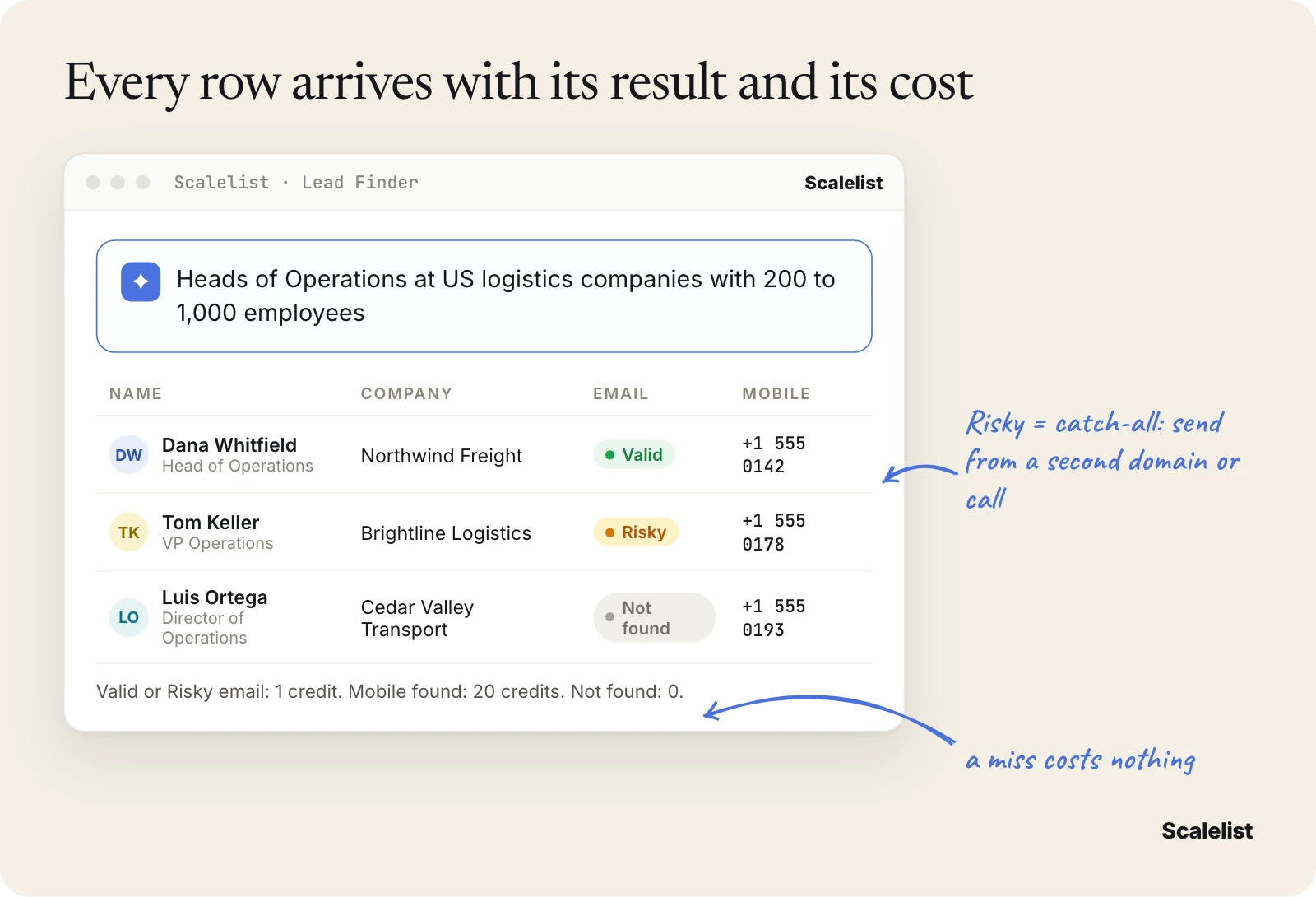
- Valid: found and the mailbox confirmed. Send from your main domain.
- Risky: found, but the domain accepts every address (catch-all). Scalelist’s help center estimates about 20 to 30% of Risky emails are deliverable and recommends sending them from a secondary domain. Our guide to catch-all emails shows how.
- Not found: no address found for that person. You pay nothing. Find the mobile and call instead.
For an address you already have, anything that fails the syntax, domain or mailbox test comes out of the list before launch. It would turn into a hard bounce, and those count against your domain.
2. Validate the phone number
A phone number passes validation when it is correctly formatted, you know what kind of line it is, and it still reaches the person named on the record. Run three checks.
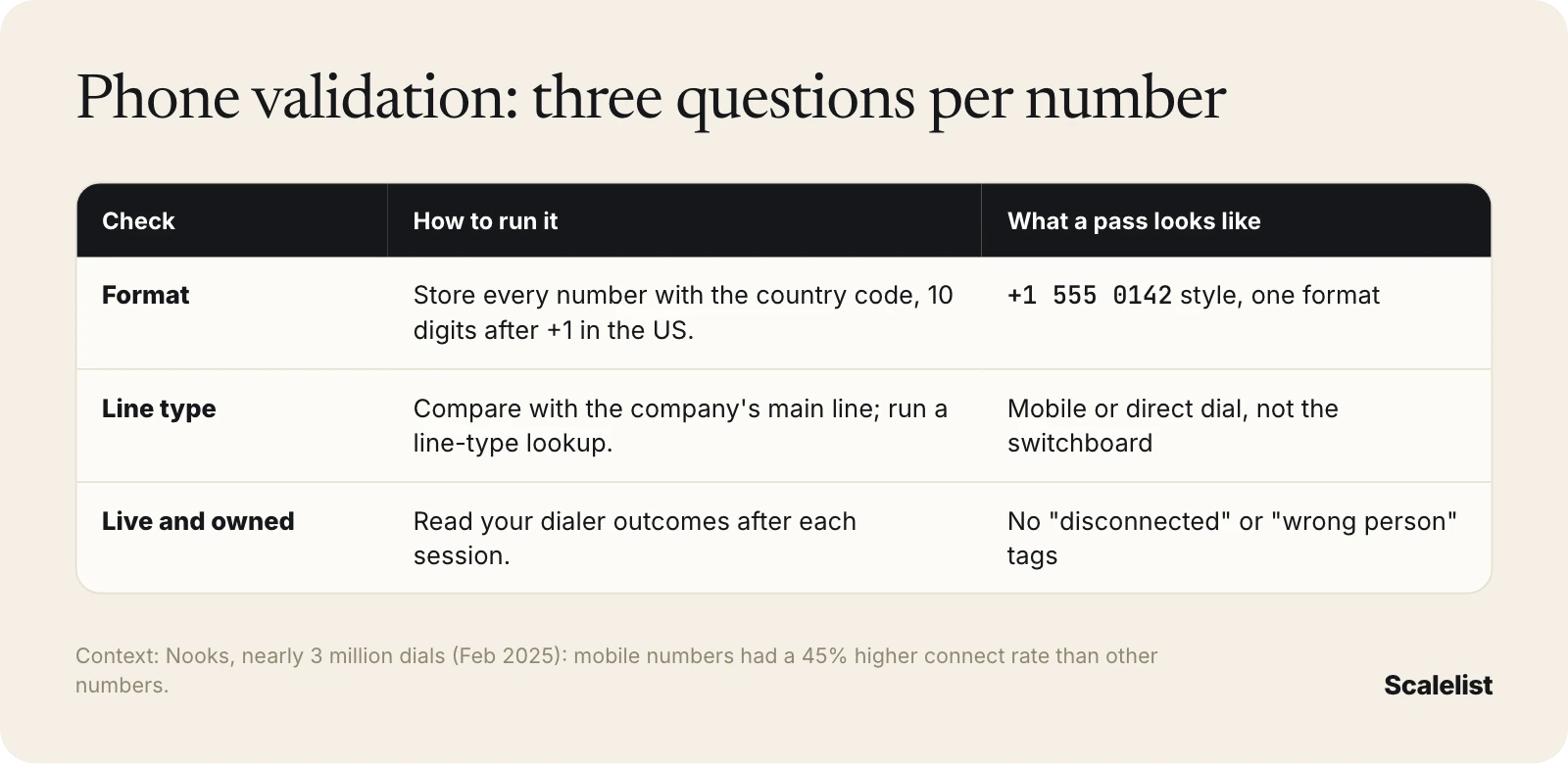
Format. A US number has 10 digits after the +1 country code: a 3-digit area code, a 3-digit exchange and a 4-digit line number. Store every number in one format, with the country code, so your dialer does not misread it.
Line type. Decide whether the number is a mobile, a direct dial or a switchboard. A quick test: if the number matches the main line on the company’s contact page, it is a switchboard, and a gatekeeper will answer.
A line-type lookup from a telecom data service can tell you whether it is a mobile or a landline. Our guide on direct dial vs mobile numbers covers which one to dial first.
Live and owned. A number can be correctly formatted and still dead, or ring someone new. Your dialer’s call outcomes tell you: tag every “disconnected” and “wrong person” result, and remove those numbers from the record the same day.
Line type matters because it decides your connect rate. Nooks found that mobile numbers had a 45% higher connect rate than other numbers, across nearly 3 million dials.
Rules also apply to who you call and how. They vary by country and by number type: see our guide to B2B cold calling laws before you load a dialer.
3. Validate the job title
A job title passes validation when the person still holds it, at that company, and it matches the buyer you are targeting. This field decays the fastest without anyone noticing, because a stale title still looks perfect.
The scale of the problem: 20.6% of US wage and salary workers had been with their current employer for a year or less in January 2026, according to the Bureau of Labor Statistics (BLS). Salespeople stay a median 3.3 years with an employer, managers 6.1 years. A list of SDR managers goes stale faster than a list of CFOs.
How to check it:
- Date the record. Every row needs a “last verified” date. A title from an 18-month-old export is a guess.
- Check one public source. The company’s team page, a recent press release or a conference speaker list confirms the person and the title in a minute.
- Normalize the title. Map “VP, Ops”, “Vice President Operations” and “Head of Operations” to one function and one seniority, so your targeting reads them the same way.
- Let the email result speak. A Valid email at the old company plus a new title somewhere else usually means the person moved and the mailbox is still open. Treat that row as stale.
4. Validate the company record
A company record passes validation when the business still operates under that name and domain, and it still fits your ideal customer profile. Companies close, merge and rebrand all the time.
The Census Bureau counted about 700,000 US employer establishments that closed in 2023, a 9.4% exit rate. Mergers and acquisitions are not even counted as closures there, so real churn in a B2B list is higher.
- Domain: the website loads, and it does not redirect to a different company. A redirect usually means an acquisition.
- Name and domain agree: “Northwind Fabrication” should not sit on a domain that belongs to someone else.
- Fit: headcount band, industry and location still match your targeting.
- Duplicates: one company, one account record. Merge rows that share a domain.
Once the four fields pass, the list is ready for the sequencer and the dialer.
Example: validating a 600-contact trade show list
Here is the method on a real-looking list. Priya Shah, RevOps manager at Harborline Analytics in Charlotte, North Carolina, gets 600 contacts from a logistics trade show. The sales team wants them in a sequence on Monday. The company and numbers are fictional.
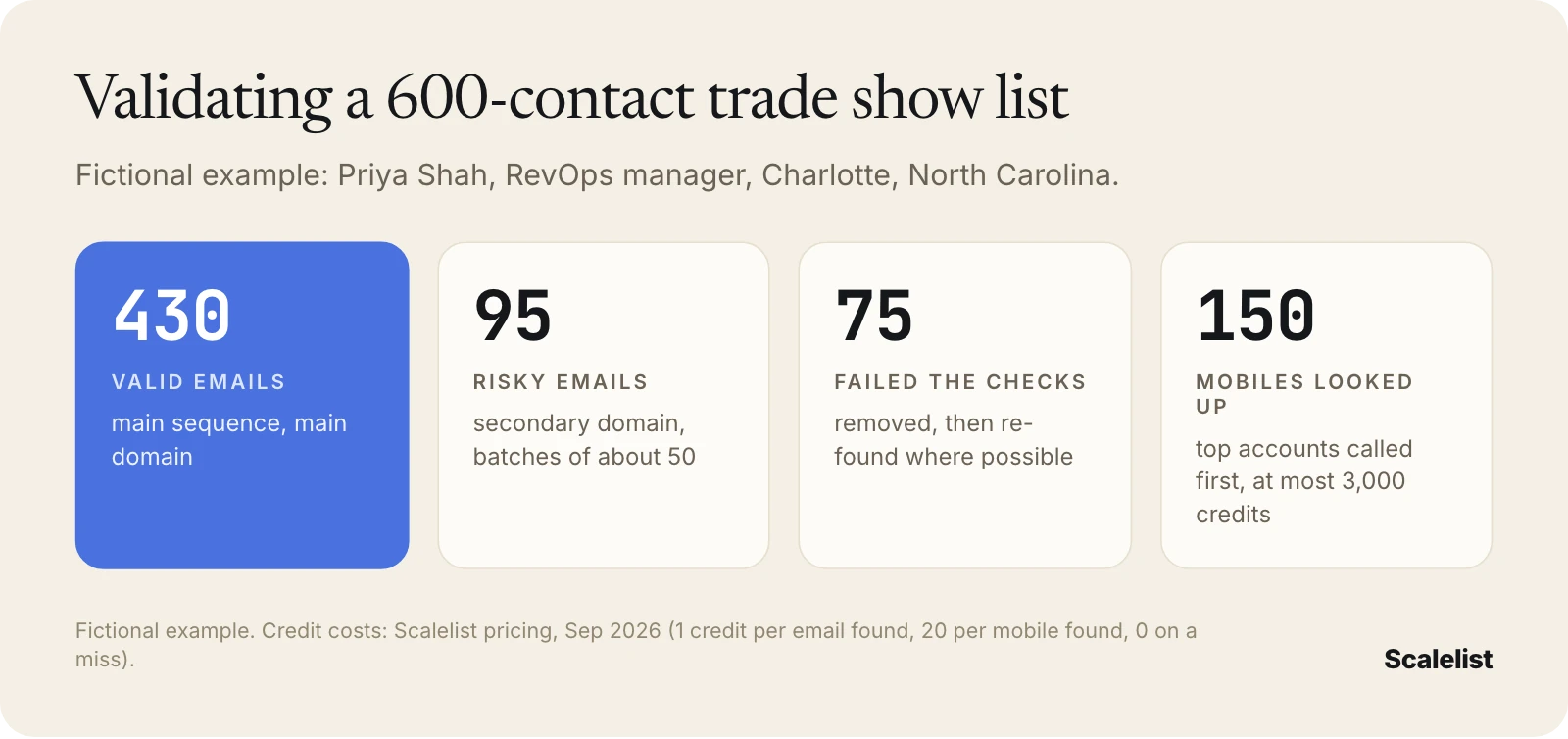
- Email. She runs the 600 emails through a verifier: 430 come back Valid, 95 Risky (catch-all), and 75 fail the checks and come out.
- Company. 41 contacts sit on domains that now redirect to an acquirer. She keeps the people, updates the company, and re-checks their emails.
- Duplicates. 26 people appear twice, once from the badge scan and once from the booth form. She merges them.
- Phone. The badge scans held switchboard numbers only. For the 150 contacts at her top accounts, she looks up mobiles.
- Launch. Valid emails go into the main sequence. Risky emails go to a secondary domain in batches of about 50. The 150 top accounts get a call first.
In Scalelist, that work fits inside one plan. Email verification is included. Re-finding the 75 failed emails costs at most 75 credits (1 per email found). The 150 mobiles cost at most 3,000 credits (20 per mobile found). Misses cost nothing, so the total is at most 3,075 credits: the Scaler 5K plan at 199 USD a month covers it. See Scalelist pricing for every plan.
Find verified emails and mobiles for your next list, labeled Valid or Risky before you send.
Get 20 credits to test itCommon data validation challenges
Validation goes wrong in a few predictable ways. Each one has a simple fix.
The list was validated once, months ago
Data that passed in March can fail in June. ZeroBounce found that at least 23% of email lists degrade in a year, based on more than 11 billion addresses it checked in 2025. Fix: validate right before each launch, not at purchase. Our page on B2B data decay explains how fast each field goes stale.
Every tool labels results differently
One verifier says “accept-all”, another “unknown”, another “catch-all”. Fix: map every label to one of three actions (send, send carefully, remove) and store the status in its own CRM field.
Risky emails get treated as Valid
Once a list is imported, most sequencers only see an address. Fix: split Valid and Risky before import, and send Risky emails from a secondary domain or skip straight to a call.
Phone fields hold the wrong kind of number
A “phone” column often mixes switchboards, desk lines and mobiles, and reps waste hours on gatekeepers. Fix: add a line-type field and sort the dialer queue mobiles first.
Validation costs more than the list
Some tools charge per check, even when the answer is “nothing here”. Fix: compare the real cost per usable contact, not the price per lookup. Our breakdown of what B2B data costs shows the math.
Data validation best practices
The best practice is simple: no list reaches a sequencer or dialer without passing the same checklist. Use this one.
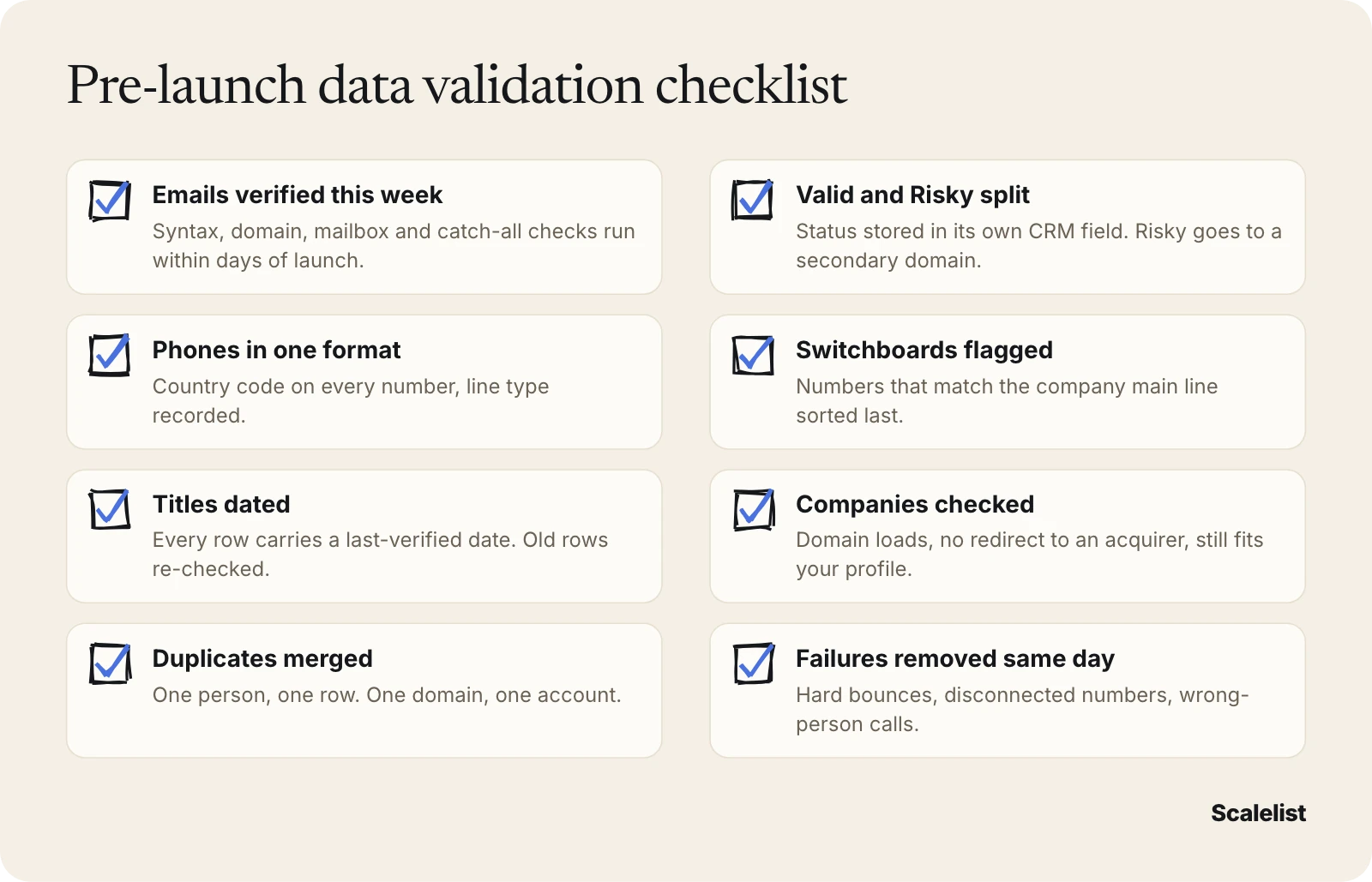
- Validate at the last moment. Run the checks within days of launch.
- Keep the status, not just the data. Store email status, line type and a “last verified” date on every record.
- Protect your main domain. It sends Valid emails only.
- Remove failures the same day. Hard bounces, disconnected numbers and wrong-person calls leave the record immediately.
- Test your provider, not just your list. If a source keeps failing validation, run a side-by-side test using our method to measure data quality.
What to look for in a data validation tool
A good data validation tool shows you the result of every check before you spend money on outreach. Look for one that:
- Runs syntax, domain, mailbox and catch-all checks on every email, and labels catch-all addresses separately.
- Keeps the status on export and on push to your CRM or sequencer.
- Finds a mobile for the same contact, so a Risky or missing email does not end the story.
- Charges only when it finds something.
- Publishes how it performs: see how providers compare in our guide to the best B2B data providers.
How Scalelist helps with B2B data validation
Scalelist, an AI Lead Finder, verifies every email before it returns it and labels it Valid or Risky. Scalelist finds and verifies contact details on demand rather than serving a pre-compiled list, so the data is checked when you ask for it, not when a file was built.
- Validate what you have: the Scalelist Email Verifier checks syntax, domain, MX, mailbox, catch-all, disposable domains and spam traps. Verification is included in every plan.
- Fill the gaps: the Mobile Finder returns mobile numbers at 20 credits per mobile found. In our 2026 provider benchmark, Scalelist found a phone number for 87% of a North America list and an email for 92%.
- Start from the right people: describe your buyer in one sentence in Lead Finder, see how many people match before you spend a credit, then reveal verified emails and mobiles.
- Pay on success: 1 credit per email found (Valid or Risky), 20 per mobile found, 1 per lead found. A miss costs 0.
Describe your buyer in one sentence and get verified emails and mobiles for the same people.
Describe your buyer in one sentenceFAQ
What is B2B data validation?
B2B data validation is checking that business contact records are correctly formed, still exist and describe the right person before you use them. It covers four fields: email (can it receive mail), phone (what kind of line, does it still reach the person), job title (is it current) and company (does it still operate under that name and domain).
What are the four types of data validation?
The four most often named are type, format, range and consistency checks. Type checks the kind of data in a field, format checks the pattern (one @ in an email), range checks allowed limits (company size in your band), and consistency checks that fields agree. For contact data, add a fifth step: checking the record is still true today.
How often should you validate B2B contact data?
Before every launch. Validate within a few days of loading a list into a sequencer or a dialer, not when you bought it. ZeroBounce found that at least 23% of email lists degrade in a year, based on more than 11 billion addresses checked in 2025, so a list validated last quarter needs a fresh pass.
What do Valid, Risky and Not found mean?
They are Scalelist’s three email results. Valid means the email was found and the mailbox confirmed. Risky means it was found but the domain accepts every address (catch-all), so it cannot be confirmed: send from a secondary domain or call. Not found means no address was found, and you are charged nothing.
Can you validate a phone number without calling it?
Partly. You can check the format, compare it with the company’s main line to spot a switchboard, and run a line-type lookup to tell mobile from landline. Only a call confirms the number still reaches the person. Tag every disconnected or wrong-person outcome in your dialer and remove it the same day.
Does Scalelist charge for validation?
Email verification is included in every Scalelist plan. Finding data is charged only on success: 1 credit per email found (Valid or Risky), 20 credits per mobile found and 1 per lead found. When nothing is found, you pay 0 credits. New accounts get 20 credits to test it.
Is B2B data validation the same as data enrichment?
No. Validation checks the fields you already have and tells you whether to keep, use carefully or remove each one. Enrichment adds fields you are missing, such as a mobile number or a current email. Most lists need both: validate first, then enrich the gaps with data verified before it reaches you.
Sources
- ZeroBounce: The Email List Decay Report for 2026
- Hunter: The State of Cold Email
- Instantly: Cold Email Benchmark Report 2026
- Nooks: Here’s Who Picks Up The Most
- U.S. Bureau of Labor Statistics: Employee Tenure in 2026
- U.S. Census Bureau: Business Dynamics Statistics 2023
- Scalelist help center: Can we use the risky emails found by Scalelist?


