


Build your own B2B email list. A bought file was compiled before you paid for it, is often sold to other teams too, and rarely includes mobile numbers. A list you build from a description of your buyer holds only people who fit, is verified the week you send, and can carry a mobile for everyone you plan to call.
Below: build vs buy side by side, the four types of B2B email list providers and what they found on the same test list, a five-step build with credit costs, and the US rules that apply to every B2B email.
What is a B2B email list?
A B2B email list is a set of work email addresses for people at companies you want to sell to, with each person’s name, job title, company and a verification status. It feeds cold email sequences, account-based campaigns and event invitations, and it is only as good as the day it was last verified.
It is different from a newsletter list, where people opted in to hear from you. A B2B email list is usually cold: the people on it have never heard of you. That is legal in the US if you follow CAN-SPAM, but it raises the bar on accuracy and relevance.
In a Gartner survey of 632 B2B buyers published in June 2025, 73% said they actively avoid suppliers who send irrelevant outreach. Email to a list is also only one of the 9 ways to generate B2B leads, and it pairs well with calls to the same people.
Should you buy a B2B email list or build your own?
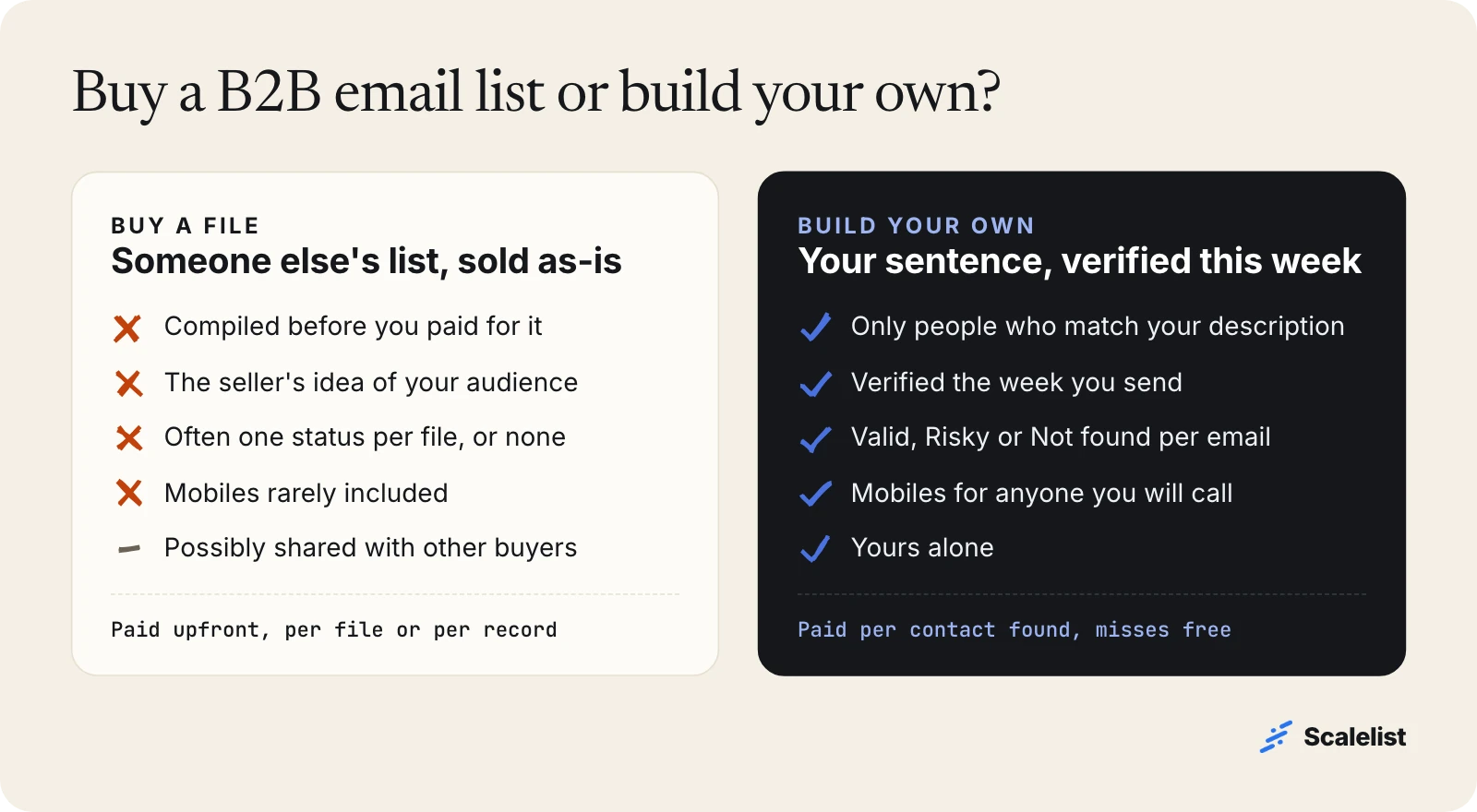
Build your own. Buying looks faster, but you inherit someone else’s targeting, someone else’s verification date and a file other companies may also be emailing. Building takes an afternoon and gives you a list you can defend line by line.
| Factor | Bought file | List you build |
|---|---|---|
| Who is on it | The seller’s idea of your audience | Only people who match your sentence |
| How current | Compiled before you paid | Verified the week you send |
| Verification | Often one status or none | Valid, Risky or Not found per email |
| Mobile numbers | Rarely included | Available for anyone you will call |
| Who else has it | Possibly other buyers | Only you |
| Cost model | Per file or per record, paid upfront | Per contact found, misses free |
The one case for buying is a one-off, like a trade show list you are licensed to use. Even then, run it through an email verifier before the first send.
Types of B2B email list providers
B2B email list providers fall into four types, and they differ in one question that matters most: is each address checked when you ask for it, or was it collected long before?
| Provider type | What you get | Checked when you ask? |
|---|---|---|
| List brokers | A ready-made file for an industry or title | No, compiled in advance |
| Contact databases (for example ZoomInfo, Apollo) | Search and export from a stored database, priced by seat, credit or both | Depends on the vendor |
| Email finders (for example Hunter, Findymail) | An email for a name and company you already have | Varies: look for a status per email |
| AI lead finders (Scalelist) | People who match a sentence, with verified emails and mobiles | Yes, found and verified on demand |
Results differ a lot even on the same people. In our own benchmark, we ran the same list of North American founders through 8 providers. The share of contacts where each one found an email ranged from 42% to 92%. Among the six that offer phone numbers, the share with a phone found ranged from 32% to 87%.
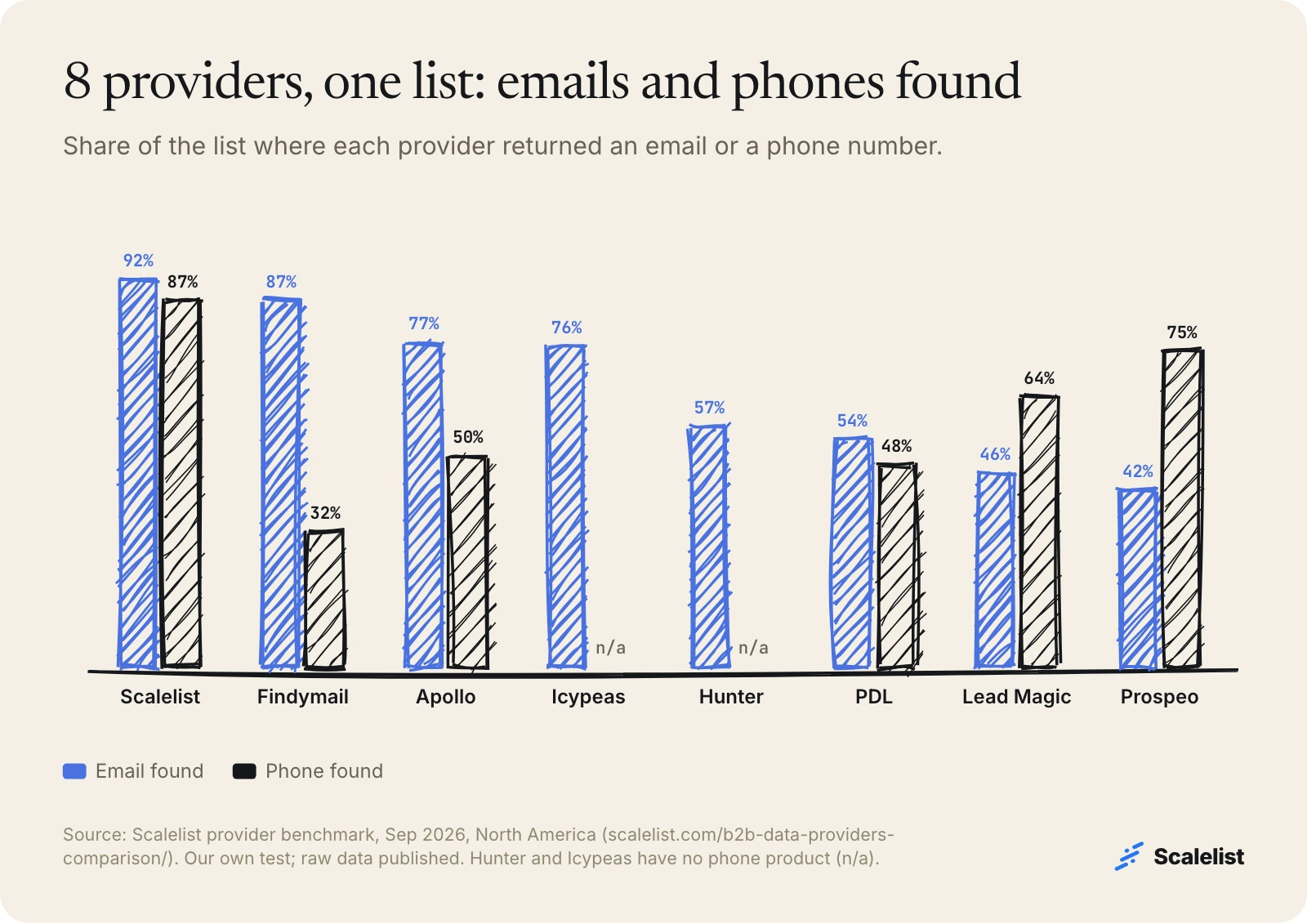
This is Scalelist’s own test, with the raw data published on our provider comparison page, so run your own before you buy. The bake-off method shows how to test any provider on 100 of your own accounts, and our roundup of the best lead generation tools compares the software side.
How to build a B2B email list in 5 steps
Building a B2B email list takes five steps: describe, size, reveal, send by status, rebuild. The full account-first method is in our prospect list how-to; here is the short version for an email campaign.
1. Describe the buyer in one sentence
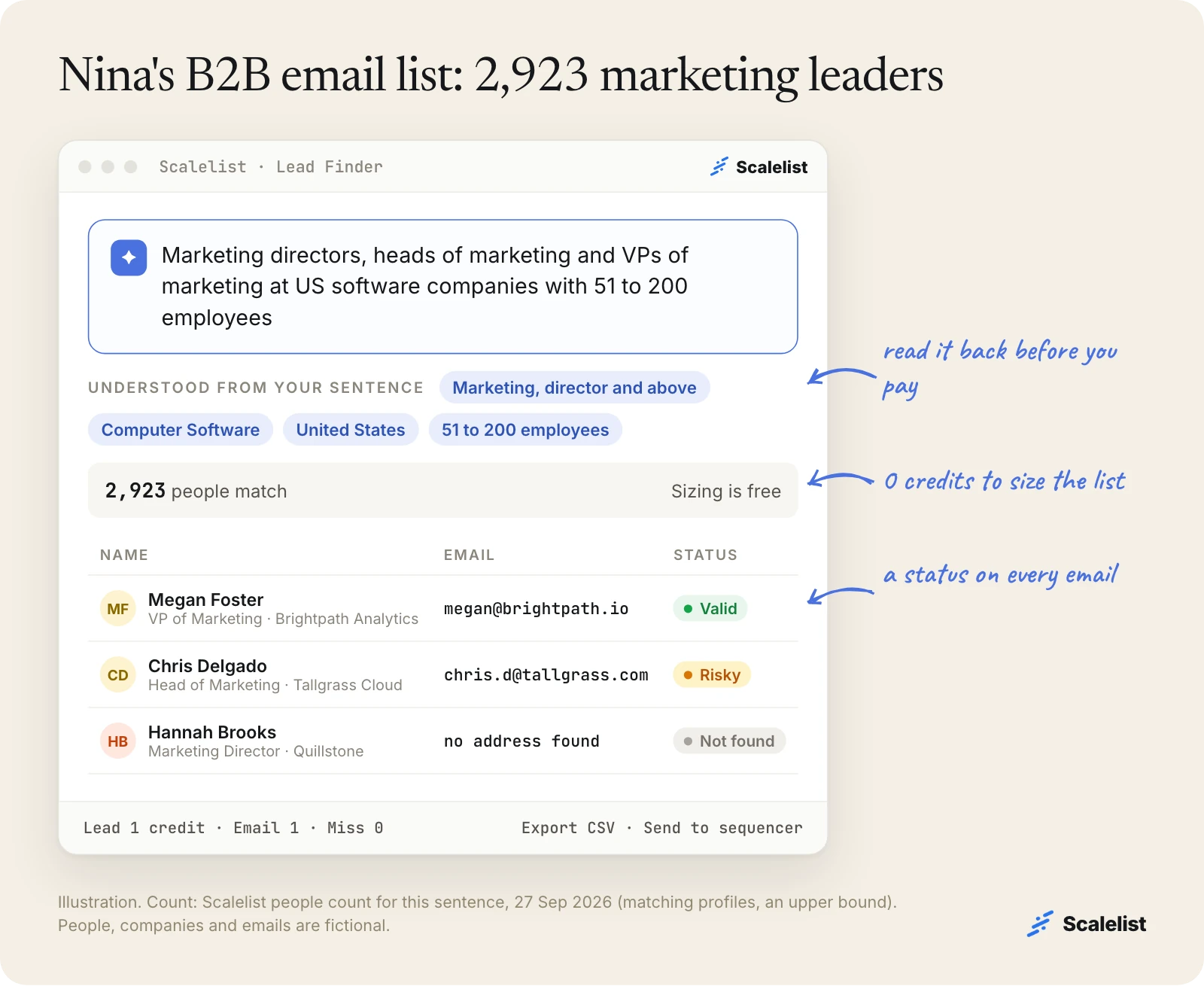
Include title, industry, company size and location. Example: Nina Alvarez, head of growth at a Denver marketing-analytics startup (fictional), wants “marketing directors, heads of marketing and VPs of marketing at US software companies with 51 to 200 employees.”
2. Size the list before you pay
Scalelist’s Lead Finder shows what it understood and how many people match, at no cost. Nina’s sentence matched 2,923 people on 27 September 2026.
3. Reveal verified emails
Pull the people and their work emails. Every email is verified before it is returned and labeled Valid or Risky; an address that cannot be found is marked Not found and costs nothing. Nina’s first 1,000 contacts cost at most 2,000 credits: 1 per lead, 1 per email.
4. Send by status
Send Valid addresses from your main domain first. Send Risky addresses, where the company’s server accepts every address, from a secondary domain; about 20 to 30% of them turn out to be deliverable. On the demo list below, 56 of 80 leads came back Valid, 10 Risky and 14 Not found.
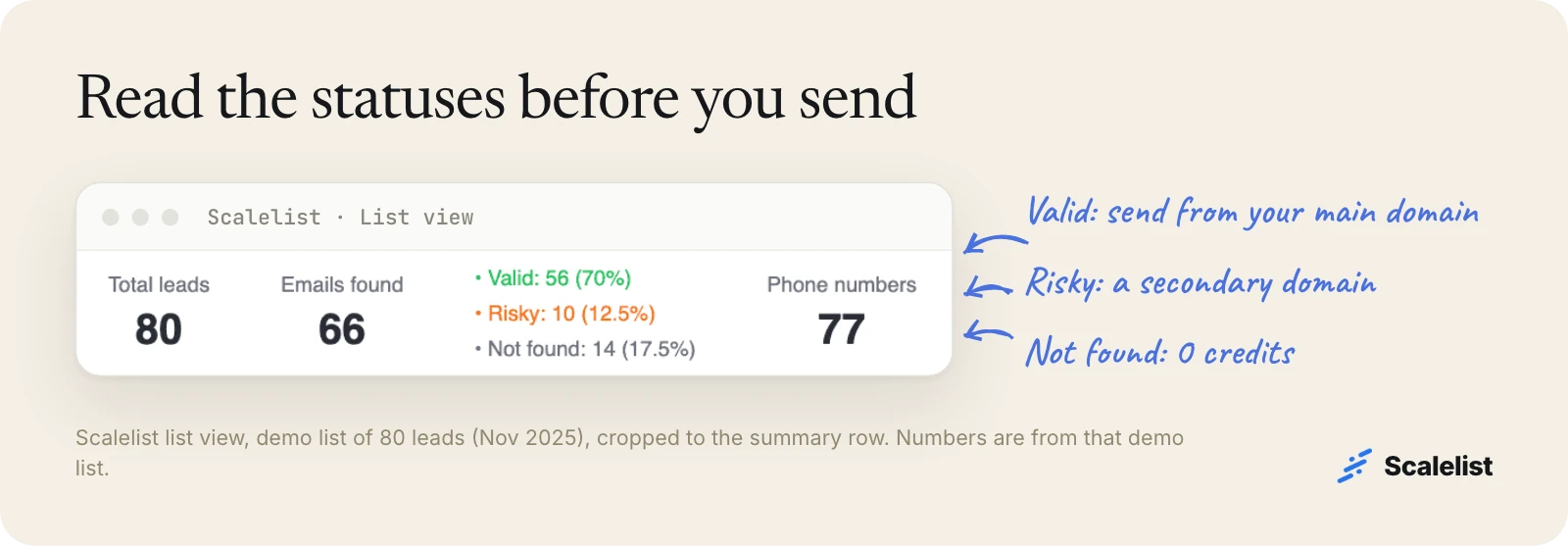
Keep bounces under 2%, the ceiling Instantly recommends for cold email. See what each status means for the details.
5. Suppress, send, rebuild
Remove customers, open deals and anyone who opted out. Then push the list to HubSpot or your sequencer (lemlist, Instantly, Smartlead, Woodpecker or Saleshandy). Rebuild it for the next campaign instead of reusing it; addresses age every month.
How much does a B2B email list cost?
With Scalelist, a contact with a verified email costs at most 2 credits (1 for the lead, 1 for the email), and a contact with an email and a mobile at most 22. You pay only for what is found.
| Plan | Price per month | Contacts with email (max) | With email and mobile (max) |
|---|---|---|---|
| Scaler 500 | 29 USD | 250 | 22 |
| Scaler 1K | 49 USD | 500 | 45 |
| Scaler 2K | 89 USD | 1,000 | 90 |
| Scaler 5K | 199 USD | 2,500 | 227 |
| Scaler 10K | 349 USD | 5,000 | 454 |
| Scaler 20K | 649 USD | 10,000 | 909 |
To be fair about it: if you only need emails at high volume, Scalelist is not the cheapest option, and a pure email finder such as Hunter costs about half as much per email credit. Scalelist is worth it when you also want mobiles, plain-English search and a status on every address. All plans are on Scalelist pricing.
Is it legal to send email to a B2B email list?
Yes, in the US, if you follow the CAN-SPAM Act. The Federal Trade Commission is explicit: “The law makes no exception for business-to-business email.” This is a summary, not legal advice.
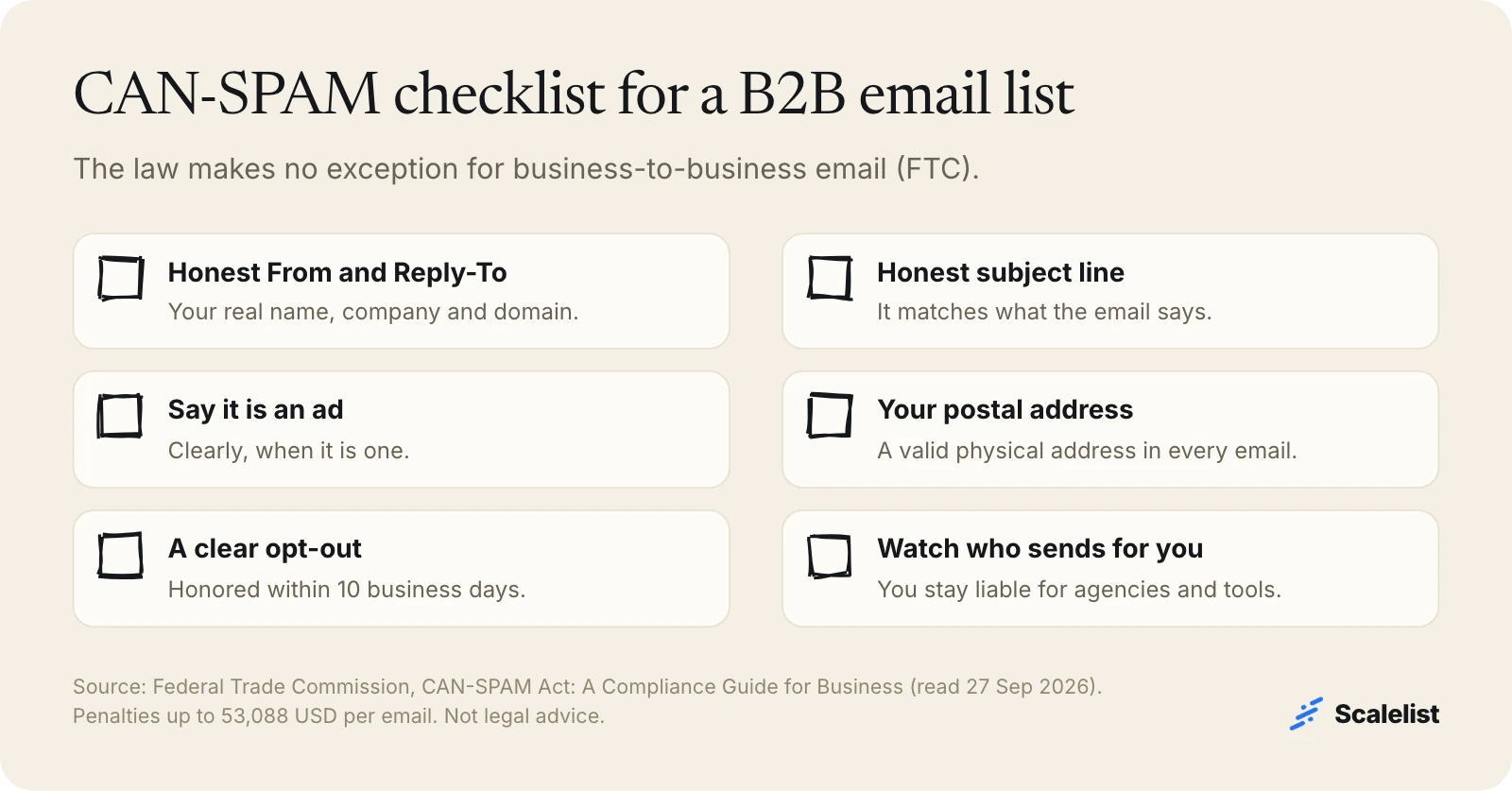
- Use honest “From” lines and subject lines, and identify the message as an ad.
- Include your physical postal address and a clear way to opt out.
- Honor opt-outs within 10 business days, including when an agency sends for you.
- Each email that breaks the law can cost up to 53,088 USD, per the FTC’s CAN-SPAM compliance guide.
If you send more than 5,000 messages a day to Gmail accounts, Google also requires SPF, DKIM, a DMARC record and one-click unsubscribe (Gmail sender guidelines). Emailing people in the EU or UK brings in the GDPR; see whether B2B contact data is legal.
Scalelist operates under the GDPR and Singapore’s PDPA, with a Data Processing Agreement, Standard Contractual Clauses and a published sub-processor list. Contact data you submit is never added to Scalelist’s database. Details are in the trust center.
B2B email lists by industry and role
The five steps above work for any audience. For the audiences we cover in depth, with counts and starting sentences, see the lead list guide or go straight to one:
- Industries and professions: healthcare, hospitals, manufacturing, nurses, lawyers, dentists, accountants and CPAs, real estate agents, insurance agents.
- Job titles: CFOs, CEOs, CIOs, IT decision makers, HR managers, recruiters.
- Software users: Salesforce, NetSuite and SAP customers.
Common mistakes with a B2B email list
Most B2B email list problems start before the first send. These four are the most expensive.
Buying data before the targeting is settled
If you cannot describe the buyer in one sentence, no list will rescue the campaign. Write the sentence first; our sales prospecting guide covers the targeting work.
Sending Risky addresses from your main domain
Risky addresses cannot be confirmed, and bounces damage the domain you use for everything else. Keep them on a secondary domain.
One list, one blast
A list that mixes CFOs and IT directors gets one generic message. Split it into one sentence and one sequence per role.
Reusing last quarter’s list
Addresses and jobs change every month. Rebuild the list for each campaign; you pay only for contacts found.
How Scalelist helps you build a B2B email list
Scalelist, an AI Lead Finder, builds the list from one sentence: it shows the count for free, then returns people with verified work emails labeled Valid or Risky, plus mobiles when you want them. Scalelist finds and verifies contact details on demand rather than serving a pre-compiled list, so the list is current the day you build it.
Describe your buyer in one sentence and get a verified B2B email list you own.
Get 20 credits to test itFAQ
Can you buy a B2B email list?
Yes, list brokers sell them, but it is rarely a good idea. A bought file was compiled before you paid, may be sold to other buyers, and often has no per-address verification or mobile numbers. Building your own B2B email list from a description of your buyer gives you only people who fit, verified the week you send.
Is it legal to email a purchased B2B email list in the US?
Yes, CAN-SPAM allows cold B2B email, but it applies in full: honest headers and subject lines, a physical address, a working opt-out honored within 10 business days, and penalties up to 53,088 USD per violating email. This is not legal advice.
Where can I get a B2B email list?
From four kinds of providers: list brokers (ready-made files), contact databases such as ZoomInfo or Apollo (search and export), email finders such as Hunter (an email for a name you already have), and AI lead finders such as Scalelist (describe the buyer, get verified emails and mobiles). Test any provider on 100 of your own accounts first.
How much does a B2B email list cost?
With Scalelist, at most 2 credits per contact with a verified email and 22 with an email and a mobile; misses are free. A 1,000-contact email list costs at most 2,000 credits, which is the Scaler 2K plan at 89 USD a month. Bought files are priced per record or per file and paid upfront.
What is a good bounce rate for a B2B email list?
Under 2%, which is the ceiling Instantly recommends for cold email in its 2026 benchmark report. To stay there, send only Valid addresses from your main domain, move Risky ones to a secondary domain, and verify again if the list is more than a few weeks old.
How often should you clean a B2B email list?
Before every campaign. At least 23% of the addresses ZeroBounce checked in 2025 had gone bad or were risky, and people change jobs every month. Rather than cleaning an old file, rebuild the list from your sentence; with Scalelist you pay only for contacts found.
Does Scalelist sell B2B email lists?
No. Scalelist is software, not a list broker. You describe the people you want, Scalelist finds and verifies their contact details on demand, and you own the result: export a CSV, push to HubSpot, or send to lemlist, Instantly, Smartlead, Woodpecker or Saleshandy.
Sources
- Federal Trade Commission: CAN-SPAM Act, a compliance guide for business
- ZeroBounce: The Email List Decay Report 2026
- Instantly: Cold Email Benchmark Report 2026
- Google: Gmail email sender guidelines
- Gartner press release, June 25, 2025 (Internet Archive capture)
- Scalelist provider benchmark, September 2026, and Scalelist people count, 27 September 2026.


