


The best AI prompt for sales is one plain-English sentence that names the person you want to reach: their title, industry, company size, location and, when timing matters, how long they have been in the role. Write it well and Scalelist, an AI Lead Finder, returns the matching people with verified work emails and mobile numbers.
This guide shows you how to build that sentence, check what Scalelist understood, tighten or widen the count before you spend a credit, and gives you 22 prompts to copy today.
What is a good AI prompt for sales prospecting?
A good AI prompt for sales prospecting is one sentence that describes one type of buyer precisely enough to count: who they are (title and seniority), where they work (industry and company size), where they are (location) and, optionally, when they started. If a colleague could read it and build the same list you would, it is a good prompt.
Most lists of AI prompts for sales help you write emails. This one comes first: it decides who gets the email or the call, the first step of AI lead generation. Gartner predicts that by 2027, 95% of sellers’ research workflows will begin with AI, up from less than 20% in 2024 (Gartner, May 2026).
The anatomy of a one-sentence ICP
Scalelist reads six things from your sentence: job title, seniority, industry, location, company size and time in role. A title usually carries the seniority (“VP of Sales” is VP level), so a strong sentence has five parts, and the last one is optional.
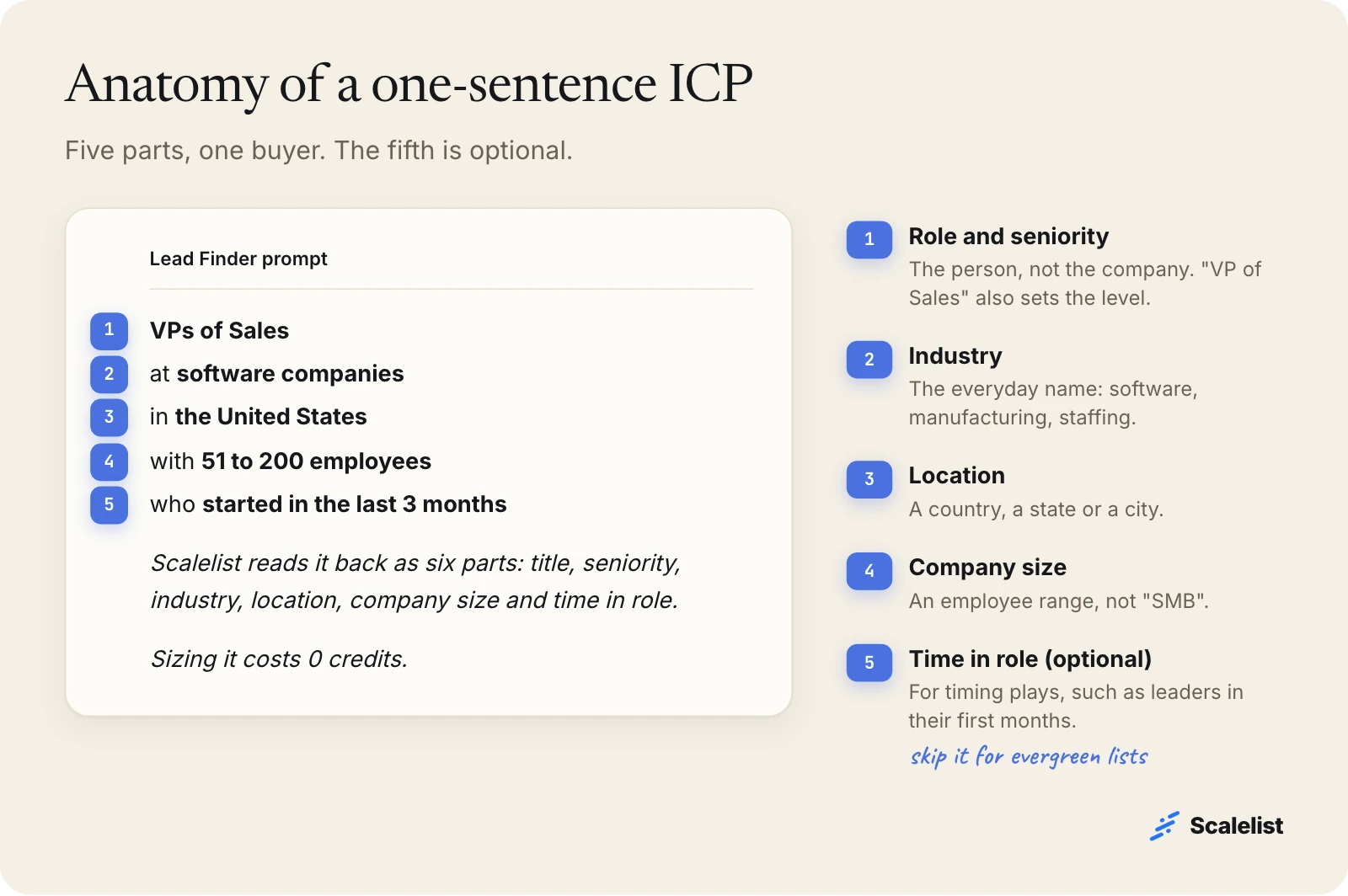
| Part | Write it like this | Avoid |
|---|---|---|
| Role and seniority | VPs of Sales, Heads of Operations, owners | “decision makers”, “leaders” |
| Industry | software, manufacturing, staffing and recruiting | “tech”, “B2B”, “enterprise” |
| Company size | with 51 to 200 employees | “mid-market”, “SMB”, “growing” |
| Location | in the United States, in Texas, in Chicago | “North America” if you only sell in the US |
| Time in role (optional) | who started in the last 3 months | “new-ish”, “recently” |
One sentence, one buyer. If you sell to both the VP of Sales and the head of RevOps, write two sentences and run them separately: each needs its own email and call opener. No written ICP yet? Fill in an ideal customer profile template first, then compress it into the sentence.
Weak vs strong prompts: 5 rewrites
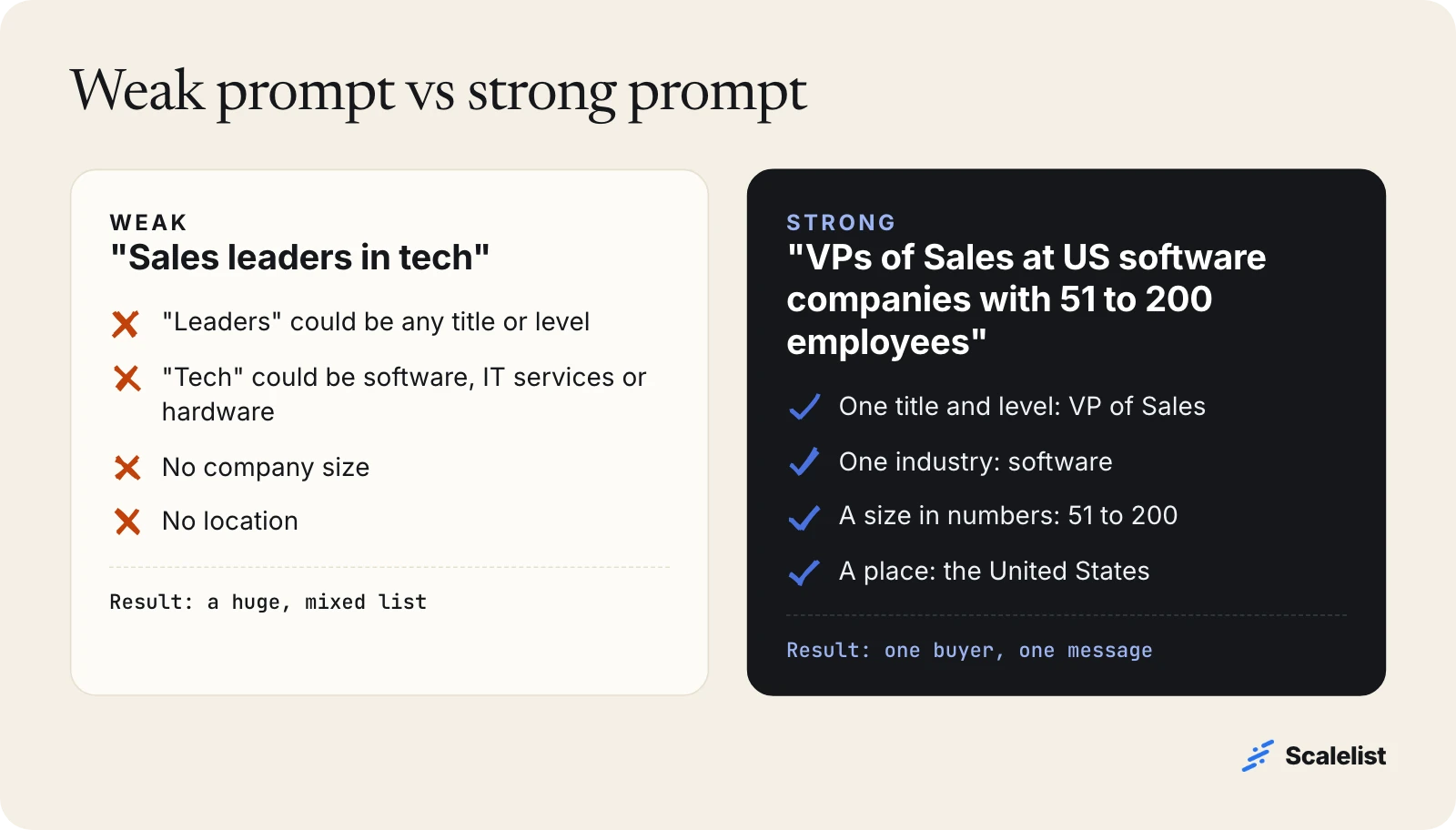
A weak prompt describes a market; a strong prompt describes a person you could call tomorrow. Here are five common weak sentences and their fixes.
| Weak prompt | What is missing | Strong prompt |
|---|---|---|
| Sales leaders in tech | industry, size, location | VPs of Sales at US software companies with 51 to 200 employees |
| Decision makers in healthcare | the title, the kind of healthcare | Practice managers at dental offices in Arizona with 11 to 50 employees |
| Mid-market manufacturers | the person, a size in numbers | Heads of Operations at US manufacturers with 200 to 1,000 employees |
| HR people at startups | seniority, size, location | HR Directors at US software companies with 51 to 200 employees |
| Companies that need a new phone system | everything: it is a need, not a buyer | IT Directors at US staffing and recruiting firms with 51 to 200 employees |
The last row is the most common mistake. A people search finds people by who they are, not by what they need. Translate the need into the role that owns it, then describe that role.
How to build a list from one sentence in Scalelist
Going from ICP to a sized list takes four steps, and the first three cost nothing: write the sentence, read what Scalelist understood, check the count, then reveal contacts only for the people you keep.
Step 1: Write the sentence from your best customers
Start from your last 10 closed deals, not your wish list. Note the buyer’s title, the company’s industry and headcount, and the state. The pattern that repeats is your sentence; our ICP examples by industry show what that looks like.
Write it in the order of the anatomy: role, industry, location, size, time in role. That order makes each part easy to check in the next step.
Step 2: Read what Scalelist understood
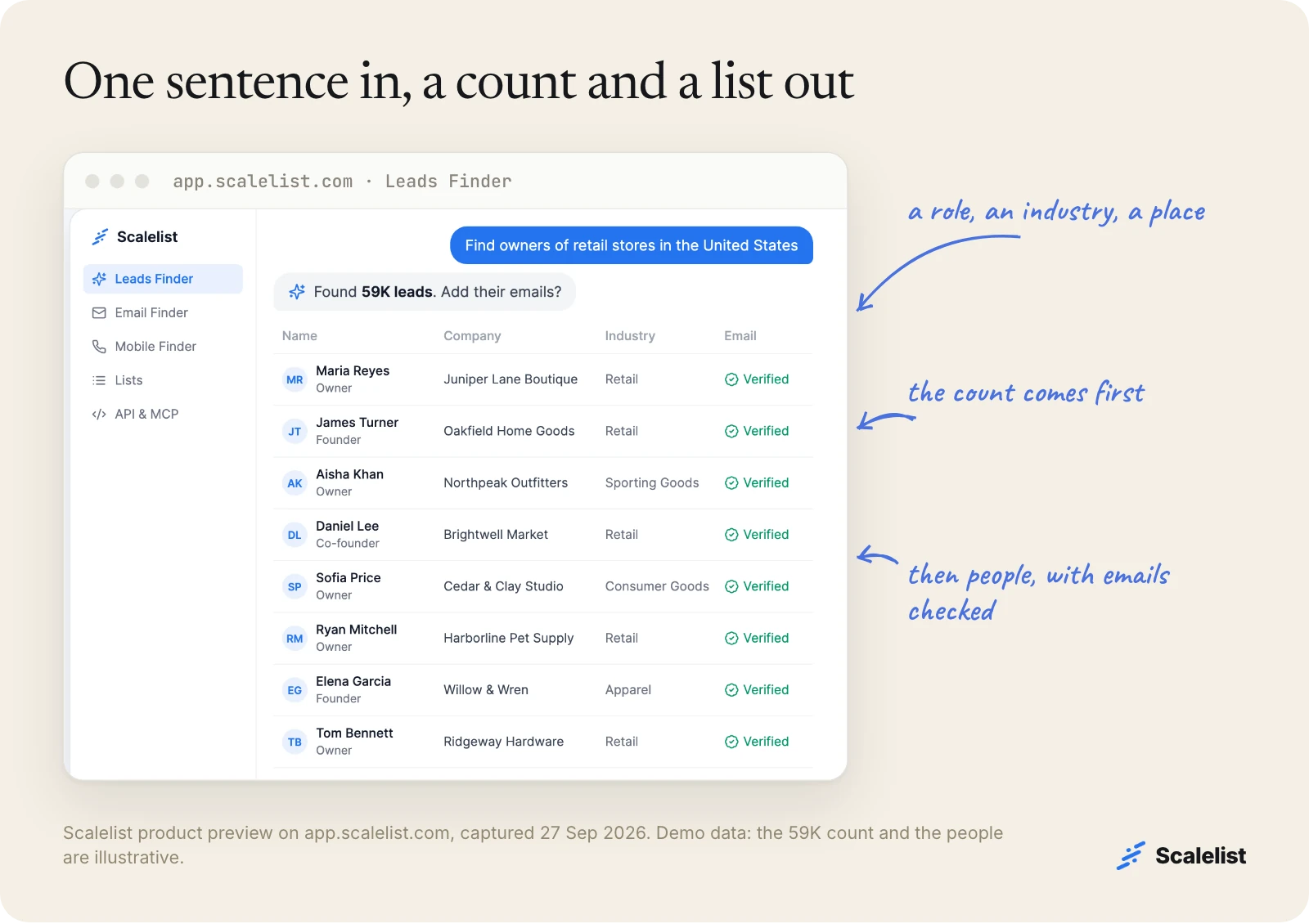
Before you spend a credit, Scalelist’s Lead Finder shows what it understood from your sentence and how many people match. This is where most mistakes get caught, at no cost.
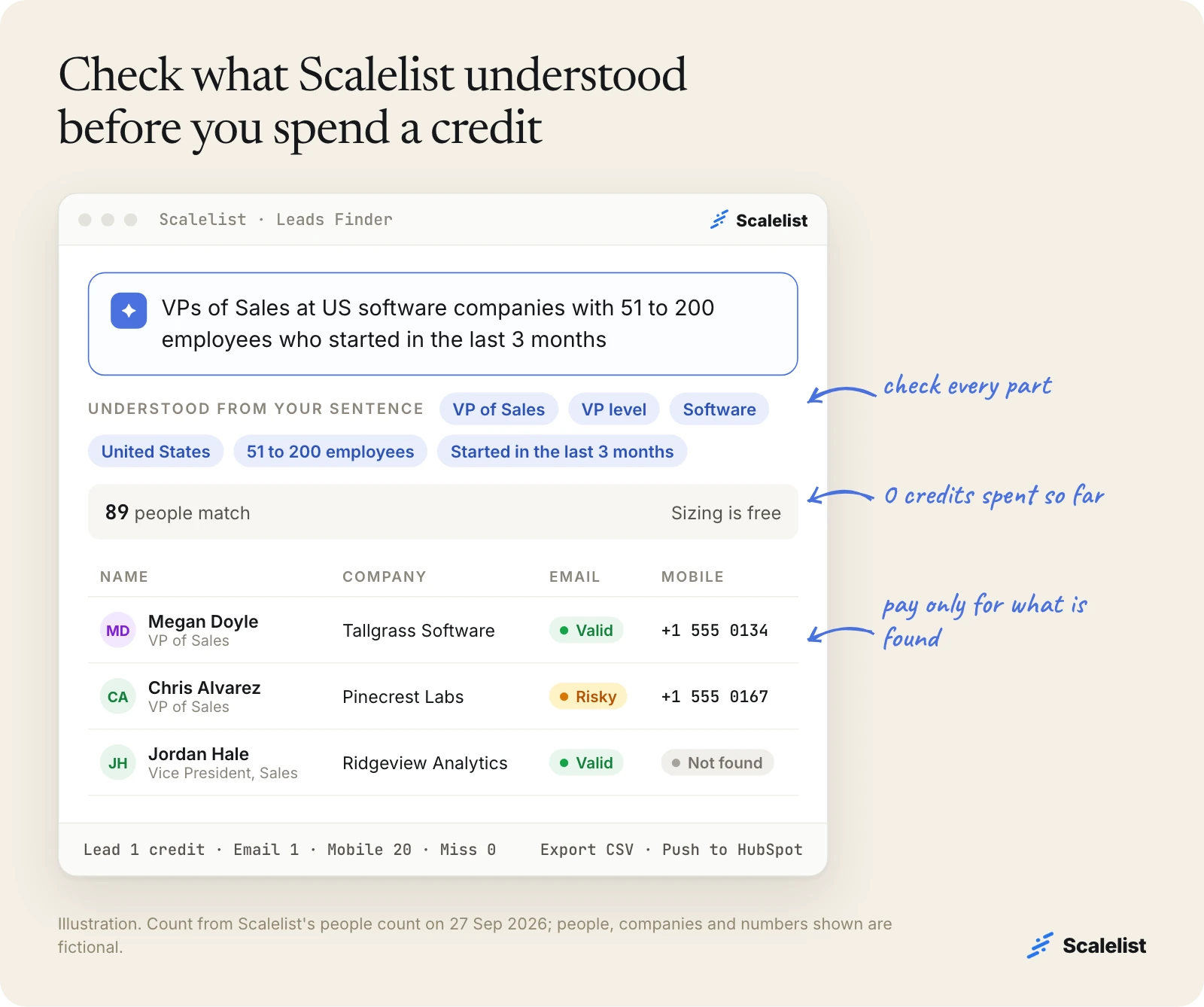
Check each part against what you meant:
- Title: is it the exact role? Spell out acronyms with two meanings: “Chief Revenue Officer”, not “CRO”.
- Industry: “software” and “IT services” are different buyers. Make sure the one shown is the one you sell to.
- Size and location: are the numbers and the place the ones you wrote?
- Anything missing: if a part you wrote does not appear in what Scalelist understood, it was not applied to the count. Rewrite that part in plainer words.
There is no form to fill in. When a part is wrong, you change the sentence and run it again. For why plain English works better than a search form, see natural-language search vs search forms.
Here is the same moment in the product: one sentence in, a count and a list of people out.
Step 3: Check the count, then narrow or widen it
The count tells you whether the sentence is the right size for your team, and checking it is free. Each part you add narrows the list. Here is one sentence built up part by part, counted on 27 September 2026:
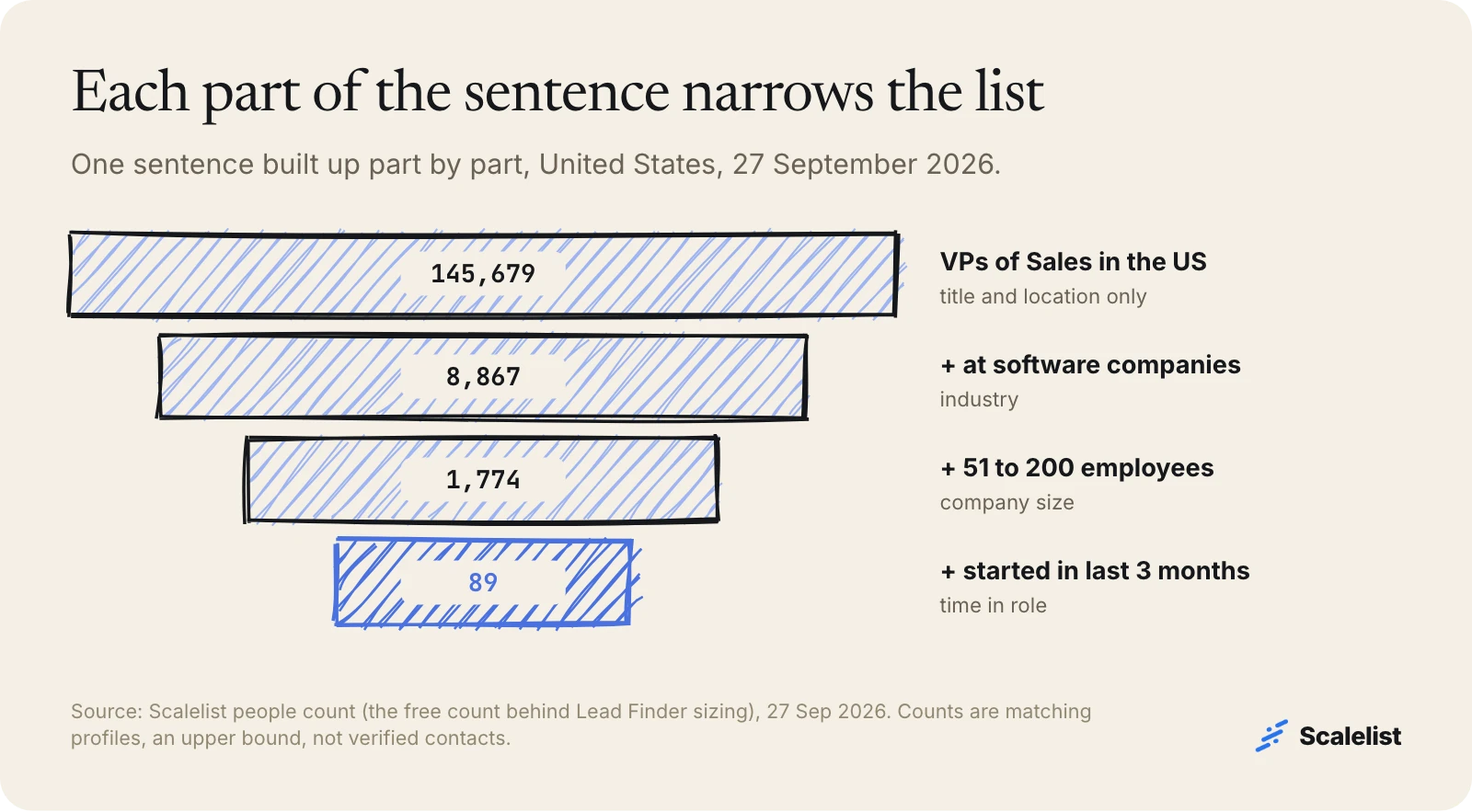
- “VPs of Sales in the United States”: 145,679 people
- “+ at software companies”: 8,867
- “+ with 51 to 200 employees”: 1,774
- “+ who started in the last 3 months”: 89
A second example: “Heads of Operations at US manufacturers with 200 to 1,000 employees” matched 6,277 people on the same day. “Owners of HVAC companies in Texas with 11 to 50 employees” matched 338.
Our rule of thumb for what to do next:
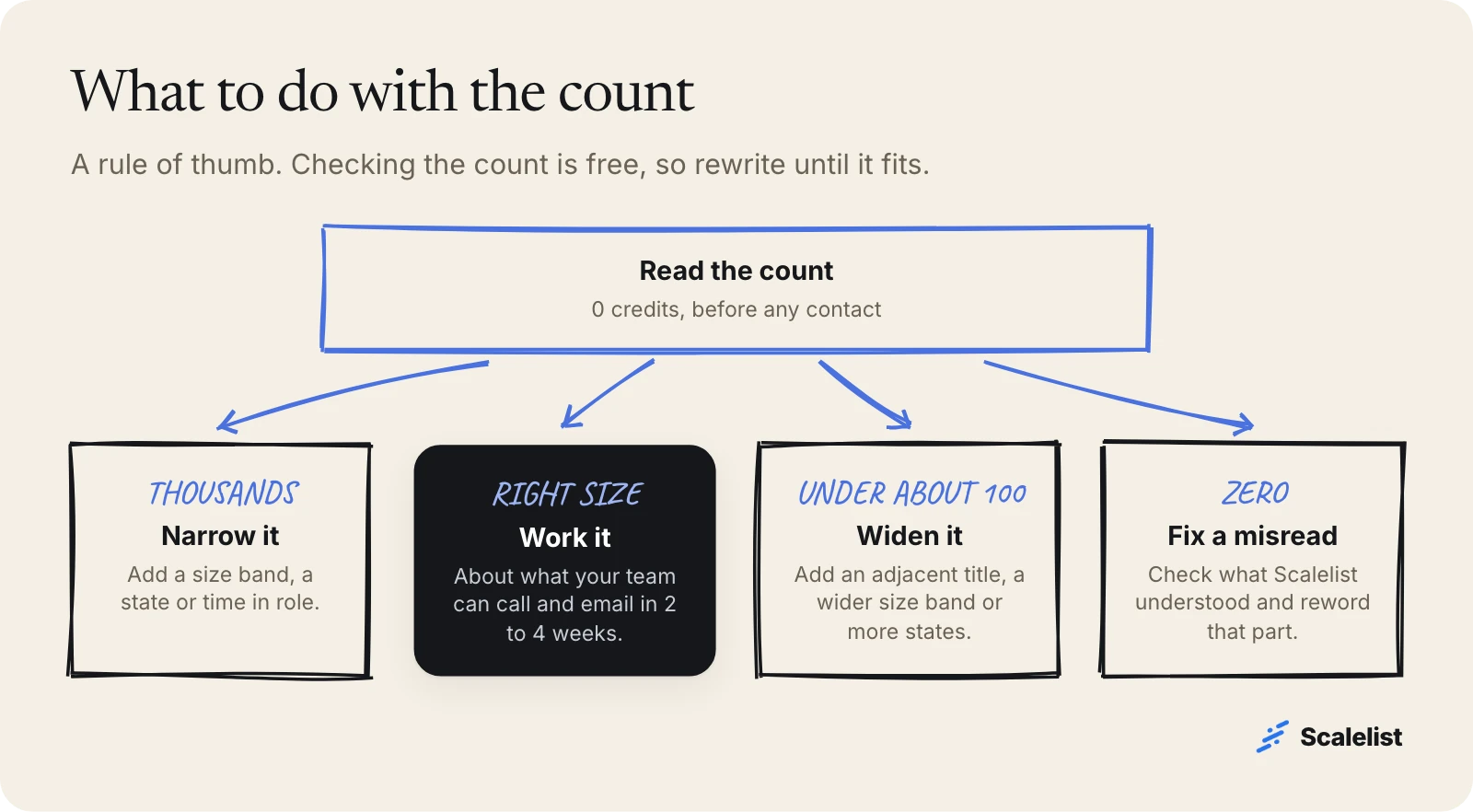
- Thousands, for a small team: narrow it. Add a size band, a state or time in role.
- Under about 100: widen it. Name an adjacent title (“VPs or Heads of Sales”), widen the size band or add states.
- Zero: one part was misread, not an empty market. Check what Scalelist understood; the usual culprit is an industry label nobody uses for their own business.
- About right: a list your team can call and email in the next 2 to 4 weeks.
Counts are profiles that match your sentence, not verified contacts. Treat them as the upper bound of who you can reach.
Step 4: Reveal emails and mobiles for the people you keep
When the list looks right, reveal contacts. Each lead found costs 1 credit, each work email found 1 credit (Valid or Risky) and each mobile number found 20 credits. If nothing is found, you pay nothing. Here is what Valid, Risky and Not found mean.
Then export a CSV, push the leads to HubSpot or send them to your sequencer. If you plan to call, the mobiles are the point: here is how to build a cold calling list from them. For the full walkthrough, see one sentence to a call list in 10 minutes.
Paste one of the sentences below and see how many people match before you spend a credit.
Describe your buyer in one sentence22 AI prompts for lead generation you can copy
These AI prompts for lead generation follow the anatomy above and are written for US markets. Swap the title, industry, size or place for yours and keep the structure.
Prompts by department buyer
Heads of Marketing at US software companies with 11 to 50 employees
CFOs at US manufacturers with 200 to 1,000 employees
HR Directors at US hospitals and health care organizations with 201 to 1,000 employees
IT Directors at US staffing and recruiting firms with 51 to 200 employees
Use these when you sell to one function and your price fits one size band.
Prompts by industry
Owners of staffing and recruiting firms in the United States with 11 to 50 employees
Practice managers at dental offices in Arizona with 11 to 50 employees
CTOs at US IT services companies with 11 to 50 employees
Directors of Logistics at US food and beverage companies with 201 to 1,000 employees
Industry is the part most often misread. Use the plain name people use for their own business.
Prompts for owners and local businesses
Owners of commercial cleaning companies in Florida with 11 to 50 employees
Founders of marketing agencies in New York City with 2 to 10 employees
Owners of roofing companies in Georgia with 11 to 50 employees
At a 20-person company the owner signs for almost everything, so “owner” beats any functional title.
Prompts for timing: new in the role
Heads of Operations at US manufacturers who started in the last 3 months
CFOs at US companies with 201 to 1,000 employees who started in the last 3 months
Marketing Directors at US health care companies who started in the last 3 months
A common outbound play: new leaders often revisit vendors in their first months. The full play is in prospecting new executives in their first 90 days.
Prompts by state or city
Heads of Sales at software companies in Austin, Texas
Plant Managers at manufacturers in Michigan with 201 to 1,000 employees
Property Managers at real estate companies in Chicago with 11 to 50 employees
Use these for field sales, local events or a rep who owns one territory. For 60 more sentences by role and industry, see our library of lead-finding prompts.
What a list costs in credits
Sizing a search is free, and you pay only for what Scalelist finds: 1 credit per lead, 1 per email and 20 per mobile. A fully enriched lead (lead, email and mobile) costs at most 22 credits.
| List | Leads | Emails | Mobiles | Credits, at most |
|---|---|---|---|---|
| 100 people, emails only | 100 | 100 | 0 | about 200 |
| 100 people, emails and mobiles | 100 | 100 | 2,000 | about 2,200 |
| 500 people, emails for all, mobiles for the top 100 | 500 | 500 | 2,000 | about 3,000 |
| The 89 new VPs of Sales, emails and mobiles | 89 | 89 | 1,780 | about 1,960 |
These are ceilings: every miss costs 0, so the real bill is lower. The 89 new VPs of Sales fit in the Scaler 2K plan (2,000 credits for 89 USD a month), and the 500-person list fits Scaler 5K (5,000 credits for 199 USD a month). All plans are on Scalelist pricing.
Common prompt mistakes and how to fix them
Most weak results trace back to four fixable mistakes in the sentence itself. (A count of zero is covered in step 3: it means a misread part, not an empty market.)
You described a need, not a person
“Companies struggling with churn” cannot be counted. Name who owns the problem: “Heads of Customer Success at US software companies with 51 to 200 employees”.
You used vague size words
“SMB”, “mid-market” and “enterprise” mean different things to every team. Write employee numbers.
You put several buyers in one sentence
“CEOs, CFOs and COOs at US manufacturers” returns a mixed list you cannot message the same way. Run one sentence per buyer.
You added conditions Scalelist did not show back
Revenue, tech stack or recent funding are useful signals, but if a condition does not appear in what Scalelist understood, it was not applied. Keep the sentence to the six parts, and work signals such as leads at recently funded companies as a separate step.
Using the same sentence in ChatGPT or Claude
A chat assistant on its own has no live contact data, so it cannot return real people with verified emails. Use it for what it does well: turning messy ICP notes into clean sentences.
Write 3 one-sentence buyer descriptions for a B2B people search.
Each sentence names one job title, one industry in everyday words, a US location, and a company size as an employee range.
Add "who started in the last 3 months" to the third sentence only.
No adjectives, no needs, no company names.
Then run the sentences where the data is. With the Scalelist MCP server, Claude, ChatGPT or any MCP client can run the same sentence against Scalelist, at the same credit costs as the app.
Describe your buyer once, check the free count, and reveal only the contacts you keep.
Get 20 credits to test itFAQ
What are the best AI prompts for sales prospecting?
The best AI prompts for sales prospecting describe one buyer in one sentence: job title, industry, company size in employees, location, and optionally time in role. Example: “VPs of Sales at US software companies with 51 to 200 employees.” Avoid vague words like “decision makers” or “mid-market”, and describe people, not needs.
How long should a lead search prompt be?
One sentence, usually 10 to 20 words. That is room for all five parts: role, industry, location, company size and time in role. Longer prompts tend to mix several buyers or add conditions a people search cannot count. If you have two buyers, write two sentences and run them separately.
Do I pick options from menus in Scalelist’s Lead Finder?
No. Lead Finder works from your sentence alone. It shows back what it understood (title, seniority, industry, location, company size and time in role) and how many people match. When a part is wrong, you rewrite the sentence and run it again. There is no form or query builder to fill in.
Does it cost anything to test a prompt?
No. Sizing a search is free: Scalelist shows what it understood and how many people match before you spend a credit. You pay only when you reveal contacts and something is found: 1 credit per lead, 1 per email, 20 per mobile, 0 for a miss. New accounts get 20 free credits, no credit card required.
Can I use these prompts in ChatGPT or Claude?
Yes, with one condition. On its own, a chat assistant has no live contact data, so it can help you write the sentence but cannot return verified contacts. Connect the Scalelist MCP server and Claude, ChatGPT or any MCP client can run the same sentence against Scalelist, at the same credit costs as the app.
Why does my prompt return too many people?
It is missing a part. Add a company size in employees, narrow the location to a state or city, or add time in role. In our example, three extra parts took “VPs of Sales in the United States” from 145,679 matching people to 89 on 27 September 2026.
Is the match count the same as the number of verified contacts?
No. The count is the number of profiles that match your sentence, an upper bound. Emails and mobiles are found and verified when you reveal them, and each email comes back as Valid, Risky or Not found. You pay only for what is found; a miss costs 0 credits.
Sources
- Gartner: sales organizations that provide AI-enabled next best actions are 2.6x more likely to achieve commercial growth (press release, 20 May 2026)
- Scalelist people counts (Lead Finder search sizing), queried 27 September 2026.


