


A lead list is a set of named people who match your buyer profile, each with a verified work email and, when you plan to call, a mobile number. The quickest way to build one: describe your buyer in one sentence, check how many people match before you spend anything, then pay only for the contacts that are found.
Below are the five steps in Scalelist with the credit cost of each, a worked example for construction finance leaders in Texas, starting sentences for 21 audiences, and fixes for the problems that come up most.
What is a lead list?
A lead list is a set of people who fit your ideal customer profile, with the details you need to reach them: name, job title, company, a work email with its verification status, and a phone number, ideally a mobile. Sales teams use it to feed cold calls, email sequences and account research.
Lead and prospect are often used as synonyms. Strictly, a lead is anyone who fits the profile, and a prospect is a lead you have researched and qualified. This page covers lead list building, which some teams call sales list building; the step-by-step prospect list guide covers the qualification work that comes after it.
What should a lead list include?
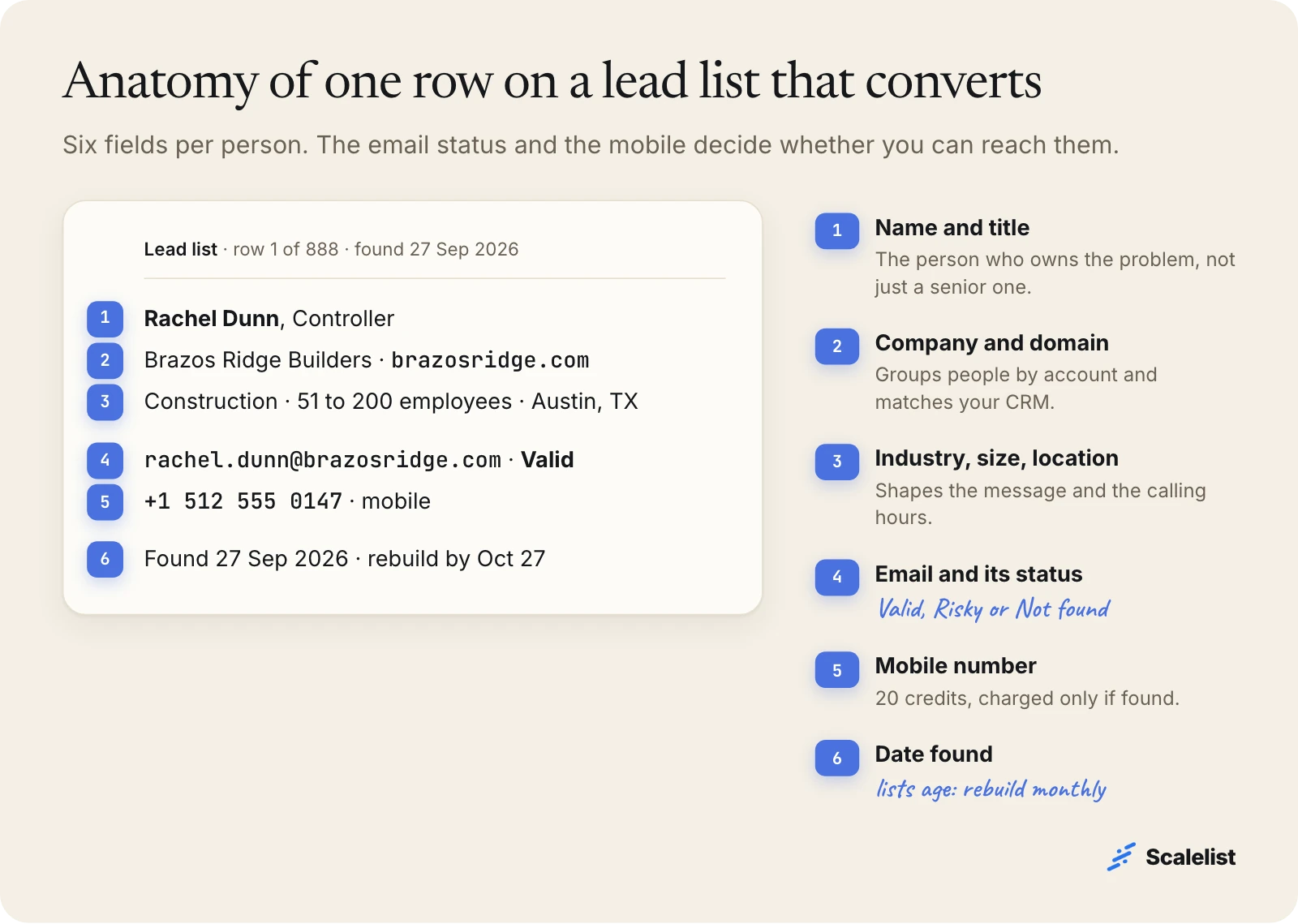
A good lead list has six fields per person, and two of them decide whether you can reach anyone at all: the email status and the mobile number.
| Field | Why it matters | Needed for |
|---|---|---|
| Name and job title | Confirms you have the person who owns the problem | Every list |
| Company and domain | Groups people by account and matches your CRM | Every list |
| Industry, size, location | Shapes the message and sets calling hours | Every list |
| Work email and status | Valid, Risky or Not found tells you how to send | |
| Mobile number | Reaches the person, not the switchboard | Calls |
| Date found | Tells you when the list is going stale | Every list |
Leave out columns you will not use. A revenue range you never segment on makes the file harder to scan and does not change who you contact.
How to build a lead list in Scalelist, step by step
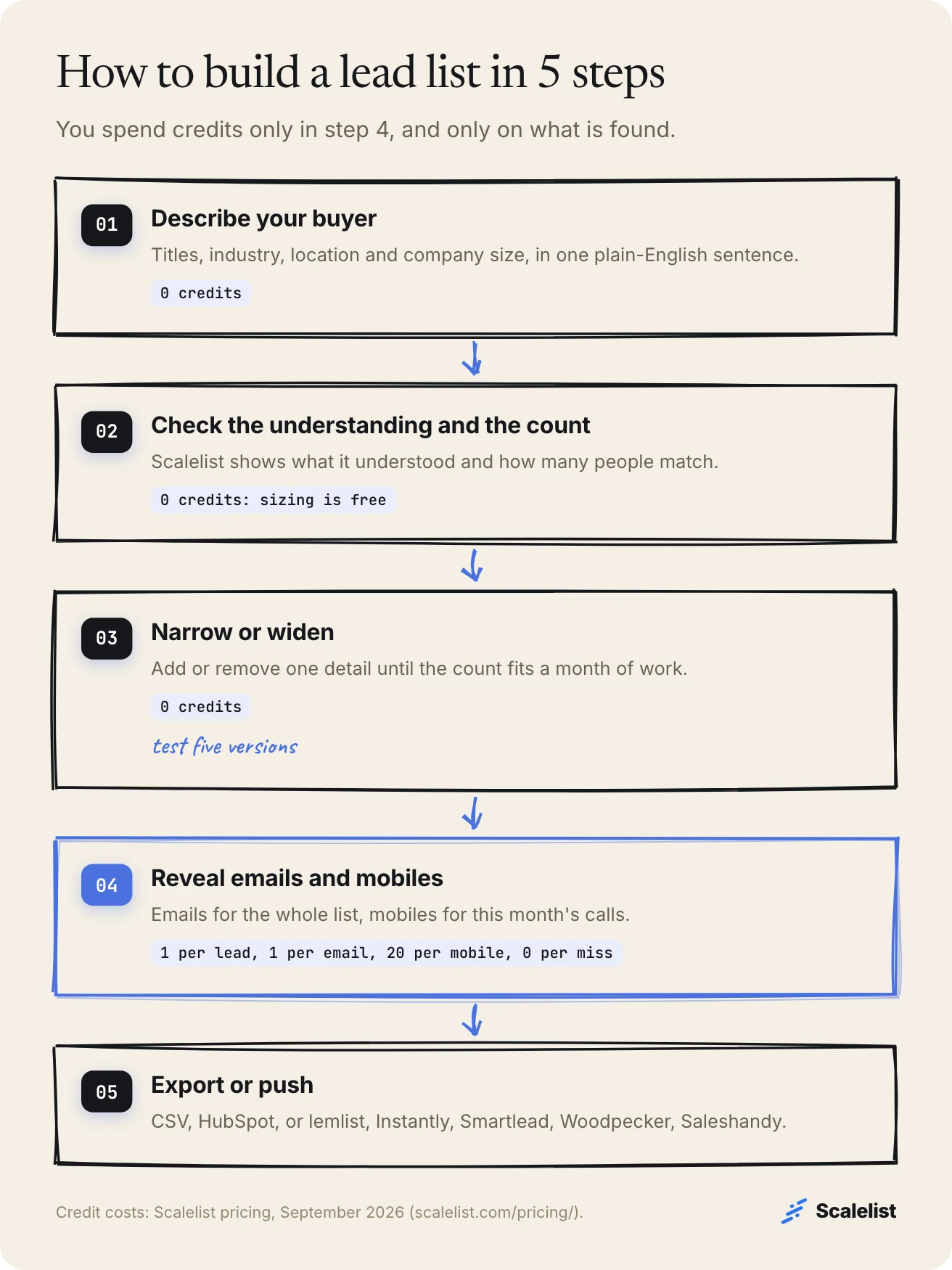
Building a lead list in Scalelist takes five steps: describe, check, narrow, reveal, export. The first three cost nothing, and step 4 charges only for what is found.
1. Describe your buyer in one sentence
Write who you want the way you would brief a colleague: titles, industry, location and company size. A pattern that works is [titles] at [industry] companies in [location] with [size] employees.
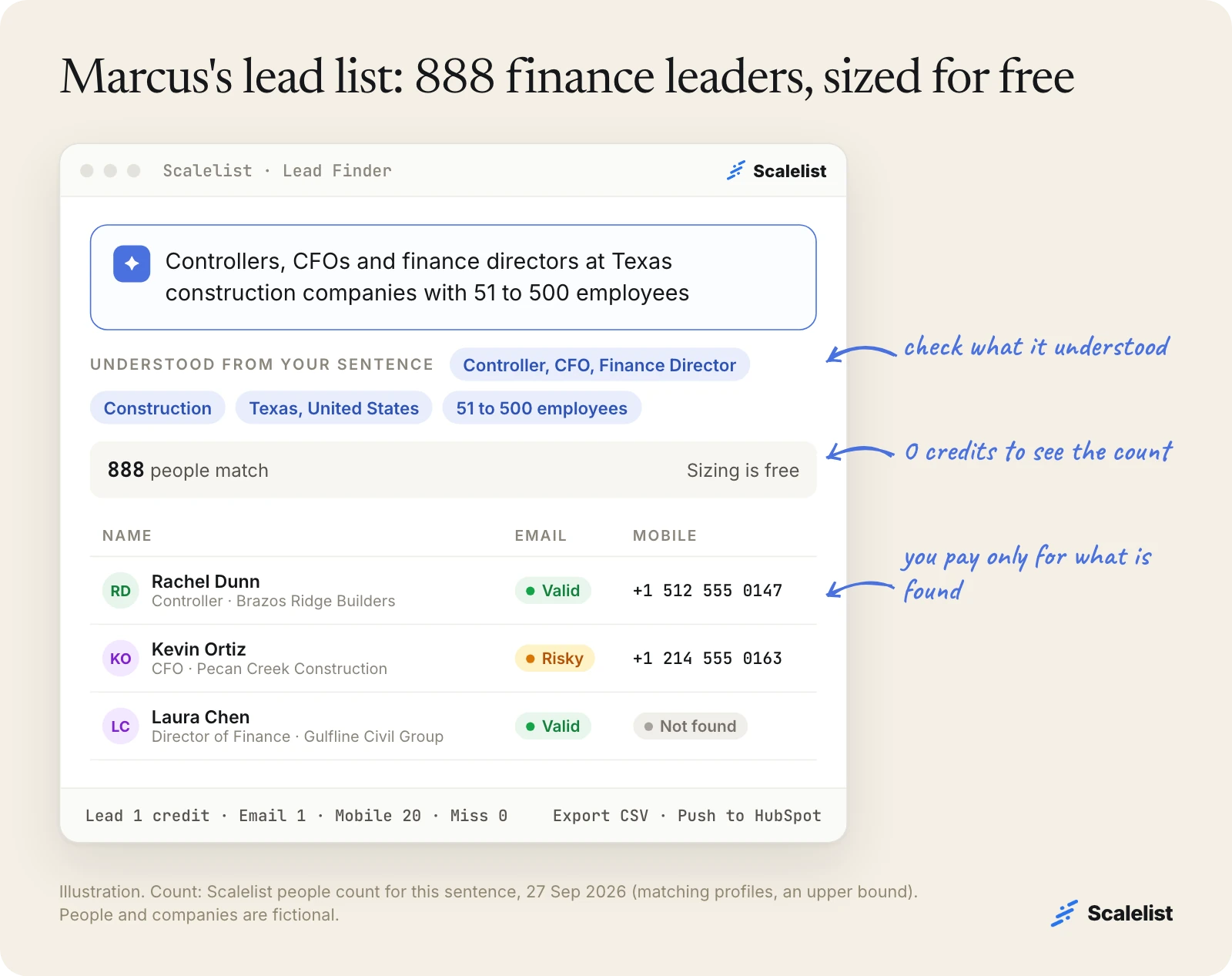
Example: Marcus Bell runs Ledgerline, a job-costing tool for contractors in Austin, Texas (a fictional company). His sentence is “Controllers, CFOs and finance directors at Texas construction companies with 51 to 500 employees.” For more patterns, see how to describe your ICP in one sentence.
2. Check what Scalelist understood and how many people match
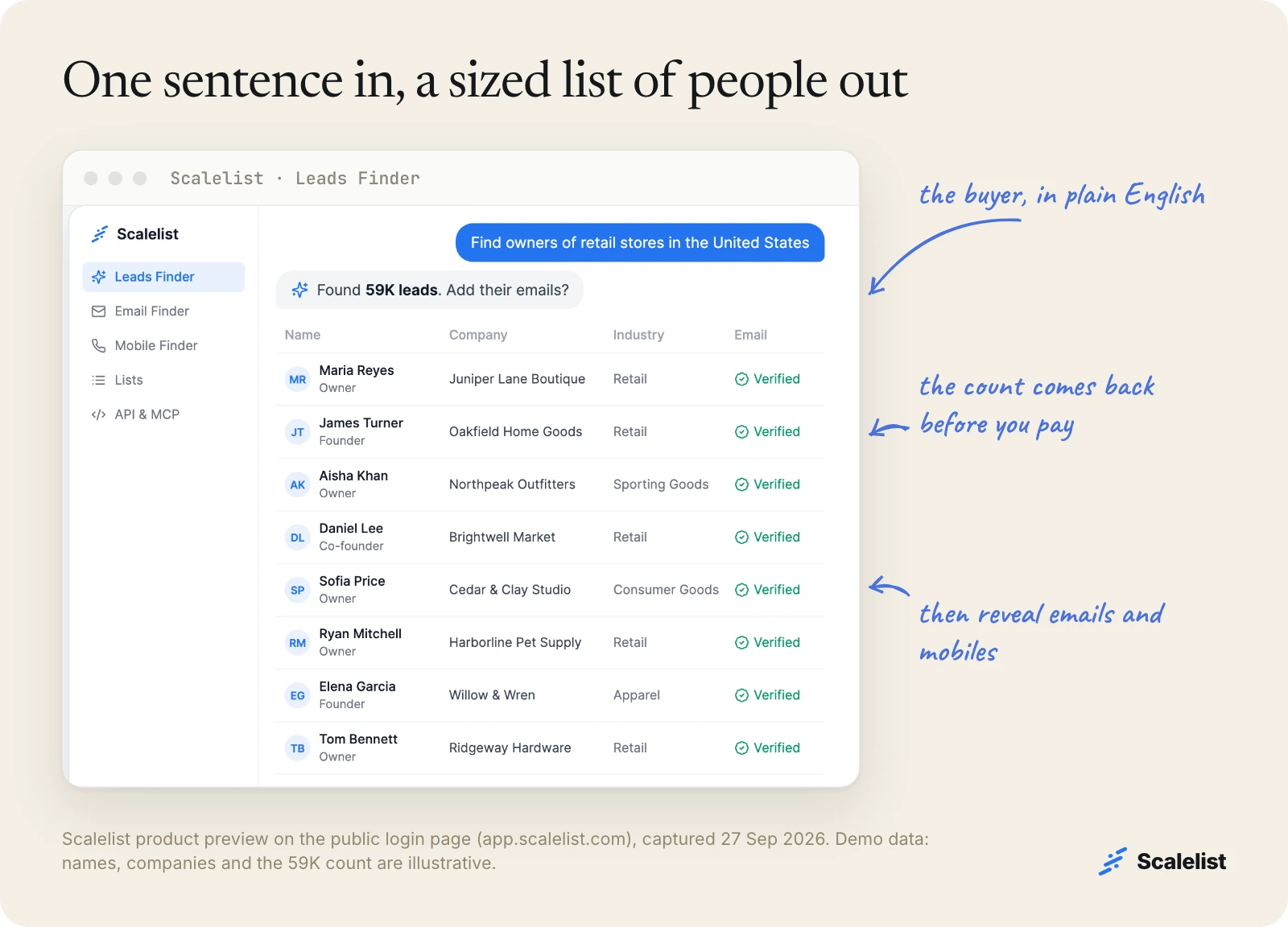
Scalelist’s Lead Finder shows what it understood from your sentence (titles, industry, location, company size) and how many people match, before you spend a credit. Read those chips. If one is wrong, rewrite the sentence instead of accepting a list built for a different buyer.
For Marcus, the count on 27 September 2026 was 888 people.
3. Narrow or widen until the count fits your team
The right size for a lead list is what your team can work before the data ages: usually a month of calls and emails, not a year. Because the count is free, you can test five versions of the sentence in a few minutes.
Marcus started with “finance leaders at US construction companies”. Each detail he added cut the count:
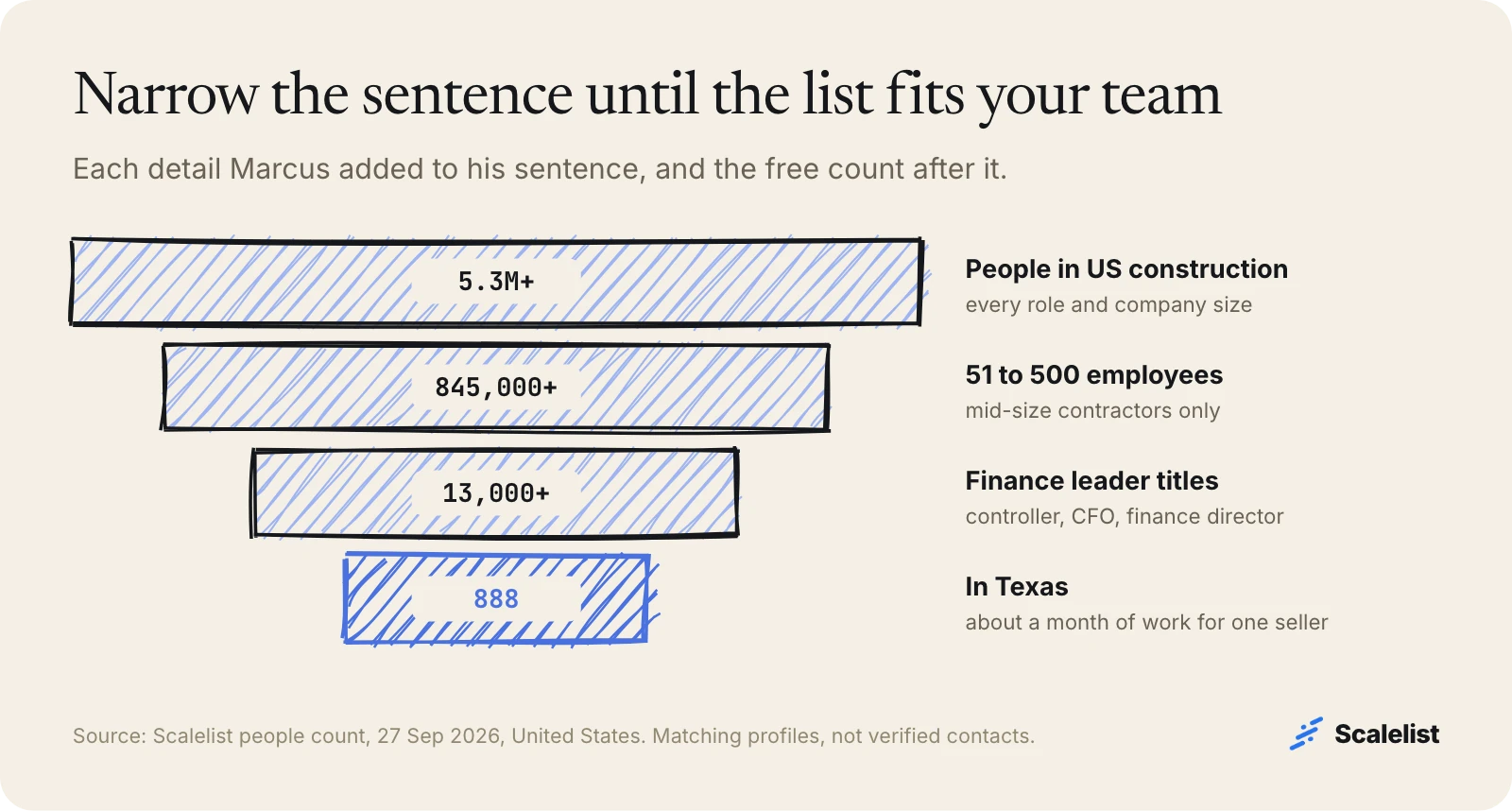
If your count runs into the hundreds of thousands, add a size band, a state or a narrower title. If it is under 100, add title synonyms or neighboring states.
4. Reveal emails for everyone, mobiles for this month’s calls
Pull the people and their emails for the whole list, then reveal mobiles only for the people you will call in the next few weeks. Credits are charged only when something is found: 1 per lead, 1 per email, 20 per mobile, 0 for a miss.
| Marcus’s list | Quantity | Maximum credits |
|---|---|---|
| Leads (people) | 888 | 888 |
| Work emails | 888 | 888 |
| Mobiles for this month’s calls | 250 | 5,000 |
| Total if everything is found | 6,776 |
That fits the Scaler 10K plan: 10,000 credits for 349 USD a month, or about 0.70 USD per mobile found. Misses cost nothing, and unused credits roll over up to twice your monthly credits while you stay subscribed. The other plans are on Scalelist pricing.
Every email is verified before it is returned and labeled Valid or Risky. The email verification statuses decide how you send: Valid from your main domain, Risky from a secondary domain, since only about 20 to 30% of Risky addresses turn out to be deliverable.
5. Export the list or push it where you work
Export a CSV, push selected leads to HubSpot with field mapping, or send them to lemlist, Instantly, Smartlead, Woodpecker or Saleshandy. The setup for each is in sending leads to your sequencer.
Before you push, remove current customers and open deals, so nobody gets a cold email from a company they already pay.
Describe your buyer in one sentence and see how many people match before you spend a credit.
Describe your buyer in one sentenceLead list examples by audience
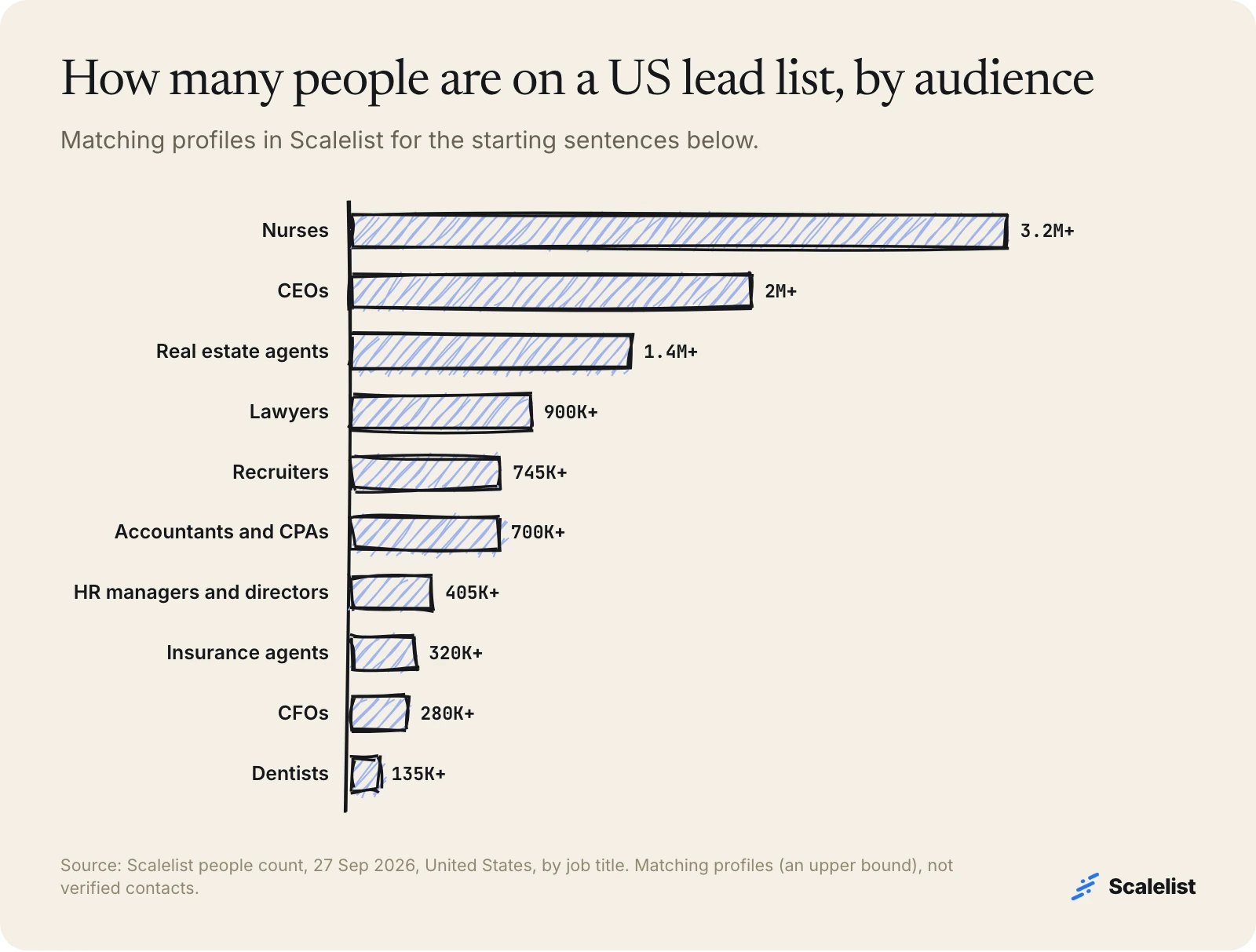
The same five steps work for any audience you can describe in a sentence. Below are starting sentences and US counts for the audiences we cover in depth; each link opens a full guide to that list. Counts are matching profiles in Scalelist on 27 September 2026, not verified contacts, so treat them as upper bounds.
Lead lists by industry or profession
| Lead list | Sentence to start from | US profiles matched |
|---|---|---|
| Healthcare email list | Directors and above at US health care organizations with 51 to 500 employees | over 107,000 |
| Hospital email list | Directors and above at US hospital and health systems with 1,001+ employees | over 300,000 |
| Manufacturing email list | Directors and above at US manufacturers with 51 to 500 employees | over 196,000 |
| Nurses email list | Registered nurses, nurse practitioners and nurse managers in the US | over 3.2 million |
| Lawyers email list | Attorneys, lawyers and counsel in the US | over 900,000 |
| Dentist email list | Dentists, orthodontists and oral surgeons in the US | over 135,000 |
| Accountants and CPAs | Accountants and CPAs in the US | over 700,000 |
| Real estate agents | Real estate agents, realtors and brokers in the US | over 1.4 million |
| Insurance agents | Insurance agents, brokers and producers in the US | over 320,000 |
| Veterinarians | Veterinarians in the US | over 61,000 |
Lead lists by job title
| Lead list | Sentence to start from | US profiles matched |
|---|---|---|
| CFO email list | CFOs at US companies | over 280,000 |
| CEO email list | CEOs at US companies (add a size band) | over 2 million |
| CIO email list | CIOs at US companies | over 46,000 |
| IT decision makers | IT directors, heads of IT, CTOs and CIOs in the US | over 209,000 |
| HR managers and directors | HR managers, HR directors and heads of people in the US | over 405,000 |
| Recruiters | Recruiters and talent acquisition specialists in the US | over 745,000 |
Lead lists by the software a company runs
Lists defined by a tool, such as a CRM or an ERP, start from the companies that run it and then find the people inside them. We cover Salesforce users, NetSuite users, SAP users, HubSpot users and Shopify users.
Tips for lead list building
These five habits separate a lead list that books meetings from one that only fills a spreadsheet.
- One sentence per segment. Controllers at builders and IT directors at hospitals need different messages, so they belong in different lists.
- Mobiles for this month only. A mobile costs 20 credits when found; reveal it when the call is on the calendar, not months before.
- Send by status. Valid first, Risky from a secondary domain, and call the people whose email came back Not found.
- Date the list and rebuild it. About 1 in 5 US wage and salary workers had been with their employer 12 months or less in January 2026, according to the Bureau of Labor Statistics. A list built six months ago already sends some calls to people who have moved on; see how fast B2B data decays.
- Suppress before you send. Remove customers, open deals and anyone who opted out.
For where lists sit among other lead sources, compare the 9 ways to generate B2B leads and where qualified sales leads come from.
Troubleshooting a lead list
Most lead list problems come from the sentence, not the data. Here are the five we see most and the fix for each.
The count is too big to work
Add one detail at a time: a company size band, a state or metro, or a narrower title such as “controller” instead of “finance”. Recheck the count after each change; it is free.
The count is too small
Add title synonyms (“VP of Finance” and “finance director”), widen the size band or add neighboring states. Very niche titles match fewer people than you expect, because people describe the same job in different words.
The chips do not match what you meant
Spell out the parts that were misread: “51 to 500 employees” rather than “mid-size”, “in Texas” rather than “in the South”. Then run the sentence again.
Many emails come back Risky
Risky means the company’s mail server accepts every address, so the mailbox cannot be confirmed. Some companies set up their mail this way, so a share of Risky results is normal. Send those from a secondary domain, and call instead where you have a mobile.
Some people have no mobile
A mobile that is not found costs 0 credits. In our own provider benchmark, Scalelist found a phone number for 87% of a North American list; the regional comparison shows the rate in other regions. Email the rest first.
Build your lead list, or buy one?
Build it. A bought file was compiled before you paid for it, may have been sold to other teams, and rarely includes mobiles. The full comparison is in B2B email lists: build or buy, and the best lead generation tools page compares the software options. For how lists fit into outbound as a whole, start with our sales prospecting guide.
Scalelist, an AI Lead Finder, finds and verifies contact details on demand rather than serving a pre-compiled list, so every lead list you build is current on the day you build it.
Build your first lead list with verified emails and mobiles; new accounts get 20 free credits.
Get 20 credits to test itFAQ
What is a lead list?
A lead list is a list of people who match your ideal customer profile, with their name, job title, company, a verified work email and, for calling, a mobile number. Sales teams use lead lists to run cold calls, email sequences and account research. A good one covers one buyer profile and is built from contact details found recently.
How much does it cost to build a lead list?
With Scalelist, 1 credit per lead found, 1 per email found and 20 per mobile found; a miss costs 0 and sizing the list is free. Example: 888 leads with emails plus 250 mobiles costs at most 6,776 credits, which fits the Scaler 10K plan at 349 USD a month. Plans start at 29 USD for 500 credits.
How many leads should be on a lead list?
As many as your team can contact before the data ages, usually one month of work. Start from capacity: reps times new contacts each rep can work per week, times four. If your count is far above that, narrow the sentence; if it is far below, widen it. Rebuild the list each month instead of building one giant file.
Does Scalelist sell lead lists?
No. Scalelist is software, not a list vendor. You describe the people you want, Scalelist finds and verifies their contact details on demand, and you pay only for what it finds. The list is yours to export as a CSV, push to HubSpot or send to lemlist, Instantly, Smartlead, Woodpecker or Saleshandy.
What is the difference between a lead list and a prospect list?
A lead list holds everyone who fits your profile. A prospect list is the subset you have researched and qualified, usually with a reason to contact each person now. Most teams build the lead list first, then add research and qualification to the accounts they will work this week.
Can I build a lead list outside the United States?
Yes. The same sentence works with any country, state or city. Coverage varies by region: in our published benchmark, Scalelist found an email for 89% and a phone number for 73% of an EMEA list, and 76% and 75% in APAC. Check local rules on calling and email before you reach out.
How often should I update a lead list?
Rebuild it at least once a quarter, and before every new campaign. People change jobs all the time: about 1 in 5 US workers had been with their employer a year or less in January 2026 (BLS). A rebuilt lead list costs credits only for the contacts found, so there is little reason to reuse an old file.
Sources
- US Bureau of Labor Statistics: Employee Tenure in 2026 (news release, PDF)
- US Bureau of Labor Statistics: Employee Tenure summary
- Scalelist people count (POST /api/v1/people/count), queried 27 September 2026, 0 credits.
- Scalelist provider benchmark, September 2026 (/b2b-data-providers-comparison/).


