


Technographic data tells you which software and infrastructure a company runs: its CRM, ecommerce platform, analytics, chat widget, cloud host. Use it to find accounts that run the tool you integrate with, the competitor you replace, or the platform your product needs.
This guide covers how technographic data is collected, what each method misses, five ways sales teams use it, the tools that sell it and what they cost, and how to turn a tech-stack account list into named buyers with direct lines.
What is technographic data?
Technographic data is information about the technology a company uses: the software, platforms and infrastructure in its stack. In B2B sales and marketing, technographics answer a question firmographics cannot: can this company use what you sell, and what would you replace?
A company can match your industry and size perfectly and still be a poor fit because it runs the wrong platform. Technographic segmentation, grouping accounts by the tools they run, fixes that. It sits on top of firmographic data in your ideal customer profile, never instead of it.
How technographic data is collected (and what each method misses)
Technographic data comes from four sources: website scans, job titles and postings, vendor case studies and marketplace listings, and self-reported surveys. Every provider blends them, which is why two vendors disagree on the same account.
| Method | What it sees well | Blind spot |
|---|---|---|
| Website scanning | Tags, scripts and platforms on public sites | Anything that runs behind a login |
| Job titles and postings | Back-office tools people are hired to run | Tools nobody administers full-time |
| Case studies and marketplace listings | Named customers of a vendor | Mostly large, public logos |
| Surveys and self-reported data | What a buyer says they use | Small samples, goes stale |
Website scanning is the method the best-known tools are built on. BuiltWith says it has “data from 491.9 million domains” and tracks “127,644 different web technologies” (BuiltWith plans page). Scale is not the issue; visibility is.
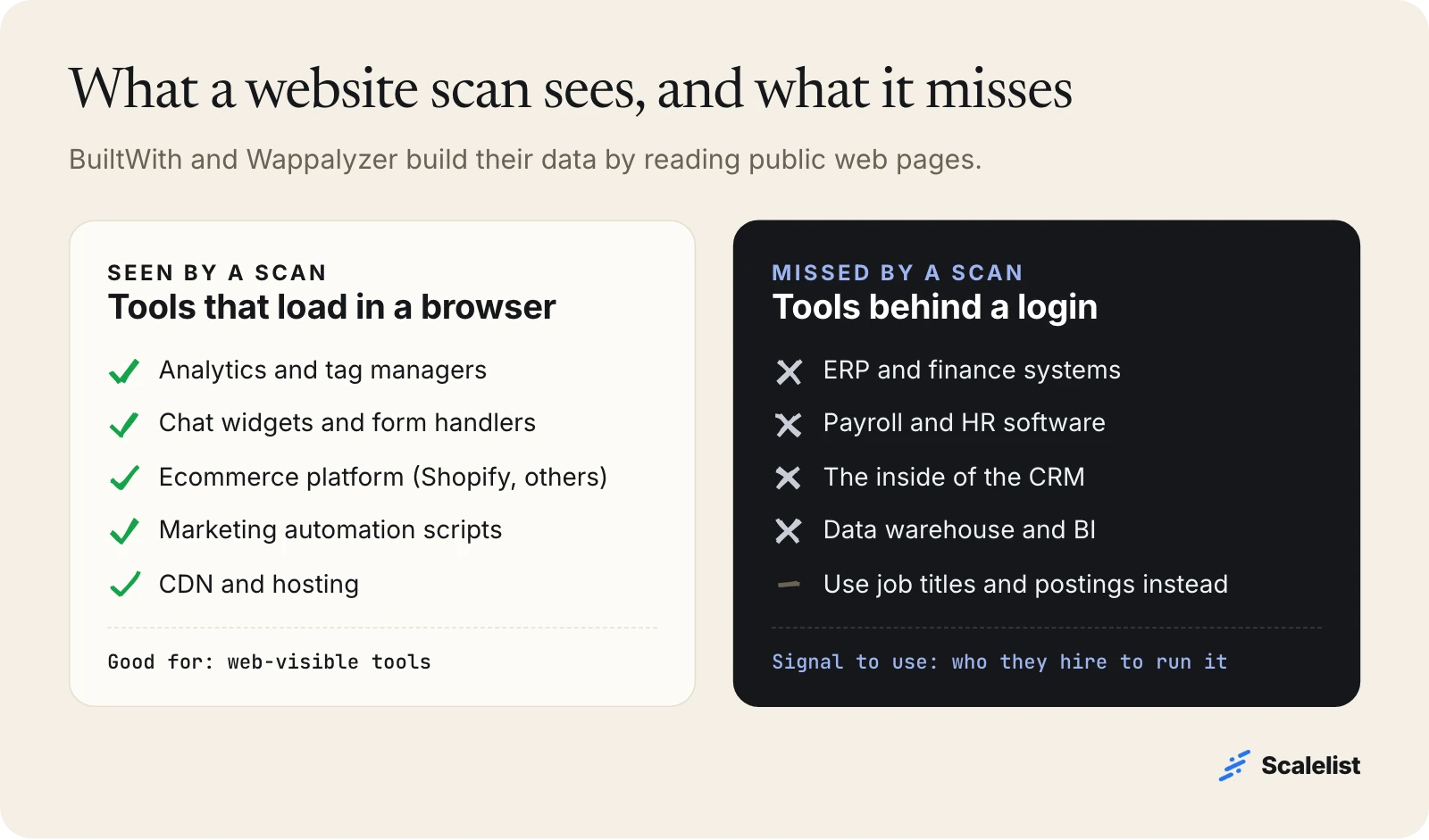
A scan reads what a browser loads: analytics tags, chat widgets, an ecommerce platform, form handlers. It cannot see a company’s ERP, payroll system or the inside of its CRM. For those, job titles and postings are the better signal: a company that employs a NetSuite administrator runs NetSuite.
5 ways to use technographic data in sales
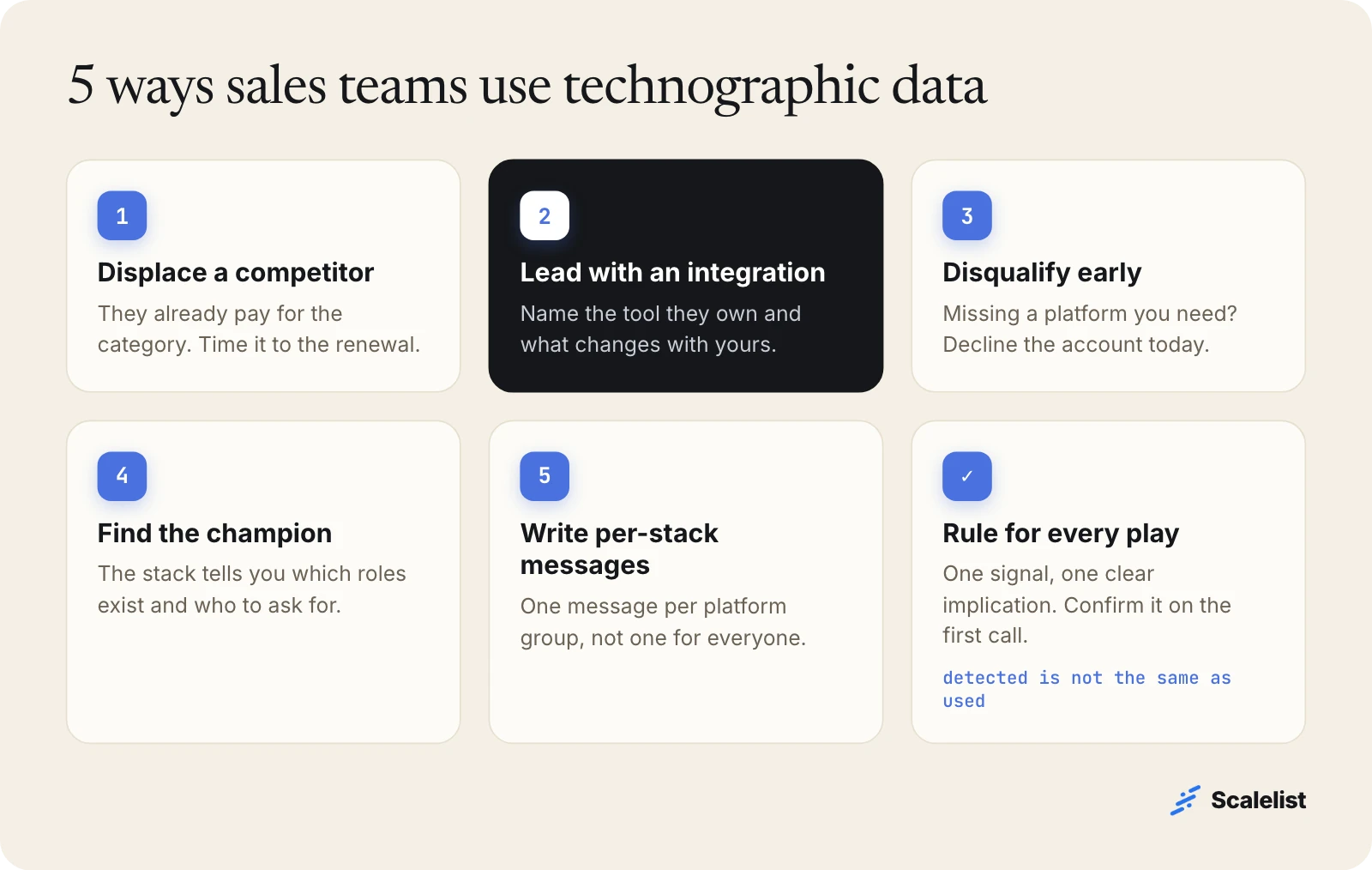
Sales teams use technographic data in five ways: to displace a competitor, to lead with an integration, to disqualify early, to find the champion, and to write stack-specific messages.
1. Displace a competitor
An account that runs a competitor already has budget and a contract with a renewal date. Detection tells you who; the renewal date usually comes from the first conversation. Reaching out a few months before renewal lands while the budget is still open.
2. Lead with an integration
An account that runs a tool you integrate with has lower switching cost and a concrete reason to listen. “You run on Shopify, here is what changes for your returns” beats a generic value proposition because it names something the buyer already owns.
3. Disqualify early
If your product needs a data warehouse and the account has none, that is a long cycle you can decline today. Removing poor-fit accounts before a rep touches them saves more time than any personalization.
4. Find the champion
The tools a company runs tell you which roles exist. A Salesforce stack implies a Salesforce administrator or a revenue operations team; a Shopify store implies someone who owns ecommerce. That tells you which title to ask for.
5. Write stack-specific messages
Group accounts by platform and write one message per group. If your email still works with the technographic detail removed, the detail is not doing any work.
Job titles: the technographic signal you can search by name
Some tools need a person to run them, and those people put the tool in their job title. A title such as “Salesforce Administrator” or “NetSuite Administrator” is strong evidence that the company runs that platform, including back-office tools a website scan never sees.
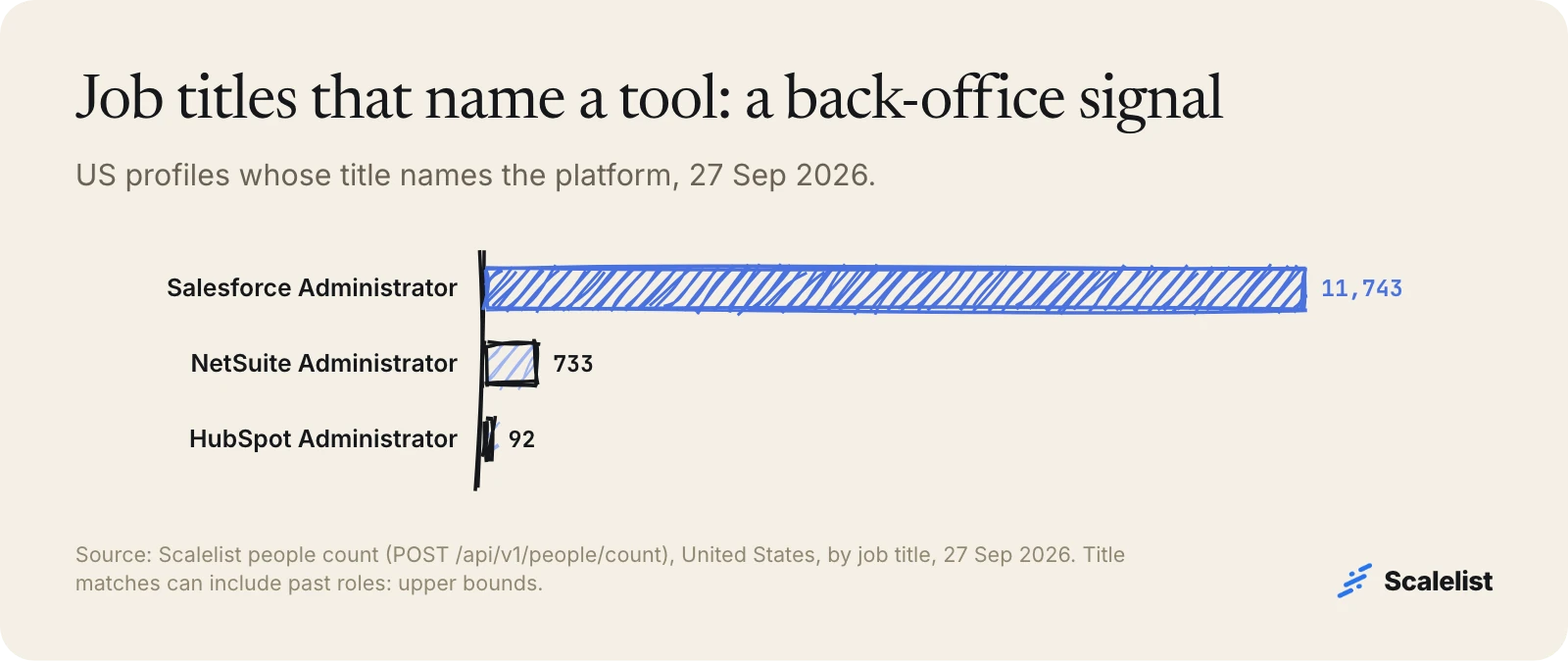
The signal is strong but uneven. On 27 September 2026, Scalelist matched 11,743 US profiles with a Salesforce Administrator title, 733 with NetSuite Administrator and only 92 with HubSpot Administrator. Platforms that need a full-time admin show up; tools run part-time by a marketer do not. Treat these counts as upper bounds, since a title can belong to a past role.
Example: two ways to build a technographic prospect list
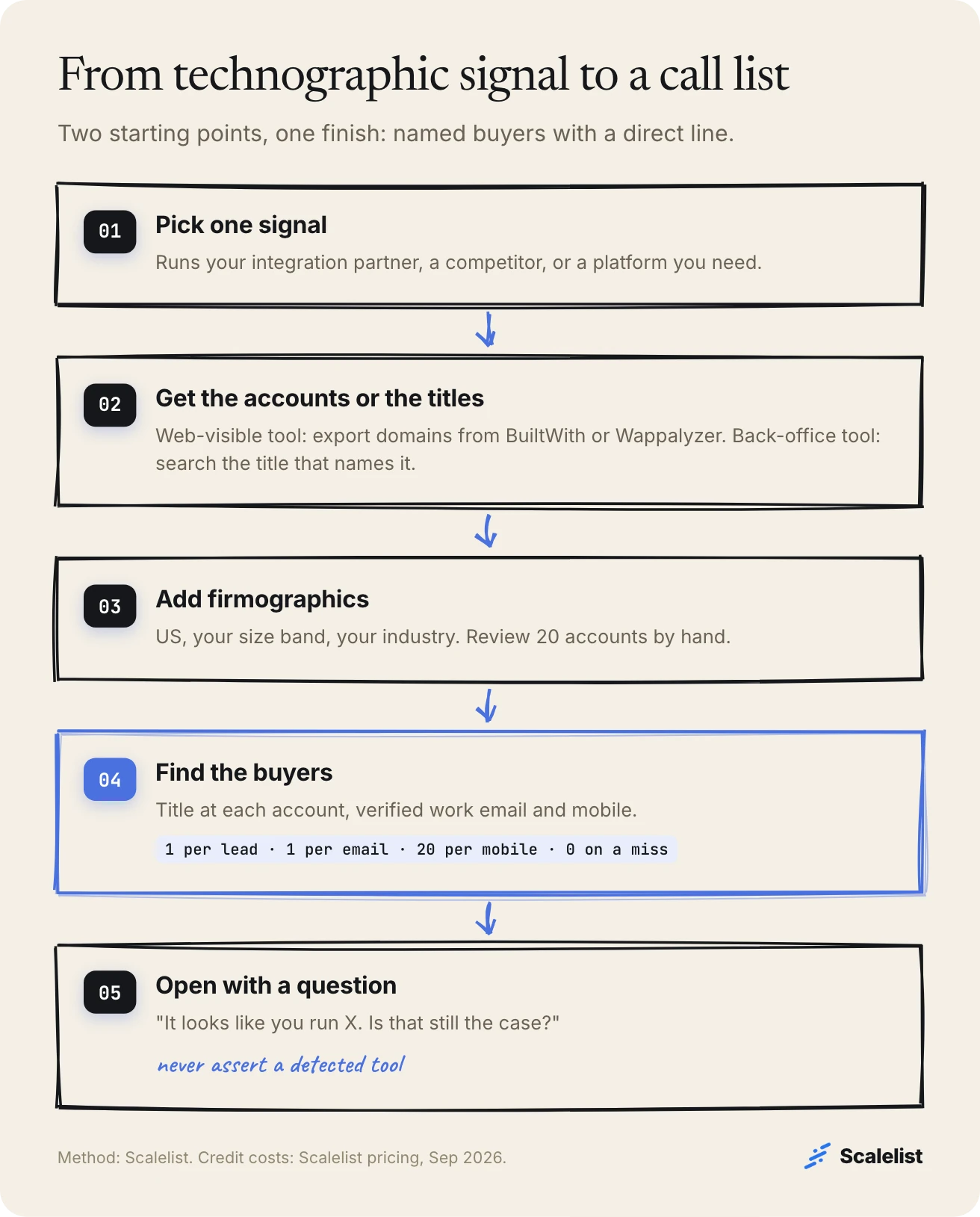
There are two routes to a technographic list: start from accounts detected by a scan, or start from people whose title names the tool. Both end the same way, with named buyers and a direct line.
Route 1: account-first, for web-visible tools
Harbor Returns, a fictional returns app in Portland, Oregon, sells to Shopify stores. Shopify is visible to a website scan, so the account list comes from a technographic tool:
- Export the domains running Shopify from BuiltWith or Wappalyzer.
- Narrow the list to US companies in your size band (check which firmographic fields your export carries) and review 20 accounts by hand.
- Find the buyer at each domain, for example the head of ecommerce. Scalelist’s people search API accepts company domains as a search parameter, or you can ask for the buyers at each domain through the Scalelist MCP server in Claude.
- Reveal verified work emails and mobile numbers only for the people you keep. Our Shopify users email list guide covers this segment in more detail.
Route 2: person-first, for back-office tools
Pinecrest Reports, also fictional, sells a Salesforce reporting add-on. Salesforce CRM runs behind a login, so a scan is weak. The title is the signal: “Salesforce administrators at US companies with 200 to 1,000 employees” matched 2,508 people in Scalelist on 27 September 2026, before any credit was spent. See our Salesforce users email list guide for this segment in depth.
Open with a question, not an assertion
Detection can be wrong, so the first line should survive being wrong. This opener asks instead of telling:
(If yes) We help Shopify brands your size handle returns without the back-and-forth emails. Is returns something you own, or should I talk to someone else?
For more lines that earn the first 30 seconds, see our cold call opening lines.
Technographic data providers and what they cost
Technographic data providers sell account lists by technology; very few sell the buyers’ direct lines. Here is what the main options publish, as of September 2026.
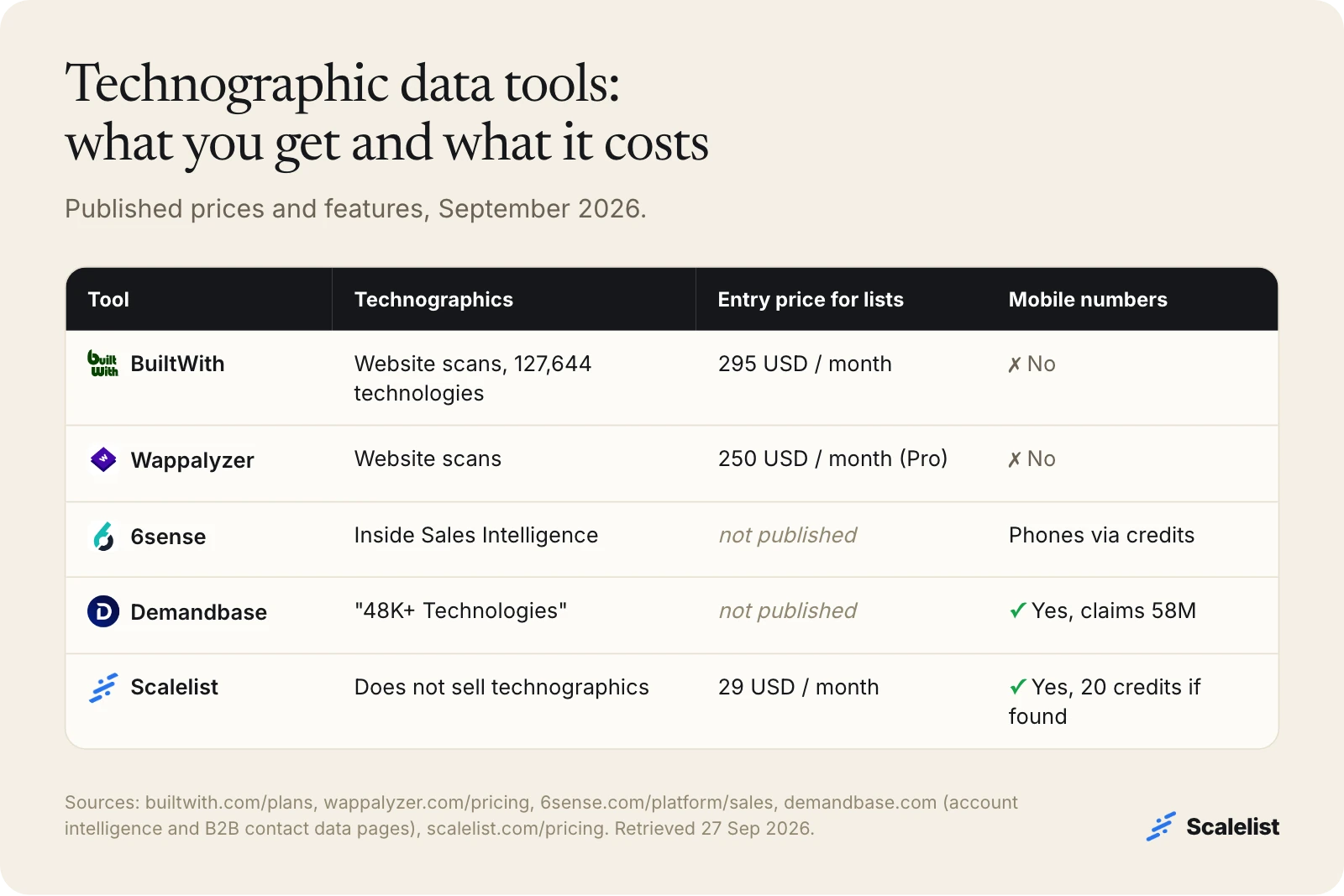
| Tool | Technographic data | Entry price for lists | Contacts included |
|---|---|---|---|
| BuiltWith | Website scans, 127,644 technologies | 295 USD a month (Basic, 2 technology reports a month) | People publicly listed with businesses; no mobiles |
| Wappalyzer | Website scans | 250 USD a month (Pro, 2 technology targets); 10 USD Plus is lookups only | Website-level emails and phones; no mobiles |
| 6sense | Technographics inside Sales Intelligence | Not published (quote only) | Emails and phone numbers through data credits |
| Demandbase | “48K+ Technologies” in account intelligence | Not published (quote only) | Contacts; claims “58M Mobile Numbers” |
| Scalelist | Does not sell technographics | 29 USD a month (500 credits) | Verified work emails and mobiles, charged only if found |
Wappalyzer also has a free account with 50 technology lookups a month, useful for checking a few accounts by hand. Prices come from each vendor’s own pricing page. If you also want to know which accounts are researching your category right now, that is a different data type: see B2B intent data.
Common technographic data problems (and the fix)
Technographic data fails in predictable ways. Knowing them keeps your reps from opening a call with a wrong fact.
A tag is not a user
A script on a website proves the script is there, not that anyone uses the tool. Trial code, abandoned pilots and old tags all look like customers. Fix: use detection to prioritize, and confirm on the first call.
Back-office tools are invisible
ERP, payroll, HR and CRM internals rarely leave a trace on a public page. Fix: use job titles and postings for these tools; companies that are hiring often name their stack in the posting.
One company, many domains
A subsidiary or a regional site can run a different stack from the parent. Fix: match on the domain the buyer actually works for, and treat group-level results with care.
Accounts without people
Every tech-stack tool above returns companies first. A list of 800 Shopify domains still has no names or phone numbers on it. Fix: add the person layer before you plan outreach.
Best practices for technographic targeting
Good technographic targeting uses one signal with one clear implication, checked by hand and paired with firmographics.
- Pick one signal. “Runs a competitor” or “runs our integration partner” beats a list of 40 detected tools.
- Size the segment first. If a signal matches 40 accounts, it is a manual play, not a campaign.
- Pair it with fit. Technographics without size and industry return tiny sites and huge enterprises in the same list. Start from the traits your best customers share; see how to find lookalike companies.
- Measure against a control. Send the same offer to a matched group without the signal, or you will never know if the technographic layer paid for itself.
What to look for in a technographic data tool
A useful technographic data tool is honest about how it detects and clear about what it costs. Look for:
- The detection method for each technology (scan, job data, self-reported) and the date it was last seen.
- Coverage of the specific tools you care about, tested on 20 accounts whose stack you already know.
- Export by technology with firmographic fields attached.
- A clear path from account to person: titles, verified work emails and mobile numbers, from the same tool or one that connects to it.
How Scalelist helps with technographic targeting
Scalelist, an AI Lead Finder, does not detect technology or sell technographic data. It finds the people at the accounts your technographic source gives you, with verified work emails and mobile numbers.
It helps in two places. For back-office tools, you describe the title that names the tool, and Scalelist’s Lead Finder shows what it understood and how many people match before you spend a credit. For web-visible tools, you bring the domain list from BuiltWith or Wappalyzer and find the buyers at those companies.
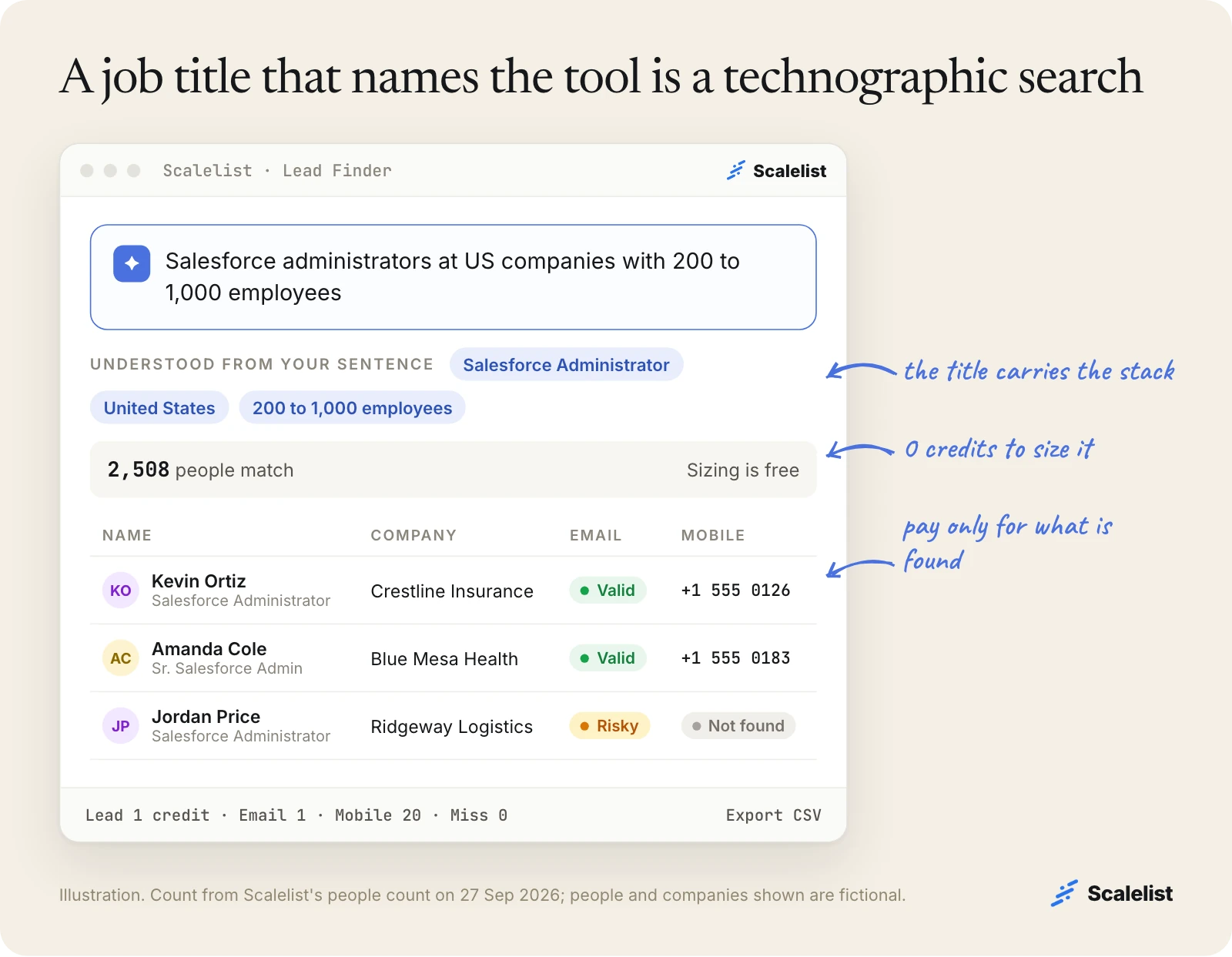
Credits are charged only when something is found: 1 per lead, 1 per email and 20 per mobile number; a miss costs 0 (plans start at 29 USD a month, see Scalelist pricing). Every email is verified before it is returned and labeled Valid or Risky. Scalelist finds and verifies contact details on demand rather than serving a pre-compiled list.
Describe the people who run the tool you sell into and see how many match before you spend a credit.
Describe your buyer in one sentenceFAQ
What is technographic data?
Technographic data describes the technology a company uses: its CRM, ecommerce platform, analytics, marketing automation, cloud hosting and other software. Sales and marketing teams use technographic data to find accounts that run a tool they integrate with or replace, to disqualify poor fits early and to write messages about the buyer’s actual stack.
How is technographic data different from firmographic data?
Firmographics describe what a company is: industry, size, location and revenue. Technographics describe what it runs. Firmographics tell you whether a company could buy; technographics tell you whether it can use your product and what it would replace. Most teams define accounts with firmographics first, then narrow with one technographic signal.
How accurate is technographic data?
It depends on the tool and the method, and most providers do not publish an accuracy rate. Website scans are good at front-end tools but cannot see back-office systems, and a detected tag does not prove active use. Test any provider on 20 companies whose stack you already know before you buy.
Where does technographic data come from?
Mostly from scanning public websites for scripts, tags and platforms. BuiltWith, for example, reports data from 491.9 million domains. Other sources are job titles and postings, vendor case studies and marketplace listings, and surveys. Each source sees different tools, so providers that blend several usually cover more.
How much does technographic data cost?
Entry prices published in September 2026: BuiltWith starts at 295 USD a month, Wappalyzer at 10 USD a month for individual lookups and 250 USD a month for lead lists, with a free account of 50 lookups a month. 6sense and Demandbase include technographics in custom-quoted platforms and do not publish prices.
Does technographic data include contact details?
Usually not at the person level. BuiltWith exports people publicly listed on company websites and Wappalyzer returns website-level emails and phone numbers; neither sells mobile numbers. To reach the buyer, pair the account list with a tool that finds verified work emails and mobiles for named people.
Can Scalelist find companies by the tools they use?
Not directly. Scalelist does not sell technographic data. It can find people whose job title names a tool, such as Salesforce administrators, and it can find the buyers at a list of domains you export from a technographic tool, with verified work emails and mobile numbers charged only when found.
Sources
- BuiltWith: plans and pricing
- BuiltWith: FAQ
- BuiltWith: exportable fields
- Wappalyzer: pricing
- 6sense: Sales Intelligence
- Demandbase: account intelligence
- Demandbase: B2B contact data
- Scalelist people count (POST /api/v1/people/count), queried 27 September 2026, 0 credits.


