The best CRM for cold calling is the one where your reps can dial, log the outcome and hear the recording without leaving the contact record. In 2026 that points to Close or Freshsales for teams that want calling inside the CRM, and to HubSpot for teams already on it. Salesforce, Pipedrive, Zoho CRM and Attio work well too, once you connect a dialer.
Below, the seven CRMs are judged on what a calling team actually uses every day: the dialer, click-to-call, call logging and recordings, call outcomes, call queues, local numbers, reporting on dials and meetings, and how easily you get phone-ready contacts in. Prices come from each vendor’s pricing page.
The 7 best CRMs for cold calling at a glance
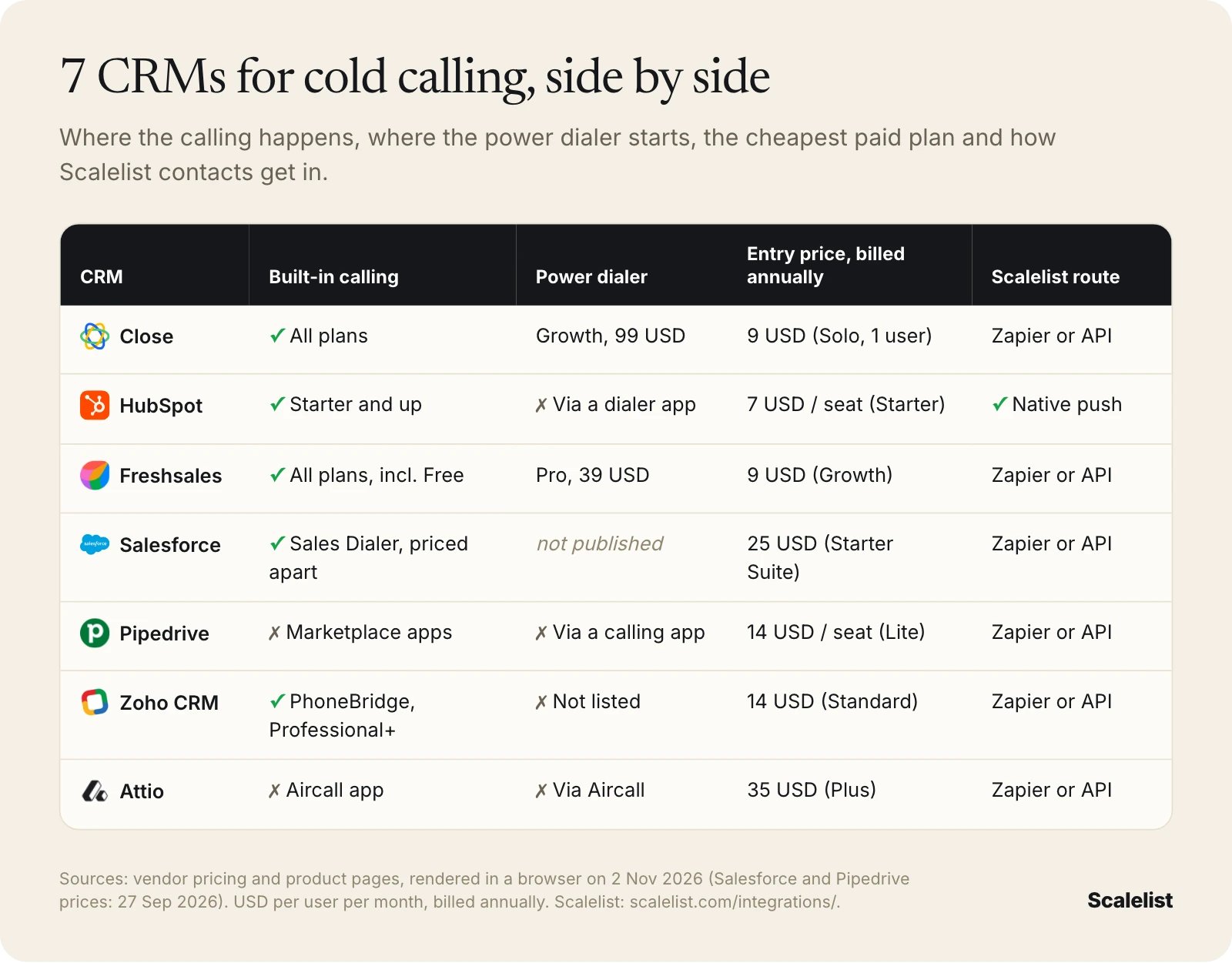
Here are the seven CRMs with identical fields. Entry price is the cheapest paid plan, billed annually, in USD per user per month.
| CRM | Built-in calling | Power dialer | Entry price, billed annually | How Scalelist contacts get in |
|---|---|---|---|---|
| Close | All plans | From Growth (99 USD) | 9 USD (Solo, 1 user) | Zapier, API or CSV |
| HubSpot | Sales Hub Starter and up | Not built in | 7 USD per seat (Starter) | Native push |
| Freshsales | All plans, including Free | From Pro (39 USD) | 9 USD (Growth) | Zapier, API or CSV |
| Salesforce Sales Cloud | Sales Dialer, priced separately | Not published | 25 USD (Starter Suite) | Zapier, API or CSV |
| Pipedrive | No, marketplace apps | Through a calling app | 14 USD per seat (Lite) | Zapier, API or CSV |
| Zoho CRM | PhoneBridge, Professional and up | Not listed | 14 USD (Standard) | Zapier, API or CSV |
| Attio | No, Aircall app | Through Aircall | 35 USD (Plus) | Zapier, API or CSV |
What is the best CRM for cold calling?
The best CRM for cold calling is Close for a small or mid-sized outbound team that wants calling, a power dialer and call outcomes in one tool. Freshsales is the cheaper option with the same shape: a built-in phone on every plan and a power dialer from Pro.
If your company already runs on HubSpot, stay there: Sales Hub Starter adds calling, recordings, required outcomes and task queues, and you can connect a dialer later. Salesforce, Pipedrive, Zoho CRM and Attio are good systems of record for a calling team, but each one needs a separate phone tool, which our cold calling software comparison covers dialer by dialer.
How we picked these CRMs for cold calling
We picked CRMs that B2B sales teams use for phone outreach and judged them only on what changes a calling day. A good pipeline view does not help a rep who has to copy numbers into a softphone.
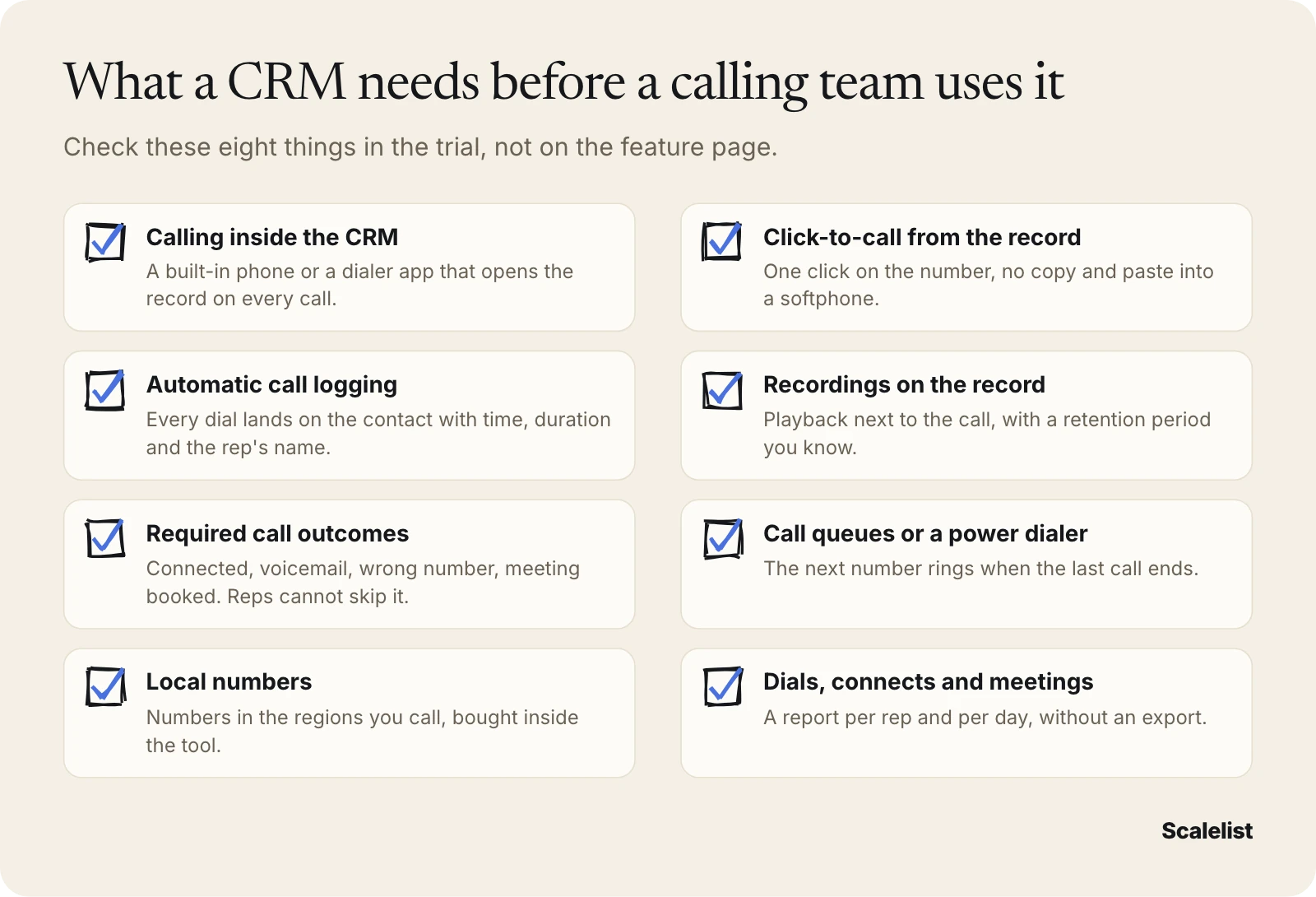
- Calling inside the CRM. A built-in phone, or a native dialer integration that opens the record on every call.
- Click-to-call. One click on the number from the record or a list.
- Logging and recordings. Every dial saved on the contact automatically, with the recording next to it and a known retention period.
- Call outcomes. Custom outcomes (connected, voicemail, wrong number, meeting booked) that reps must fill in.
- Queues and dialing. Task queues, call lists or a power dialer, so the next number rings when the last call ends. Our power dialer comparison explains the dialing modes.
- Local numbers. Numbers in the regions you call, bought in the tool. Our guide to local presence and branded caller ID covers when it helps.
- Reporting. Dials, connects and meetings per rep, per day, inside the CRM.
- Getting contacts in. How a list of phone-ready contacts reaches the CRM: a native push, Zapier, an API or a CSV import.
Facts come from each vendor’s pricing page, plan comparison and help center, read in a browser on 2 November 2026 (Salesforce and Pipedrive prices on 27 September 2026). When a vendor does not publish something, we write “not published”.
The numbers a CRM has to report
A calling team is managed on three numbers: dials, connects and meetings booked. If the CRM cannot show them per rep and per week without an export, you will coach by feel.
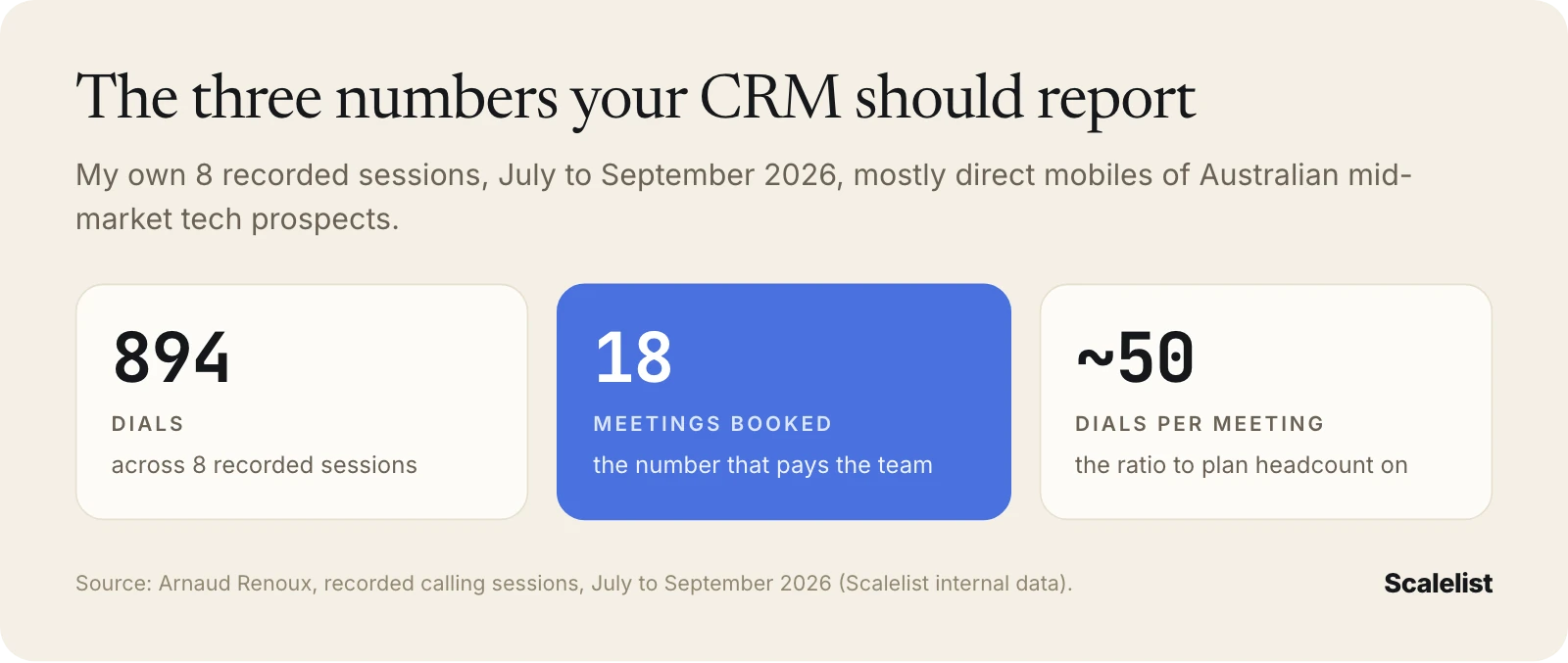
Across 894 dials in my own 8 recorded sessions from July to September 2026, 18 meetings were booked, about one meeting per 50 dials. Most of those sessions called the direct mobiles of Australian mid-market tech prospects; the one US session connected at 10% with no meetings. Our connect rate benchmarks by number type show what to expect from your own list.
CRMs with calling built in
These three CRMs let a rep dial from the record without buying a separate phone system.
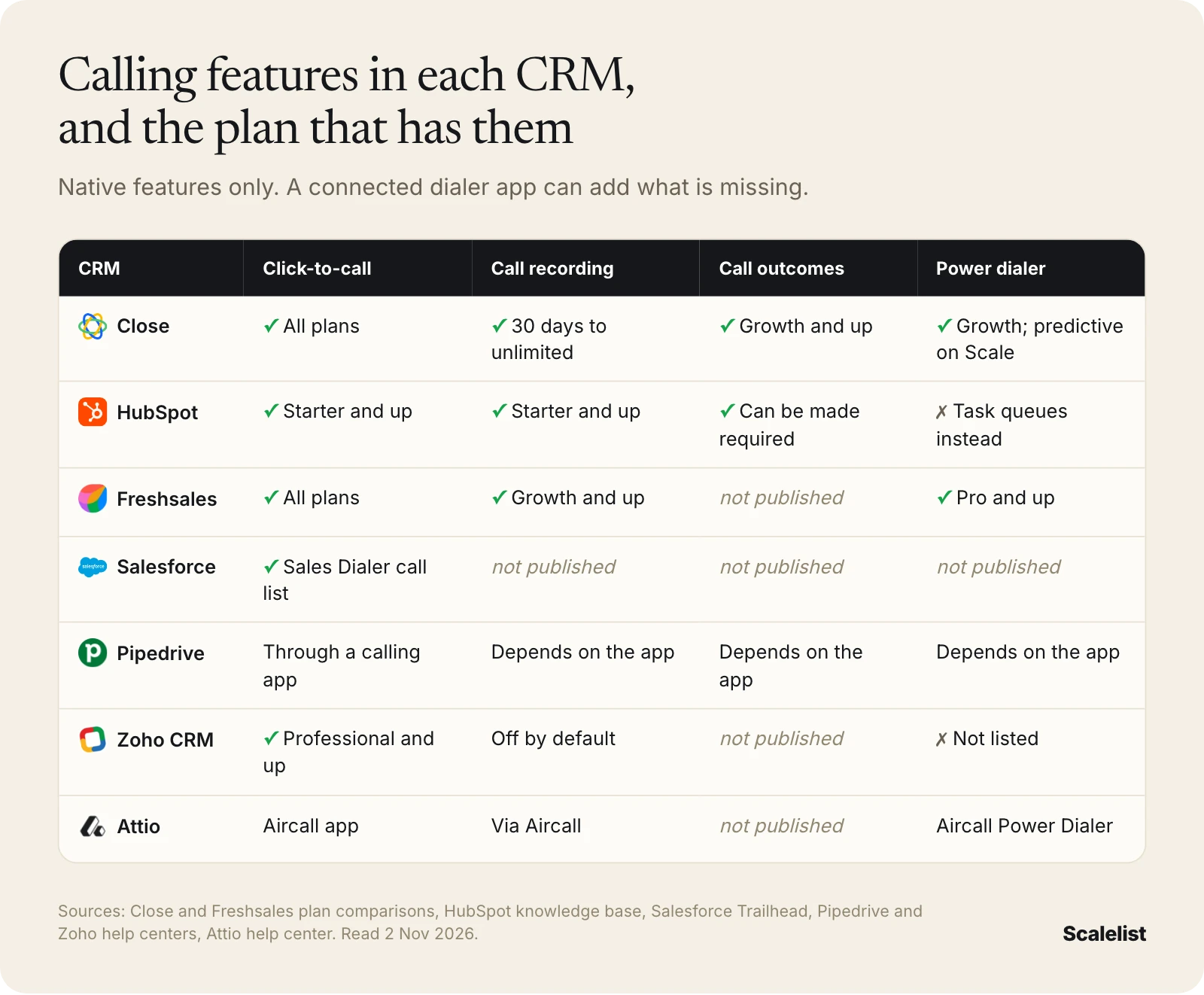
1. Close
What it is: A sales CRM built around calling, email and SMS, with workflows and an AI sales agent called Chloe, for small and mid-sized sales teams.
Calling inside the CRM: Built-in calling on every plan, with numbers you rent or bring, “outbound calls to nearly 200 countries” and international numbers “for local presence in different regions”. The power dialer starts on Growth; Scale adds a predictive dialer that “calls multiple leads at once”.
Logging, recordings and outcomes: “All calls are automatically logged under the relevant contact.” Recordings are kept 30 days on Solo and Essentials, 90 days on Growth and without limit on Scale. Customizable call outcomes and voicemail drop start on Growth.
Call lists and reporting: A centralized inbox and task list on Essentials. Reporting compares team activity on “calls, emails, and opportunities with leaderboard and call graph”.
Entry price: Solo is 9 USD per user a month billed annually, or 19 USD monthly, for 1 user and up to 10,000 leads. Essentials is 35 USD (49 USD monthly), Growth 99 USD (109 USD) and Scale 139 USD (149 USD). Calling usage is extra: “Most outbound calls are around $0.02/minute; phone numbers start at about $1/month” (Close pricing, 2 Nov 2026).
Getting phone-ready contacts in: No native Scalelist connector. Use the Scalelist Zapier app, the REST API, or a CSV import.
Best for: Small and mid-sized outbound teams that want the dialer, outcomes and recordings in the same tool as the pipeline.
Where it falls short: The features a calling team needs most (power dialer, required outcomes, voicemail drop) sit on Growth, not on the cheaper plans. Thirty-day recording retention on Solo and Essentials is short for coaching.
2. HubSpot Sales Hub
What it is: The sales layer of HubSpot’s customer platform, with calling, sequences, forecasting and AI agents, from a free CRM up to Enterprise.
Calling inside the CRM: Calling starts on Sales Hub Starter: 500 calling minutes on Starter, 3,000 on Professional and 12,000 on Enterprise, with 1, 3 and 5 HubSpot-provided numbers. The pricing page does not say whether minutes are per seat or per account, and the free CRM has no calling.
Reps call from the browser, their own phone or the HubSpot app; a call through their own phone uses twice the minutes. Local presence is not published, and there is no native power dialer.
Logging, recordings and outcomes: Recording is a setting that HubSpot turns on by default for new accounts. Admins can make a call outcome required for outbound calls placed from the browser. Transcription needs a Sales seat, with 750 hours per account a month on Professional.
Call lists and reporting: Task queues from Starter let reps work through calling tasks back to back; adding tasks to a queue automatically needs Professional. The Call Analytics page (Starter and up) includes “Calls placed totals by rep”, “Calls outcome totals by rep” and “Calls made vs. goal”.
Entry price: Sales Hub Starter starts at 7 USD per seat a month billed annually, or 10 USD monthly, with a 20 USD list price shown struck through. Professional starts at 90 USD a seat annually (100 USD monthly) plus a one-time 1,500 USD onboarding fee (HubSpot pricing, 2 Nov 2026).
Getting phone-ready contacts in: HubSpot is Scalelist’s only native CRM integration. You select leads, map fields and push them to HubSpot (see Scalelist’s HubSpot integration). HubSpot’s own data enrichment does not add contact phone numbers.
Best for: Teams already on HubSpot that want calling, outcomes and reports in the same records as marketing and deals.
Where it falls short: No power dialer, so high-volume callers add a dialer app. Calling minutes are capped by plan, and sequences and transcription need Professional.
3. Freshsales
What it is: Freshworks’ sales CRM with a built-in phone, email, chat and sales sequences, sold in Free, Growth, Pro and Enterprise plans.
Calling inside the CRM: The built-in phone and buying local and toll-free numbers are checked on every plan, including Free. The Power Dialer, warm transfer, advanced call queues and bring-your-own-carrier start on Pro.
Logging, recordings and outcomes: Call recording, voicemail drop and basic call queues start on Growth. Custom call outcomes are not published on the plan comparison.
Call lists and reporting: Basic call queues on Growth, advanced queues on Pro, and a sales dashboard from Growth. Call-specific reports are not published on the pages reviewed.
Entry price: Growth is 9 USD per user a month billed annually, or 11 USD monthly. Pro is 39 USD (47 USD monthly) and Enterprise 59 USD (71 USD). The Free plan covers up to 3 users (Freshsales pricing, 2 Nov 2026). Per-minute call rates are not published.
Getting phone-ready contacts in: No native Scalelist connector. Use Zapier, the REST API, or a CSV import.
Best for: Small teams on a tight budget that want a phone inside the CRM from day one and a power dialer for under 50 USD a seat.
Where it falls short: Recording and voicemail drop are not on Free, the power dialer needs Pro, and call reporting detail is not published.
CRMs that call through a dialer or add-on
These four CRMs are strong records for a calling team, but the phone lives in a separate product.
4. Salesforce Sales Cloud
What it is: Salesforce’s sales CRM, sold as small-business suites (Free, Starter, Pro) and larger editions (Core, Advanced, Max) for teams from two users to enterprise.
Calling inside the CRM: Salesforce sells Sales Dialer, which adds a call list in the call panel, local presence (“automatically reserves a list of local numbers for your company”) and one-click voicemail drop, according to Salesforce Trailhead. Its price and which editions include it are not published on the pages we could load. Most third-party dialers also connect to Salesforce.
Logging, recordings and outcomes: Managers can listen in on live Sales Dialer calls, and calls logged by hand are saved as tasks you can report on. Recording and call outcomes are not published on the pages reviewed.
Call lists and reporting: Reps add leads, contacts or accounts to the call list and click Call Next. Managers can run reports on “the call history for different users”.
Entry price: Starter Suite is 25 USD per user a month, billed monthly or annually. Pro Suite is 100 USD per user a month, billed annually with a contract. A Free Suite covers 2 users (Salesforce pricing, 27 Sep 2026).
Getting phone-ready contacts in: No native Scalelist connector. Use Zapier, the REST API, or a CSV import.
Best for: Companies already on Salesforce, or ones that need deep customization and are ready for annual contracts.
Where it falls short: Calling is an extra product with no public price on the pages we could load, and most editions above Starter are billed annually.
5. Pipedrive
What it is: A pipeline-focused sales CRM for small and mid-sized teams, sold per seat in Lite, Growth, Premium and Ultimate plans.
Calling inside the CRM: “Pipedrive doesn’t have a built-in calling integration.” You pick a default calling app from the Marketplace, such as CloudTalk, Kixie, CallHippo, Aircall, Toky, JustCall or Circleloop. The mobile app can place calls on your own phone plan and log them.
Logging, recordings and outcomes: Calls are logged as activities. Recording, outcomes, local numbers and dialing modes depend on the calling app you connect.
Call lists and reporting: The Insights “activities performance” report can be broken down by activity type, which gives you calls per rep and per period.
Entry price: Lite is 14 USD per seat a month billed annually, or 24 USD monthly. Ultimate is 79 USD (99 USD monthly) and includes “Save 20% on PandaDoc and CloudTalk subscriptions” (Pipedrive pricing, 27 Sep 2026).
Getting phone-ready contacts in: No native Scalelist connector; use Zapier, the REST API, or a CSV import. Pipedrive’s own phone enrichment is on Ultimate (or Premium with a paid add-on): Ultimate includes 500 credits a month at 5 credits per phone lookup, so up to 100 phone lookups a month.
Best for: Small teams that like Pipedrive’s pipeline and already pay for a calling app.
Where it falls short: Every calling feature depends on a second subscription, and the built-in phone lookups stop at about 100 a month.
6. Zoho CRM
What it is: A highly customizable CRM sold in Standard, Professional, Enterprise and Ultimate editions, with a free edition for up to 3 users.
Calling inside the CRM: Calling runs through Zoho PhoneBridge, which “is available only in the Enterprise, Professional Editions of Zoho CRM and above”. Zoho says it supports “130+ telephony systems”, with click-to-call through providers such as RingCentral and Twilio. No native power dialer is listed.
Logging, recordings and outcomes: Zoho’s telephony page says you can “automatically log calls under the relevant records”. “Calls are not recorded in Zoho CRM by default”: you switch recording on in the telephony provider, which may charge for it. Call outcomes are not published.
Call lists and reporting: Cadences from Standard can include call follow-ups. Professional and above get unlimited custom reports. Imports take 20,000 records per batch on Standard and 50,000 on Professional.
Entry price: Standard is 14 USD per user a month billed annually, and Professional, the first edition with PhoneBridge, is 23 USD (Zoho CRM pricing, 2 Nov 2026). Local taxes are added.
Getting phone-ready contacts in: No native Scalelist connector. Use Zapier, the REST API, or a CSV import.
Best for: Cost-conscious teams that want a deeply customizable CRM and already run a phone system Zoho supports.
Where it falls short: Calling needs Professional plus a telephony provider, recording is off by default, and Zoho’s FAQ says “you can’t transfer a call”.
7. Attio
What it is: A flexible, data-model-driven CRM with workflows, email sequences and AI, aimed at startups and scaling revenue teams.
Calling inside the CRM: No built-in calling. The Aircall app (all Attio plans) lets you add people to an Aircall dialer campaign and work it in Aircall’s Power Dialer. You need Aircall’s desktop app open to call.
Logging, recordings and outcomes: After each successful Aircall call, Attio adds a note to the person’s record with the rep, time, call length and whether it was answered. The record must already exist with the right phone number, or the call does not sync. Logging phone calls on records starts on Plus.
Call lists and reporting: Lists in Attio feed Aircall dialer campaigns. Call-specific reports are not published; advanced reporting starts on Pro.
Entry price: Plus is 35 USD per user a month billed annually, or 44 USD monthly, for up to 10 seats. Pro is 79 USD (99 USD monthly). A free plan covers up to 3 seats (Attio pricing, 2 Nov 2026).
Getting phone-ready contacts in: No native Scalelist connector. Use Zapier, the REST API, or a CSV import. Attio’s own enrichment does not add phone numbers.
Best for: Startups that want a modern, flexible CRM and are happy to run calls in Aircall.
Where it falls short: Two products to pay for, and call notes sync only for people who already exist in Attio with the correct number.
Where the phone numbers come from
None of the seven is built to be your source of direct mobiles, so the list comes from a separate contact data tool. Pipedrive’s capped phone lookups are the only built-in option published.
Scalelist: the mobiles for whichever CRM you pick
Scalelist, an AI lead finder, is where you get the mobile number, not just the email. It is not a CRM and not a dialer. It finds the people you want to call, with direct mobiles and verified work emails, and sends them to the CRM you chose above.
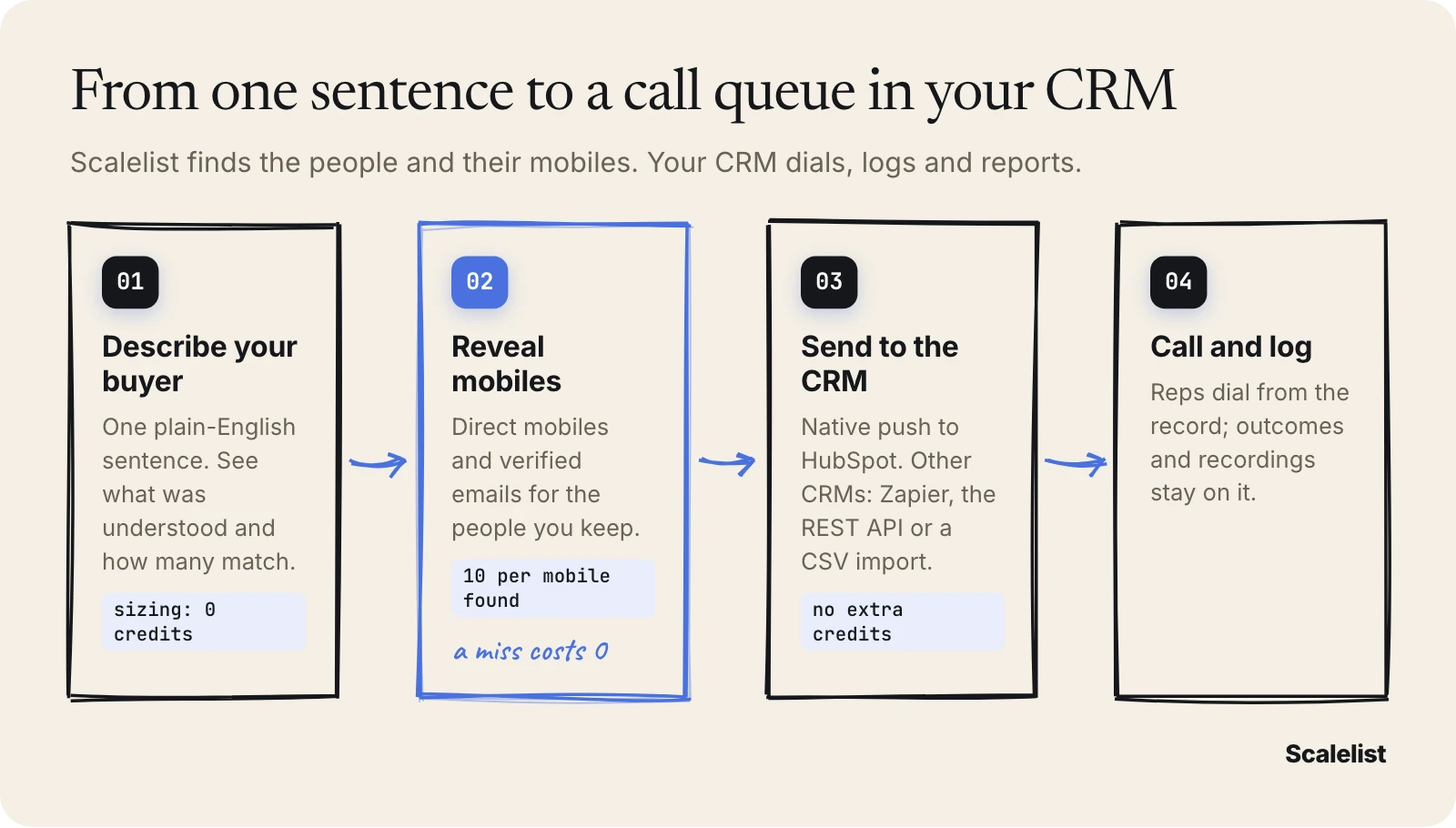
- Describe your buyer in one sentence, for example “Heads of Operations at US manufacturers with 200 to 1,000 employees”. The Lead Finder shows what it understood and how many people match before you spend a credit.
- Reveal mobiles and emails. 10 credits per mobile found, 1 per lead or email found, nothing when nothing is found. Every email is verified before it is returned and labelled Valid or Risky.
- Send them to the CRM. HubSpot gets a native push with field mapping. Salesforce, Pipedrive, Close, Zoho CRM, Freshsales and Attio get the same contacts through the Scalelist Zapier app (Email Finder and Mobile Finder actions), the REST API, or a CSV import. Every route is on the Scalelist integrations page.
- Call from the record. Your CRM or dialer places the call and keeps the outcome and recording on the contact.
Say you keep 200 leads, Scalelist finds mobiles for 150 of them and emails for 180. That is 200 + 1,500 + 180 = 1,880 credits, inside the Scaler 2K plan (89 USD a month for 2,000 credits), where a mobile found costs about 0.45 USD. The 50 mobiles it misses cost nothing.
Already have names and companies in your CRM? The Mobile Finder adds mobiles to a CSV at the same 10 credits per mobile found. In our provider benchmark, Scalelist found a phone number for 87% of a North American test list.
Scalelist is not the right buy if you want the numbers inside the dialer contract, or if you need a tool that dials, records or logs calls: it does none of that.
Describe the people your reps should call in one sentence, see how many match at no cost, then pay 10 credits only for each mobile found.
Get 100 credits to test itHow to choose a CRM for cold calling
Choose where your reps will dial first, then pick the CRM. That one decision narrows seven options to two or three.
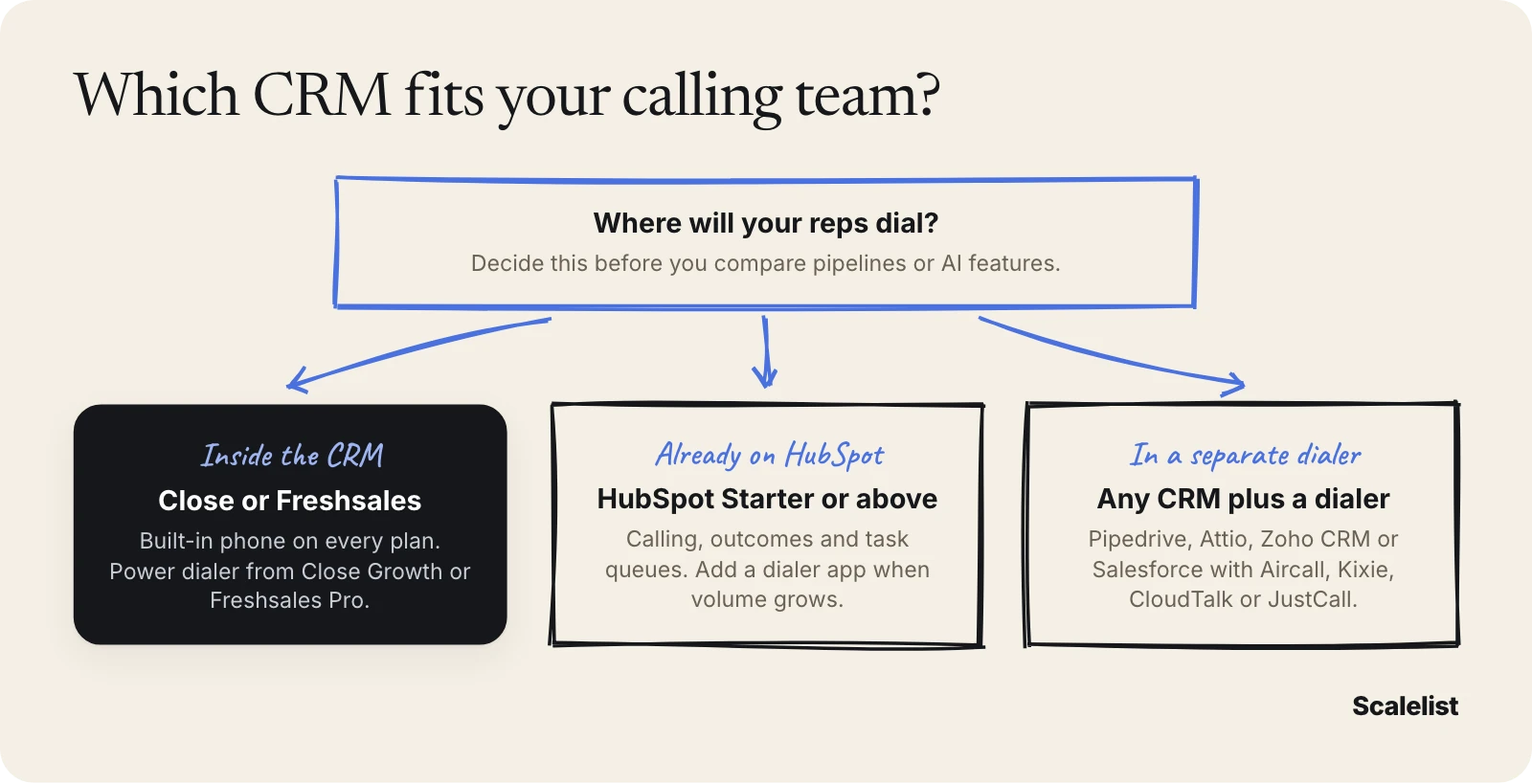
- Calling is the main job. Close Growth or Freshsales Pro gives you the power dialer, recordings and queues in one seat price.
- The company already runs on HubSpot. Turn on Starter calling, require call outcomes, build task queues, and add a dialer from the dialer integration guide when reps outgrow one call at a time.
- You are buying a dedicated dialer anyway. Keep the CRM your team likes and check that the dialer logs calls, outcomes and recordings back to it. Teams whose reps call all day should also read how parallel dialers work.
- Recordings matter for coaching. Check retention per plan: Close keeps 30 days on its cheaper plans, and Zoho records nothing by default. Our guide to cold call coaching shows how teams use them.
- The budget is tight. Freshsales Growth (9 USD) and HubSpot Starter (7 USD per seat) are the cheapest paid plans with calling built in.
Phone outreach and call recording are subject to rules that differ by country and state; see B2B cold calling laws by country before you switch on recording or automatic dialing.
Test before you sign. Load 50 of your own prospects with direct mobiles, run one calling block, and check that every dial, outcome and recording landed on the record. The complete cold calling guide covers the scripts and cadence that sit on top of the CRM.
Build a list of 50 prospects with direct mobiles and send it to HubSpot or your CRM for your first calling block.
Find your first 20 contactsFAQ
What is the best CRM for cold calling?
Close is the best CRM for cold calling for most small and mid-sized outbound teams, because calling, a power dialer, call outcomes and recordings all live in the CRM from its Growth plan (99 USD per user a month, billed annually). Freshsales is the cheaper alternative, with a power dialer from Pro at 39 USD. Teams already on HubSpot should use Sales Hub Starter calling.
Does HubSpot have a power dialer?
No, not natively on the pages we reviewed. HubSpot Sales Hub Starter and above include calling, call recording, required call outcomes and task queues, so reps can work through calls back to back. For true power dialing, teams connect a dialer app that integrates with HubSpot, such as Aircall, Kixie or JustCall.
Which CRM has a built-in dialer?
Close and Freshsales have built-in power dialers: Close from Growth (99 USD per user a month, billed annually) and Freshsales from Pro (39 USD). Close Scale adds a predictive dialer. Salesforce sells Sales Dialer as a separate product. Pipedrive, Zoho CRM and Attio rely on telephony apps or integrations for dialing.
Is a cold calling CRM enough on its own?
No. A cold calling CRM dials, logs and reports, but it does not give you the phone numbers. You still need a contact data tool that returns direct mobiles. Scalelist finds them at 10 credits per mobile found, with nothing charged on a miss, and sends them to HubSpot natively or to other CRMs through Zapier, the API or a CSV.
Can I use a CRM for cold calling without a separate dialer?
Yes, with Close, Freshsales or HubSpot. All three have a built-in phone with click-to-call and call logging on paid plans; Freshsales also includes its phone on the Free plan. Pipedrive and Attio cannot, because neither has built-in calling, and Zoho CRM needs PhoneBridge plus a telephony provider.
Does Scalelist integrate with Salesforce or Pipedrive?
Not natively. HubSpot is Scalelist’s only native CRM integration, a push of selected leads with field mapping. Salesforce, Pipedrive, Close, Zoho CRM, Freshsales and Attio connect through the Scalelist Zapier app, the REST API, or a CSV import.
Sources
- Close pricing, Close calling and Close reporting
- HubSpot Sales Hub pricing, HubSpot: use the calling tool, HubSpot: call settings, HubSpot: call index and analytics and HubSpot: task queues
- Freshsales pricing and Freshsales plan comparison
- Salesforce Sales Cloud pricing and Salesforce Trailhead: Sales Dialer
- Pipedrive pricing, Pipedrive: how to make calls and Pipedrive: activities performance report
- Zoho CRM pricing, Zoho CRM telephony and Zoho PhoneBridge FAQ
- Attio pricing, Attio: Aircall app and Attio plans and features
- Prices read in a browser on 2 November 2026 (Salesforce and Pipedrive on 27 September 2026). Scalelist provider benchmark, September 2026 (/b2b-data-providers-comparison/).