Dialpad pricing starts at 15 USD per user per month for Dialpad Connect, its business phone system, and 39 USD per user per month for Dialpad Sell, its outbound sales calling product, both billed annually (prices checked on 2 November 2026). Billed monthly, the same plans cost 27 USD and 49 USD.
Most pricing guides treat Dialpad as one product. It is two different buys for a sales team, and the real cost of an outbound seat also includes add-ons, dialer calling credits and the phone numbers your reps dial. This page prices all of it for a 5-rep and a 10-rep team.
Dialpad pricing at a glance (November 2026)
Dialpad publishes six plans across its two calling products: three for Sell and three for Connect. Here is every price, per user per month in USD, from the pricing page rendered on 2 November 2026.
| Plan | Product | Billed monthly | Billed annually | What it adds |
|---|---|---|---|---|
| Essentials | Sell | 49 USD | 39 USD | Calling, AI transcripts, recording, CRM sync, coaching teams |
| Advanced | Sell | 70 USD | 59 USD | Local presence + voicemail drop, real-time AI coaching |
| Premium | Sell | 95 USD (listed) | 79 USD | AI scorecards and playbooks, Dialpad Dialer access |
| Standard | Connect | 27 USD | 15 USD | Business phone, messaging, meetings |
| Pro | Connect | 35 USD | 25 USD | CRM integrations, 24/7 support |
| Enterprise | Connect | Not published | Not published | SSO, unlimited offices |
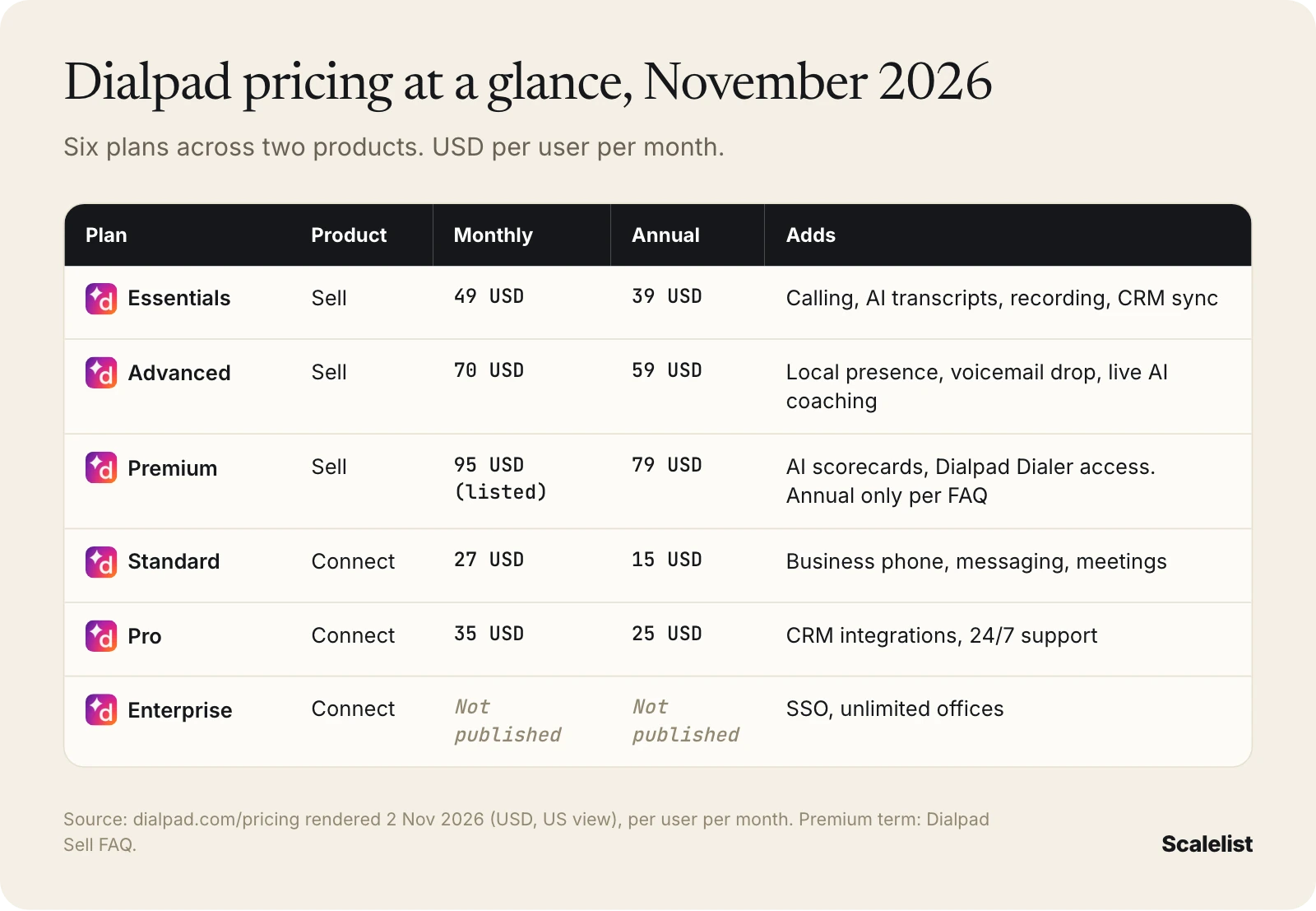
Dialpad’s FAQ adds two caveats. Premium is “available on annual plans only”, even though the card lists a monthly price. And the price you see “may differ from your actual price due to regional pricing and currency”.
Dialpad Connect vs Dialpad Sell: which one are you buying?
Dialpad Connect is a business phone system; Dialpad Sell is an outbound calling product for sales teams. Both include unlimited US and Canada calling, but only Sell is built for reps who spend hours a day dialing prospects.
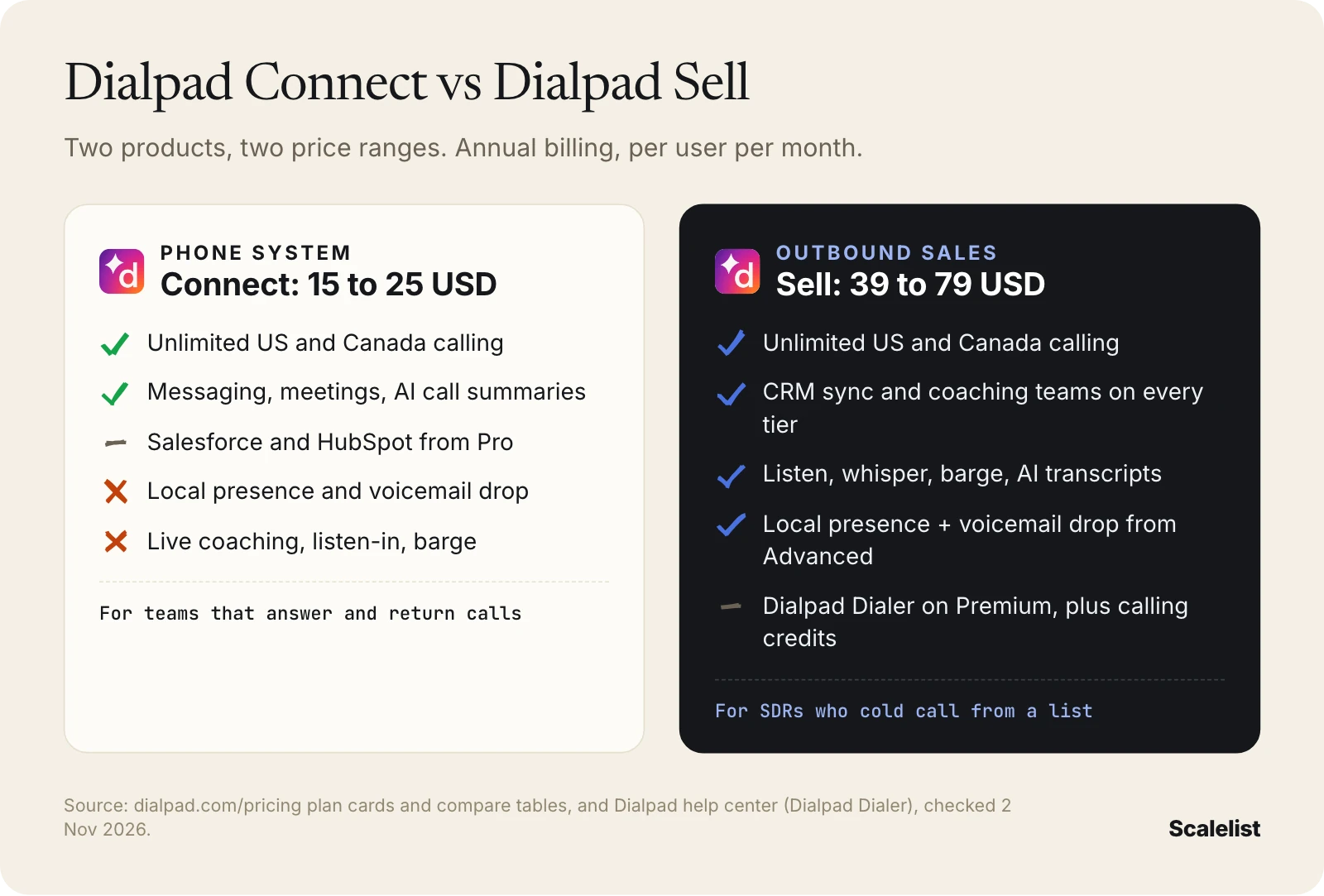
- Connect gives every user a phone line, texting, meetings and AI call summaries. Its plan table shows no voicemail drop, no local presence and no live call coaching on any tier. CRM integrations such as Salesforce and HubSpot start on Pro.
- Sell adds what a manager of SDRs needs: CRM sync on every tier, listen, whisper and barge, coaching teams, and the outbound dialing tools on the higher tiers.
Dialpad Sell plans explained
Each Dialpad Sell plan adds a module on top of the one below. The base calling, recording and CRM sync are the same on all three.
Sell Essentials: 49 USD monthly, 39 USD annually
Essentials is the only Sell plan you can buy online (“Buy now”); the other two go through sales. It includes unlimited US and Canada minutes, AI transcripts and recaps, call recording with 1-year retrieval, coaching teams and Salesforce, HubSpot and Zoho sync.
- Missing for cold calling: local presence and voicemail drop. Dialpad lists both as an optional add-on (the Reach Booster module) on this tier, with no published price.
- Who it fits: reps who call inbound leads and follow-ups, with a manager who wants recordings and transcripts.
Sell Advanced: 70 USD monthly, 59 USD annually
Advanced includes Reach Booster (local presence dialing and voicemail drop) and Live Coach (real-time assist and the AI assistant). Dialpad sells it month to month or annually and includes 24/7 phone support.
- Watch out: local presence “requires local number package sold separately”. The package price is not published.
- Who it fits: most SDR teams that dial cold lists from their own Dialpad line.
Sell Premium: 95 USD listed monthly, 79 USD annually
Premium adds Quality Management (AI CSAT, scorecards, playbooks) and an Enterprise SLA. It is also the plan that unlocks the Dialpad Dialer, a progressive dialer that “connects only answered calls to available agents”, per Dialpad’s help center.
- The catch: the Dialer also needs reps assigned to a Contact Center and “outbound calling credits”. Dialpad’s plan table excludes Dialer calls from unlimited calling. The credit price is not published.
- Who it fits: high-volume teams that want automated list dialing and AI scoring, and can commit to an annual plan.
For how progressive and power dialing compare with other modes, see our guide to power dialers.
What a Dialpad Sell team costs: 5 and 10 reps
A 5-rep outbound team pays 195 to 395 USD a month for Dialpad Sell on annual billing, and a 10-rep team pays 390 to 790 USD. The math is seats times the per-user price; Dialpad publishes no team discount.
| Sell plan | 5 reps, annual billing | 5 reps, monthly billing | 10 reps, annual billing | 10 reps, monthly billing |
|---|---|---|---|---|
| Essentials | 195 USD/mo | 245 USD/mo | 390 USD/mo | 490 USD/mo |
| Advanced | 295 USD/mo | 350 USD/mo | 590 USD/mo | 700 USD/mo |
| Premium | 395 USD/mo | Annual only (FAQ) | 790 USD/mo | Annual only (FAQ) |
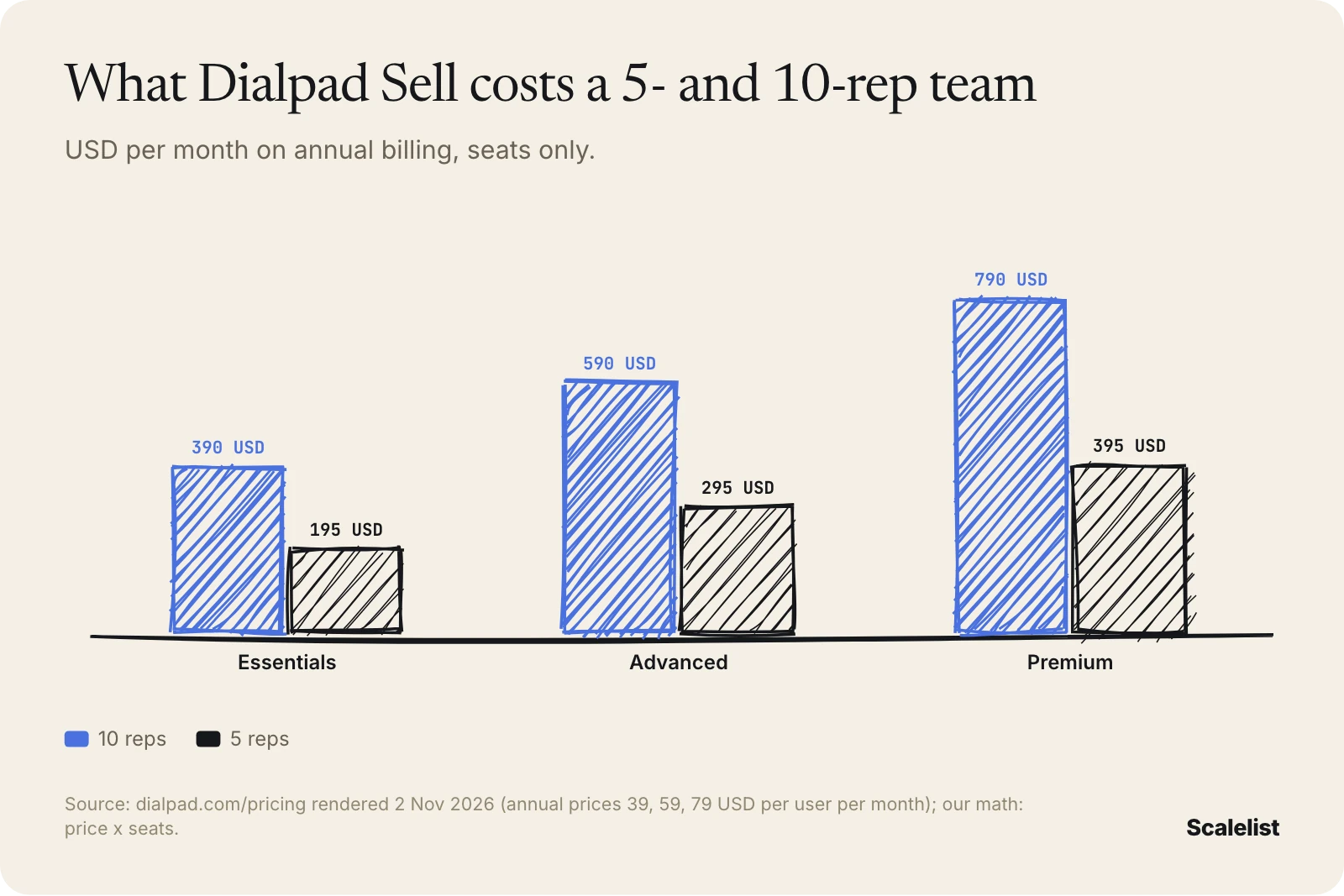
Over a year on annual billing, that is 3,540 USD for 5 reps on Advanced and 7,080 USD for 10 reps. Monthly billing on Advanced costs 660 USD more a year for 5 reps and 1,320 USD more for 10.
Hidden Dialpad costs and contract terms
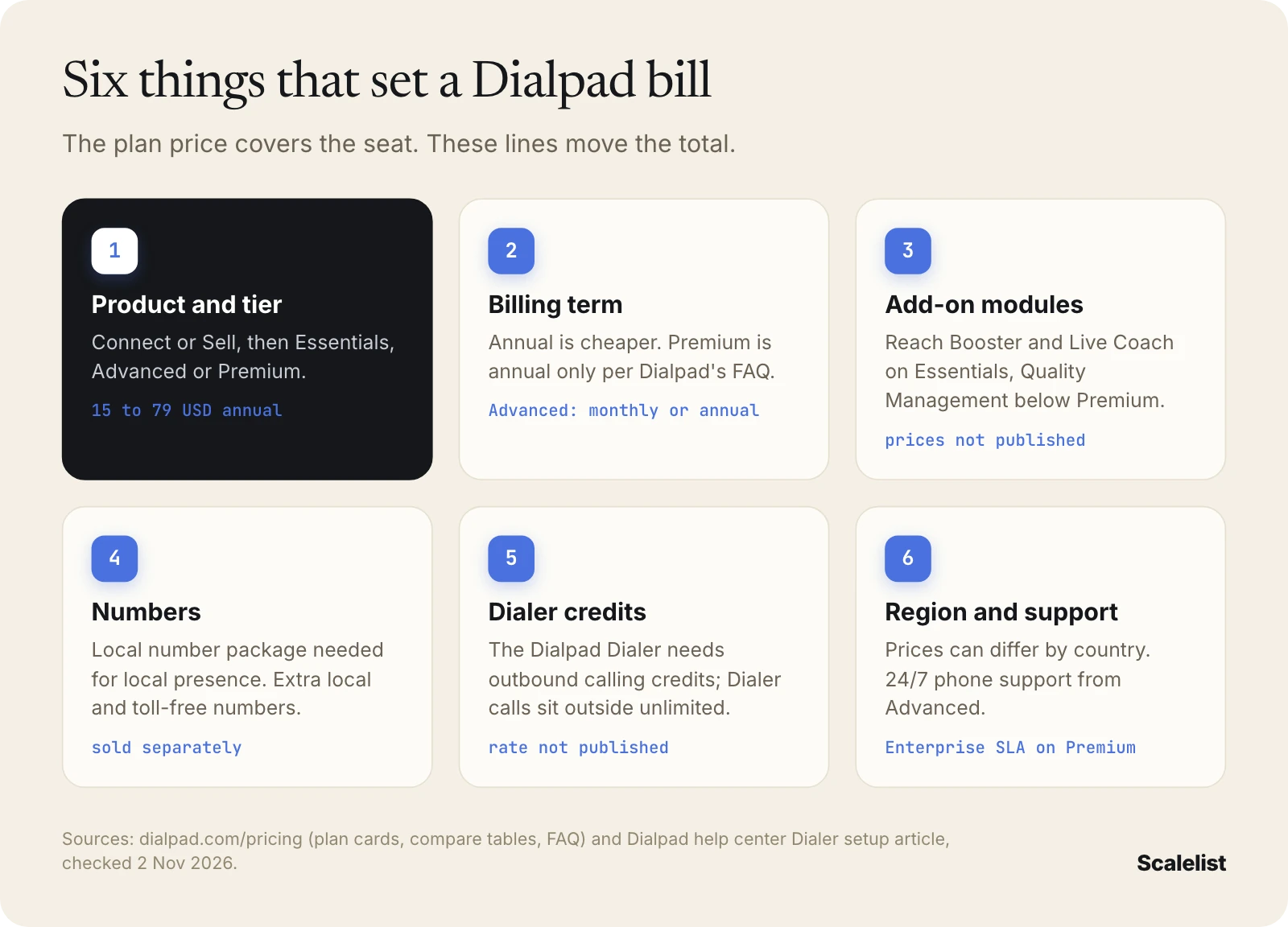
The extra Dialpad costs sit in add-on modules, phone numbers, dialer usage and billing terms. All of them come from Dialpad’s own pricing page and help center; none has a published price.
Add-on modules
Dialpad’s Sell plan table marks these as “Optional Add-on”:
- On Essentials: Reach Booster (local presence, voicemail drop) and Live Coach.
- On Essentials and Advanced: Quality Management (AI CSAT, scorecards, playbooks).
- On every tier: extra local and toll-free numbers, the local number package, internet faxing, extended recording retrieval (3 or 7 years), Meetings dial-in and large meetings, Workforce Management and Business Intelligence.
Dialer calls and calling credits
Unlimited calling covers US and Canada calls from a rep’s line, excluding toll-free. Dialpad’s table carves out Dialer calls, and its setup guide lists “outbound calling credits available for Dialer usage” as a requirement. Ask for the credit rate in writing before you size a Premium deal.
Contract, support and regional pricing
- Premium is annual only, per the Sell FAQ. Advanced can be month to month or annual.
- Annual plans lock “the same rate for the duration of your contract”, per Dialpad.
- Support: 24/7 phone support on Advanced; 24/7 plus Enterprise SLA on Premium. The Essentials support level is not stated on the page.
- Regional pricing: prices outside the US view can differ by country and currency.
What a Dialpad calling seat really costs, numbers included
A Dialpad Sell seat costs the plan, plus add-ons and dialer credits, plus the contact data you load into it. Dialpad supplies none of that data: it is a calling platform, and its pricing page sells no prospect lists or mobile numbers.
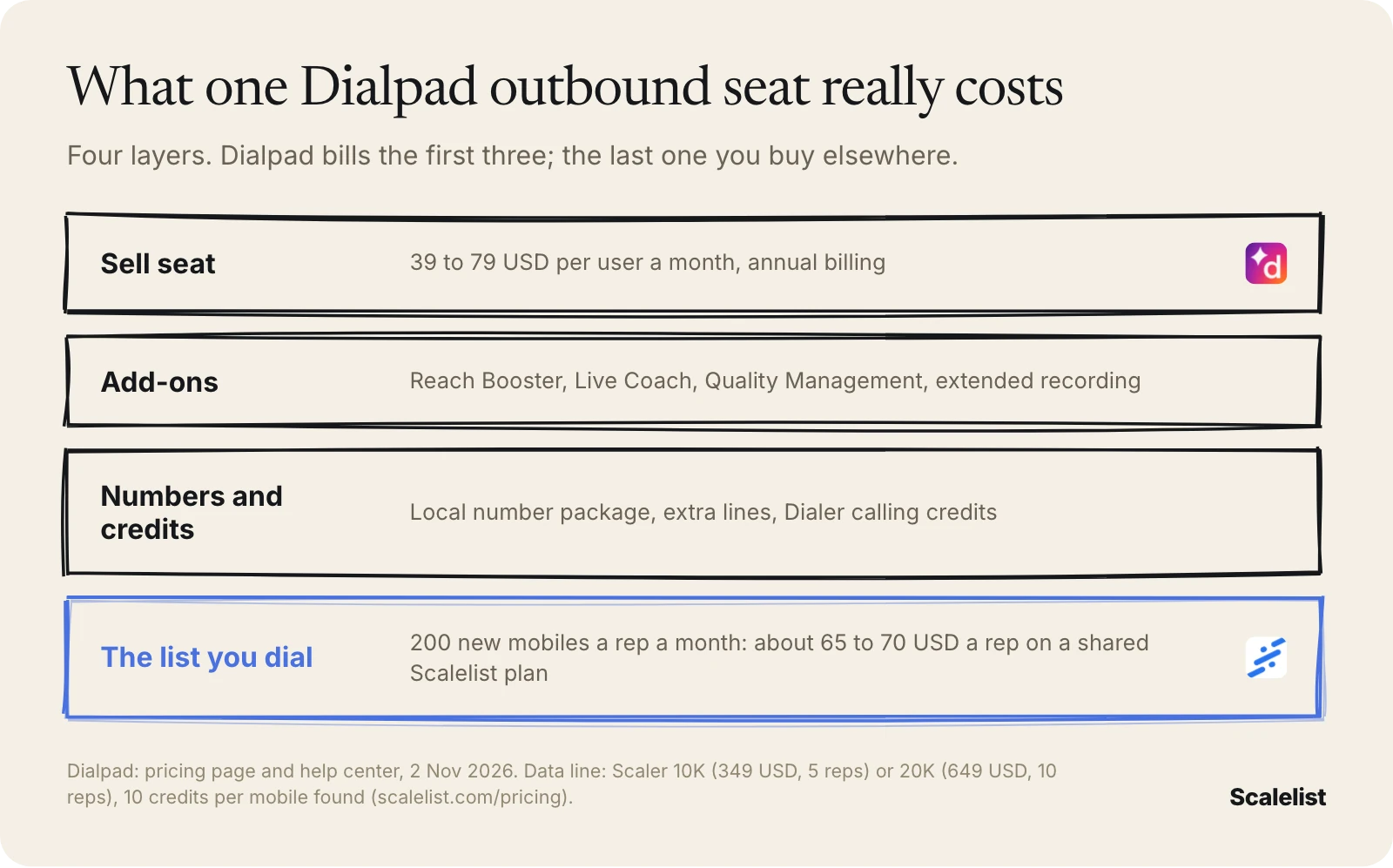
That last layer decides whether the seat pays off. Gong’s study of 300 million cold calls found the average rep connects on 5.4% of dials. Nooks found, across nearly 3 million dials, that mobile numbers connect 45% more often than other numbers. Local presence on a switchboard number still reaches a switchboard.
What the numbers cost on top of Dialpad
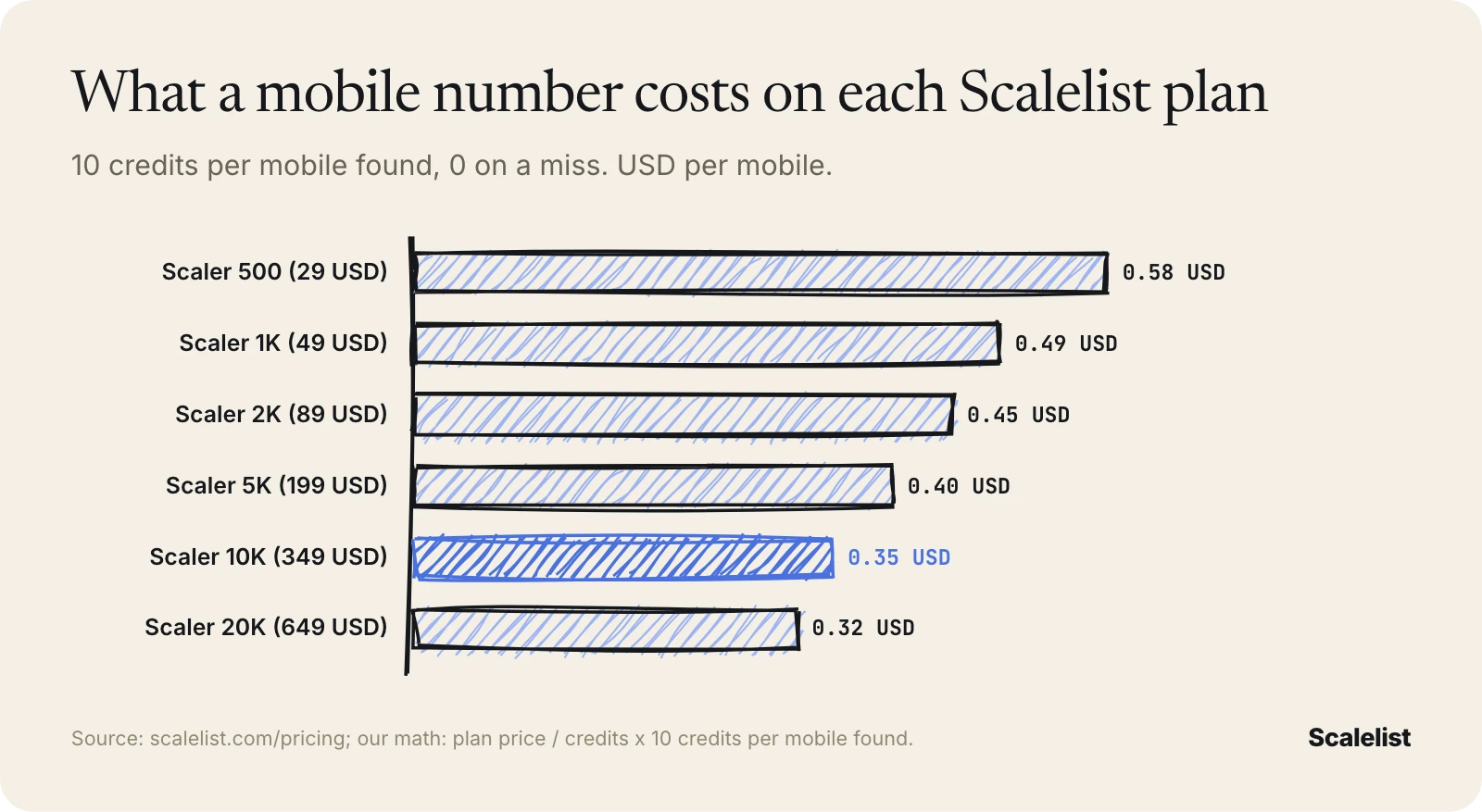
Scalelist, an AI lead finder, charges 10 credits per mobile number found and nothing when it finds none. Cost per mobile is fixed by the plan:
| Scalelist plan | Price per month | Mobiles it buys | Cost per mobile |
|---|---|---|---|
| Scaler 500 | 29 USD | 50 | 0.58 USD |
| Scaler 1K | 49 USD | 100 | 0.49 USD |
| Scaler 2K | 89 USD | 200 | 0.45 USD |
| Scaler 5K | 199 USD | 500 | 0.40 USD |
| Scaler 10K | 349 USD | 1,000 | 0.35 USD |
| Scaler 20K | 649 USD | 2,000 | 0.32 USD |
Worked example: 5 and 10 SDRs on Sell Advanced
Rachel Ortiz runs outbound at Lakeshore Payroll Software in Milwaukee, Wisconsin. Each SDR needs 200 new contacts with a mobile number every month.
- 5 reps: 5 x 200 = 1,000 mobiles = 10,000 credits, the Scaler 10K plan at 349 USD, about 70 USD per rep. With Dialpad Sell Advanced on annual billing (295 USD), the team runs on 644 USD a month before add-ons.
- 10 reps: 10 x 200 = 2,000 mobiles = 20,000 credits, the Scaler 20K plan at 649 USD, about 65 USD per rep. With 590 USD of Dialpad seats, that is 1,239 USD a month.
- Misses: at the 87% North America phone rate from our benchmark, Rachel submits about 1,150 contacts for 1,000 mobiles, or about 2,300 for 2,000. The misses cost 0 credits.
Scalelist has no direct Dialpad connector. Export a CSV and upload it as a Dialpad Dialer list (Dialpad accepts lists from CSV), or send leads to Salesforce through Zapier or the Scalelist API and dial them with Dialpad’s Salesforce Powerdialer. Other routes are in our dialer integration guide.
Build a Dialpad call list with direct mobiles; misses cost nothing.
Get 100 credits to test itIs Dialpad worth it?
Dialpad is worth it for teams that want one platform for business calling, meetings, messaging and sales calling, with AI transcripts and coaching on every Sell tier. It is a weaker fit when you need automated dialing at the entry price.
Dialpad fits you if:
- Your company already runs on Dialpad Connect and sales needs coaching on the same platform.
- Your managers want recordings, transcripts and live listen-in for every rep.
- Your reps call mostly US and Canada numbers from their own line.
Look elsewhere if:
- You want a power dialer on the cheapest plan. The Dialpad Dialer starts on Premium with separate calling credits.
- You want month-to-month billing with full dialing features.
- You only need contact data, not a phone system.
Cheaper or better-fit Dialpad alternatives
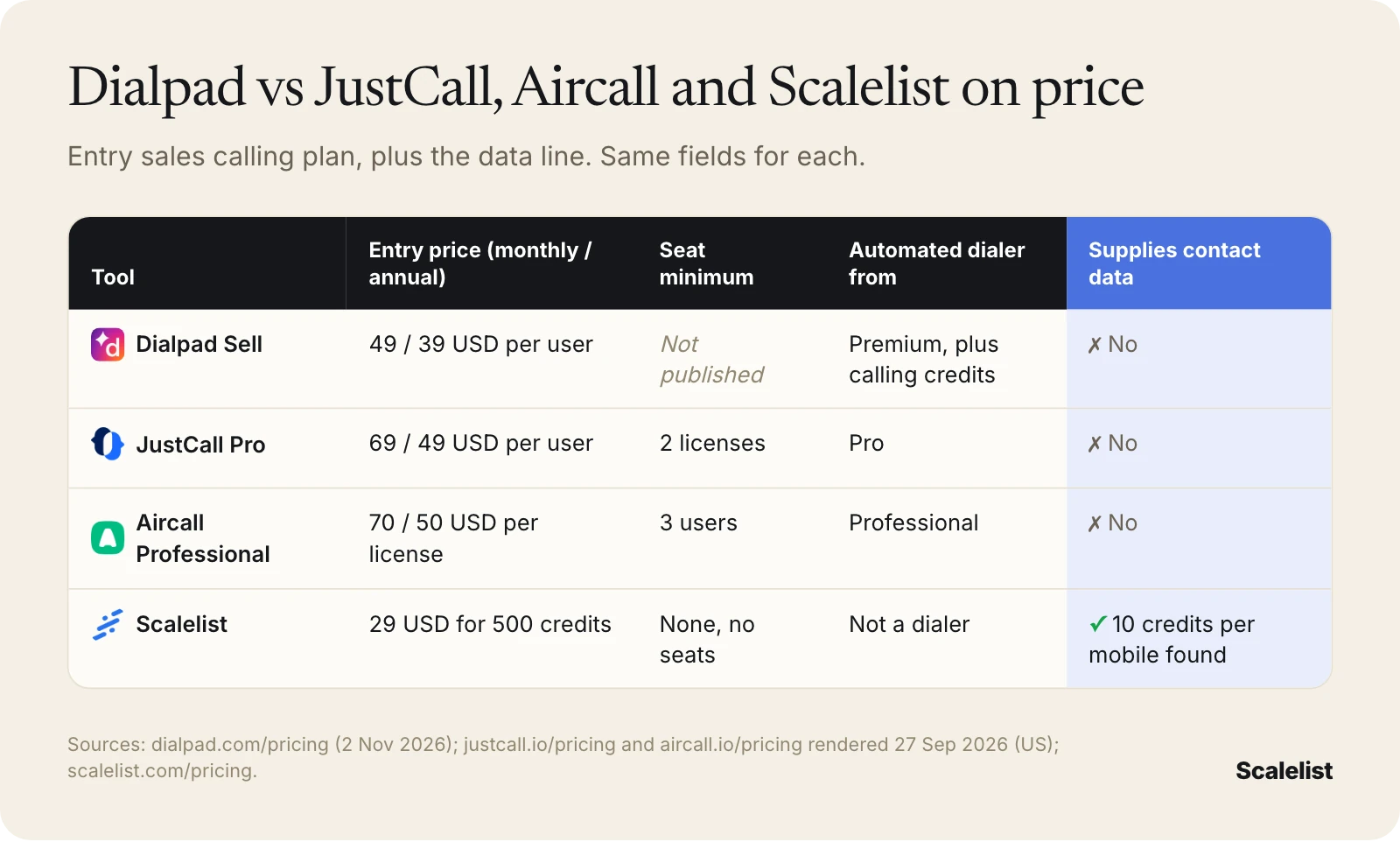
JustCall and Aircall publish a seat price for a plan with a power dialer, and Scalelist covers the data line Dialpad leaves open. The same five fields for each:
| Tool | Entry sales calling price (monthly / annual) | Seat minimum | Automated dialer starts on | Supplies contact data |
|---|---|---|---|---|
| Dialpad Sell | 49 / 39 USD per user (Essentials) | Not published | Premium (Dialpad Dialer, plus calling credits) | No |
| JustCall | 69 / 49 USD per user (Pro) | 2 licenses | Pro (power dialer) | No |
| Aircall | 70 / 50 USD per license (Professional) | 3 users | Professional (Power Dialer) | No |
| Scalelist | 29 USD a month for 500 credits (not a dialer) | None, no per-seat pricing | Not a dialer | Yes: 10 credits per mobile found, 0 on a miss |
- JustCall: the power dialer starts on Pro; predictive dialing up to 10 lines is on the quote-only SalesPro plan. Full breakdown in our JustCall pricing guide.
- Aircall: Power Dialer, voicemail drop and outbound campaigns start on Professional. See our list of Aircall alternatives.
- Kixie and Orum do not publish seat prices: read what Kixie costs and how Orum is quoted.
For dialers grouped by job, with the data each one needs, see our roundup of cold calling software.
How to buy Dialpad smart
The cheapest Dialpad setup is the lowest Sell tier that has the dialing tools your reps use, priced in writing, with data budgeted as its own line.
- Decide Connect or Sell first. Do not pay Sell prices for reps who never cold call, and do not give cold callers Connect.
- Get Advanced and Premium quotes side by side. Both go through sales. Ask for monthly and annual terms.
- Price every add-on. Reach Booster on Essentials, the local number package, Quality Management, extended recording.
- Ask for the Dialer credit rate. If you need Premium for the Dialer, get the outbound calling credit price before you sign an annual plan.
- Trial with your real list. Load 200 of your own contacts and count connects per hour, not dials.
- Budget the numbers separately. Seats x new contacts per rep x your mobile hit rate gives you the data line. Size it with a cold calling list build before the trial ends.
Rules apply to who you can call and how. Read our B2B cold calling laws overview before you load a list.
If your data budget also covers an enterprise database, compare it with ZoomInfo’s pricing. Our benchmark of 8 data providers shows phone find rates by region, and Scalelist plans start at 29 USD a month. More vendor breakdowns are on the Scalelist blog.
FAQ
How much does Dialpad cost per user?
Dialpad costs 15 to 79 USD per user per month on annual billing, as of November 2026. Dialpad Connect, the phone system, runs 15 USD (Standard) or 25 USD (Pro). Dialpad Sell, the outbound sales product, runs 39 USD (Essentials), 59 USD (Advanced) or 79 USD (Premium). Monthly billing costs more: 27 to 49 USD on the entry plans.
What are the Dialpad plans?
Dialpad sells calling through two product lines. Dialpad Connect has Standard, Pro and Enterprise plans for business phone use. Dialpad Sell has Essentials, Advanced and Premium plans for outbound sales teams. Dialpad also sells Support (contact center) and Resolve (AI agents), priced separately or by quote.
Does Dialpad have a power dialer on every plan?
No. Dialpad’s automated Dialer is available to organizations with Sell Premium licenses, and it needs outbound calling credits that are priced separately. Dialpad’s help center documents the older Salesforce Powerdialer for users with a Sell license. Connect plans list no dialer, local presence or voicemail drop. Confirm the tier with Dialpad sales.
Does Dialpad require an annual contract?
Not always. Dialpad says Sell Advanced is available month to month or annually, while Sell Premium is available on annual plans only. Essentials and both paid Connect plans show monthly and annual prices. Annual billing is cheaper on every plan, and Dialpad says it locks the same rate for the length of the contract.
Is there a free trial of Dialpad?
Yes. Dialpad offers a 14-day free trial of Dialpad Connect, and Sell Essentials shows a “Try free” button whose trial length is not stated on the pricing page. Sell Advanced and Premium go through sales. No Dialpad plan is free to keep after the trial.
Does Dialpad have an app?
Yes. Dialpad says its platform is available on desktops, laptops and smartphones, including iOS and Android. Dialpad describes calling, messaging, meetings and contact center as running in one app on one platform, so the app is the same whether you buy Connect or Sell. The plan you pay for decides which features appear in it.
Does Dialpad include phone numbers to call?
No. Dialpad gives each user a direct line and sells extra local numbers as add-ons, but it does not sell prospect contact data. You bring the list. Scalelist, an AI lead finder, finds mobile numbers for 10 credits each, only when found, and you upload them to Dialpad by CSV or through Salesforce.
What is better than Dialpad for outbound calling?
It depends on the job. JustCall Pro (69 USD monthly, 49 USD annual) and Aircall Professional (70 USD monthly, 50 USD annual) include a power dialer at a lower tier than Dialpad’s Dialer. Orum and Kixie quote their prices. None of them supplies the mobile numbers you dial.
Sources
- Dialpad pricing page, Sell and Connect plans, compare tables and FAQ, rendered 2 Nov 2026
- Dialpad power dialer feature page
- Dialpad FAQ
- Dialpad help center: Dialpad Dialer
- Dialpad help center: setting up Dialpad Dialer
- Dialpad help center: Powerdialer with Salesforce
- JustCall pricing and Aircall pricing
- Gong: insights from 300M cold calls
- Nooks Insights: who picks up the most